
Part 14 gave each replica a name and a disk. Deployments and StatefulSets both run Pods that are meant to keep running. Two common needs do not fit that shape: something that must run on every node, such as a log shipper or a node monitor, and work that must finish, such as a database migration, a nightly report or a batch of files to process. This episode covers the three controllers built for those jobs. By the end you can run a DaemonSet and decide which nodes it covers, run a Job with retries and parallel Pods, and schedule Jobs with a CronJob. You need the three-node kind cluster from part 3 (one control plane, two workers) and the k8s-from-zero namespace. We tested on kind v0.33.0 (node image v1.37.0) with kubectl v1.37.2; our cluster is called k8s-ep13.
What you will build
A DaemonSet called node-agent that prints a heartbeat from every node, first on the two workers and then on the control plane too. A Job called batch that processes six numbered items two at a time, and a Job called flaky that fails until it runs out of retries. Finally a CronJob called report that runs every minute, keeps a short history, and can be triggered by hand.
DaemonSets: one Pod per node
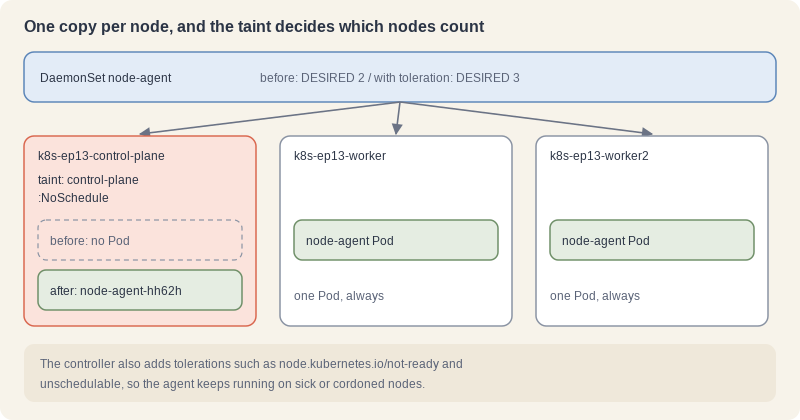
The DaemonSet page says a DaemonSet ensures that all, or some, nodes run a copy of a Pod. Add a node and it gets a Pod; remove a node and its Pod is garbage-collected. Deleting the DaemonSet removes the Pods it made. The docs give typical uses: a storage daemon, a log collector or a monitoring agent on every node. Your cluster already runs two. On kind, kube-proxy (part 2) and the kindnet network plugin are DaemonSets in kube-system.
There is no replicas field. The number of Pods is the number of nodes that qualify, which you see as DESIRED in kubectl get daemonset. Two things decide which nodes qualify:
- A node selector or node affinity in the Pod template, to target, say, only Linux nodes or only GPU nodes. Part 17 covers affinity in depth.
- Taints. A taint on a node repels Pods that do not tolerate it. kind, like kubeadm clusters, taints the control plane with
node-role.kubernetes.io/control-plane:NoSchedule, so ordinary Pods stay off it. A DaemonSet Pod lands there only if its template carries a matching toleration. Part 18 covers taints and tolerations fully; here you need just one.
The DaemonSet controller also adds some tolerations by itself, such as node.kubernetes.io/not-ready, node.kubernetes.io/unreachable and node.kubernetes.io/unschedulable. The docs explain why: DaemonSet Pods can then run on nodes marked unschedulable, and a node-level function such as the network plugin can start on a node before it is ready. Without that, a node could wait for its network plugin while the plugin waits for the node. You will see the list in the lab.
Updating a DaemonSet’s template rolls its Pods over node by node, much like the Deployment rollouts in part 7, and kubectl rollout status and rollout history work on it.
Jobs: run until done
A Deployment restarts a Pod that exits. A Job expects its Pods to exit, and counts the successes. The Jobs page describes the fields you will use most:
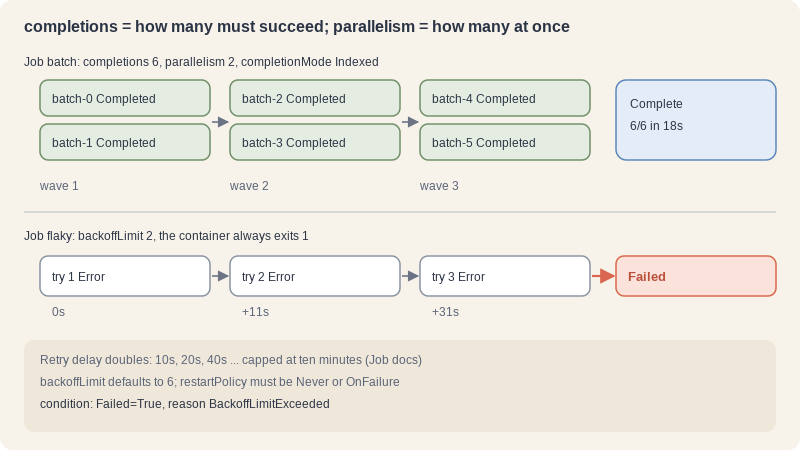
completions: how many Pods must succeed. Default 1.parallelism: how many may run at the same time. Default 1.completionMode: Indexedgives each Pod an index from 0 tocompletions - 1, in the environment variableJOB_COMPLETION_INDEX, the labelbatch.kubernetes.io/job-completion-indexand a hostname of the form<job-name>-<index>. The Job is complete when each index has one success. Use it to split work: item N goes to index N.backoffLimit: how many retries before the Job is marked failed. It defaults to 6. Failed Pods are recreated after an exponential delay, 10s, 20s, 40s and so on, capped at ten minutes.restartPolicyin the Pod template must beNeverorOnFailure. WithNever, each retry is a new Pod and the failed ones stay for you to read. The docs suggestNeverwhile debugging.activeDeadlineSeconds: a time limit for the whole Job, whatever the retries.ttlSecondsAfterFinished: delete the finished Job and its Pods after this many seconds. The cleanup page lists it as stable since v1.23.
Two finer controls exist for later. A Pod failure policy (stable since v1.31) lets you say “exit code 42 means do not retry” or “a Pod lost to node drain does not count”. backoffLimitPerIndex (stable since v1.33) gives each index of an Indexed Job its own retry budget. The Pod failure policy page has worked examples.
CronJobs: Jobs on a schedule
A CronJob creates a Job at each tick of a schedule, like a line in a Unix crontab. The CronJob page covers the pieces:
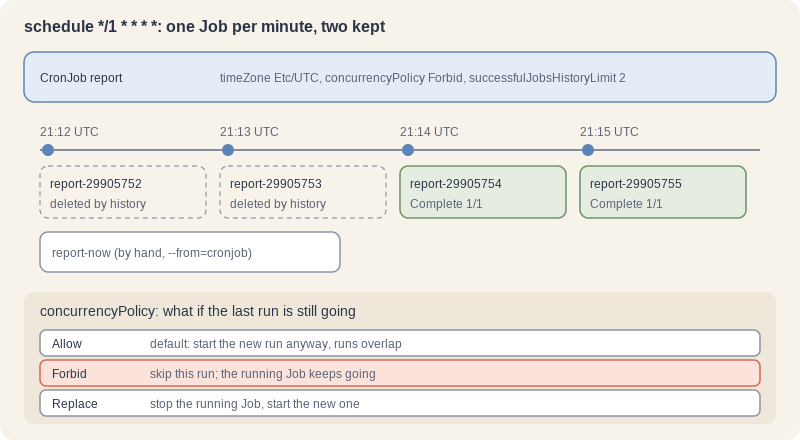
schedule: five fields, minute, hour, day of month, month and day of week.*/1 * * * *means every minute and0 3 * * *means 03:00 daily. Macros such as@hourlyand@dailyalso work.timeZone: an IANA zone name such asEtc/UTCorAsia/Jerusalem(stable since v1.27). Without it, the schedule follows the time zone of the kube-controller-manager. WritingCRON_TZ=orTZ=insidescheduleis not supported and fails validation.jobTemplate: a full Job spec, nested.concurrencyPolicy: what to do when a run is due and the last one is still going.Allow(the default) lets them overlap,Forbidskips the new run, andReplacestops the running Job and starts the new one.successfulJobsHistoryLimitandfailedJobsHistoryLimit: how many finished Jobs to keep. Defaults 3 and 1.startingDeadlineSeconds: how late a missed run may still start. The docs say that if the controller counts more than 100 missed schedules, it records aTooManyMissedTimeswarning event, starts one Job for the most recent missed schedule, and never starts the earlier ones. Set this on CronJobs that might be suspended or down for a while.suspend: truepauses future runs without touching a run in progress.
The CronJob’s own name is limited to 52 characters because the controller appends 11 characters to name each Job.
Try it: agents, batches and a schedule
Set your context namespace to k8s-from-zero. The box we tested on has no internet inside the cluster, so we preloaded busybox:1.37 with kind load docker-image; on your laptop it pulls normally.
- Meet the DaemonSets you already have.
kubectl get nodes
kubectl get daemonsets -n kube-systemExplain this command
kubectl get nodes
kubectl get daemonsets -n kube-systemkubectlThe Kubernetes command-line client. Subcommands and flags are documented under kubernetes.io/docs/reference/kubectl/.getDisplay one or many resources. kubectl get prints a table of the most important information about the resources you name.nodesThe resource type to display. kubectl get points you to kubectl api-resources for the full list of types the server supports.kubectlThe Kubernetes command-line client. Subcommands and flags are documented under kubernetes.io/docs/reference/kubectl/.getDisplay one or many resources. kubectl get prints a table of the most important information about the resources you name.daemonsetsThe resource type to display. kubectl get points you to kubectl api-resources for the full list of types the server supports.-nShort form of --namespace. If present, the namespace scope for this CLI request.kube-systemThe namespace passed to --namespace. kube-system holds kindnet and kube-proxy.
NAME                     STATUS   ROLES           AGE   VERSION
k8s-ep13-control-plane   Ready    control-plane   13m   v1.37.0
k8s-ep13-worker          Ready    <none>          12m   v1.37.0
k8s-ep13-worker2         Ready    <none>          12m   v1.37.0
NAME         DESIRED   CURRENT   READY   UP-TO-DATE   AVAILABLE   NODE SELECTOR            AGE
kindnet      3         3         3       3            3           kubernetes.io/os=linux   26m
kube-proxy   3         3         3       3            3           kubernetes.io/os=linux   26m
Three nodes, three copies each, limited to Linux nodes by a node selector.
- Write a node agent. Save as
node-agent.yaml:
apiVersion: apps/v1
kind: DaemonSet
metadata:
  name: node-agent
  namespace: k8s-from-zero
spec:
  selector:
    matchLabels:
      app.kubernetes.io/name: node-agent
  template:
    metadata:
      labels:
        app.kubernetes.io/name: node-agent
    spec:
      containers:
        - name: agent
          image: busybox:1.37
          command: ["sh", "-c", "while true; do echo \"$(date -u +%T) agent on $NODE_NAME\"; sleep 30; done"]
          env:
            - name: NODE_NAME
              valueFrom:
                fieldRef:
                  fieldPath: spec.nodeName
          resources:
            requests:
              cpu: 10m
              memory: 16Mi
            limits:
              memory: 32Mi
fieldRef: spec.nodeName hands the Pod the name of the node it runs on. Agents run everywhere, so keep their requests small (part 11).
kubectl apply -f node-agent.yaml
kubectl rollout status daemonset/node-agent --timeout=90s
kubectl get daemonset node-agent
kubectl get pods -l app.kubernetes.io/name=node-agent -o wideExplain this command
kubectl apply -f node-agent.yaml
kubectl rollout status daemonset/node-agent --timeout=90s
kubectl get daemonset node-agent
kubectl get pods -l app.kubernetes.io/name=node-agent -o widekubectlThe Kubernetes command-line client. Subcommands and flags are documented under kubernetes.io/docs/reference/kubectl/.applyApply a configuration to a resource by file name or stdin. The apply docs say the resource is created if it does not exist yet. JSON and YAML are accepted.-fShort form of --filename. The file, directory or URL that contains the configuration to apply.node-agent.yamlThe file named by --filename. apply creates the objects or updates them to match this file.kubectlThe Kubernetes command-line client. Subcommands and flags are documented under kubernetes.io/docs/reference/kubectl/.rolloutThe command group for rollout actions.statusShow the status of a rollout and wait until it finishes.daemonset/node-agentThe resource written as type/name: daemonset/node-agent.--timeout=90sHow long to wait before giving up. This command passes 90s.kubectlThe Kubernetes command-line client. Subcommands and flags are documented under kubernetes.io/docs/reference/kubectl/.getDisplay one or many resources. kubectl get prints a table of the most important information about the resources you name.daemonsetThe resource type to display. kubectl get points you to kubectl api-resources for the full list of types the server supports.node-agentThe object name.kubectlThe Kubernetes command-line client. Subcommands and flags are documented under kubernetes.io/docs/reference/kubectl/.getDisplay one or many resources. kubectl get prints a table of the most important information about the resources you name.podsThe resource type to display. kubectl get points you to kubectl api-resources for the full list of types the server supports.-lShort form of --selector. A label query. The get docs say it supports '=', '==', '!=', 'in' and 'notin', and that matching objects must satisfy every constraint.app.kubernetes.io/name=node-agentThe label query passed to --selector: app.kubernetes.io/name=node-agent.-oShort form of --output. It selects the output format. For get, the formats include json, yaml, name, jsonpath, custom-columns and wide.wideAn output format. The get examples say wide adds more information, such as the node name. For Pods the lesson's table adds IP, NODE, NOMINATED NODE and READINESS GATES.
daemonset.apps/node-agent created
Waiting for daemon set "node-agent" rollout to finish: 0 of 2 updated pods are available...
Waiting for daemon set "node-agent" rollout to finish: 1 of 2 updated pods are available...
daemon set "node-agent" successfully rolled out
NAME         DESIRED   CURRENT   READY   UP-TO-DATE   AVAILABLE   NODE SELECTOR   AGE
node-agent   2         2         2       2            2           <none>          0s
NAME               READY   STATUS    RESTARTS   AGE   IP            NODE               NOMINATED NODE   READINESS GATES
node-agent-9sqwh   1/1     Running   0          0s    10.244.1.24   k8s-ep13-worker    <none>           <none>
node-agent-x99lx   1/1     Running   0          0s    10.244.2.19   k8s-ep13-worker2   <none>           <none>
DESIRED 2 on a three-node cluster. The control plane is missing.
- Find out why, and fix it.
kubectl describe node k8s-ep13-control-plane | grep TaintsExplain this command
kubectl describe node k8s-ep13-control-plane | grep TaintskubectlThe Kubernetes command-line client. Subcommands and flags are documented under kubernetes.io/docs/reference/kubectl/.describeShow details of a specific resource or group of resources. The describe docs say this includes related resources such as events or controllers.nodeThe resource type.k8s-ep13-control-planeThe object name.|Shell. Sends the previous command's standard output to the next command.grepShell. Prints input lines that match a pattern.TaintsThe pattern grep looks for. The lesson uses it to show the control-plane taint.
Taints: node-role.kubernetes.io/control-plane:NoScheduleSave this patch as toleration-patch.yaml:
spec:
  template:
    spec:
      tolerations:
        - key: node-role.kubernetes.io/control-plane
          operator: Exists
effect: NoSchedulekubectl patch daemonset node-agent --patch-file toleration-patch.yaml
kubectl rollout status daemonset/node-agent --timeout=120s
kubectl get daemonset node-agent
kubectl get pods -l app.kubernetes.io/name=node-agent -o wideExplain this command
kubectl patch daemonset node-agent --patch-file toleration-patch.yaml
kubectl rollout status daemonset/node-agent --timeout=120s
kubectl get daemonset node-agent
kubectl get pods -l app.kubernetes.io/name=node-agent -o widekubectlThe Kubernetes command-line client. Subcommands and flags are documented under kubernetes.io/docs/reference/kubectl/.patchUpdate fields of a resource using a strategic merge patch, a JSON merge patch, or a JSON patch. The patch docs say JSON and YAML are accepted.daemonsetThe resource type.node-agentThe object name.--patch-fileRead the patch from a file. The lesson's file adds the control-plane toleration.toleration-patch.yamlThe file this flag names.kubectlThe Kubernetes command-line client. Subcommands and flags are documented under kubernetes.io/docs/reference/kubectl/.rolloutThe command group for rollout actions.statusShow the status of a rollout and wait until it finishes.daemonset/node-agentThe resource written as type/name: daemonset/node-agent.--timeout=120sHow long to wait before giving up. This command passes 120s.kubectlThe Kubernetes command-line client. Subcommands and flags are documented under kubernetes.io/docs/reference/kubectl/.getDisplay one or many resources. kubectl get prints a table of the most important information about the resources you name.daemonsetThe resource type to display. kubectl get points you to kubectl api-resources for the full list of types the server supports.node-agentThe object name.kubectlThe Kubernetes command-line client. Subcommands and flags are documented under kubernetes.io/docs/reference/kubectl/.getDisplay one or many resources. kubectl get prints a table of the most important information about the resources you name.podsThe resource type to display. kubectl get points you to kubectl api-resources for the full list of types the server supports.-lShort form of --selector. A label query. The get docs say it supports '=', '==', '!=', 'in' and 'notin', and that matching objects must satisfy every constraint.app.kubernetes.io/name=node-agentThe label query passed to --selector: app.kubernetes.io/name=node-agent.-oShort form of --output. It selects the output format. For get, the formats include json, yaml, name, jsonpath, custom-columns and wide.wideAn output format. The get examples say wide adds more information, such as the node name. For Pods the lesson's table adds IP, NODE, NOMINATED NODE and READINESS GATES.
daemonset.apps/node-agent patched
Waiting for daemon set "node-agent" rollout to finish: 1 out of 3 new pods have been updated...
...
Waiting for daemon set "node-agent" rollout to finish: 2 of 3 updated pods are available...
daemon set "node-agent" successfully rolled out
NAME         DESIRED   CURRENT   READY   UP-TO-DATE   AVAILABLE   NODE SELECTOR   AGE
node-agent   3         3         3       3            3           <none>          74s
NAME               READY   STATUS    RESTARTS   AGE   IP            NODE                     NOMINATED NODE   READINESS GATES
node-agent-4ld2d   1/1     Running   0          44s   10.244.1.25   k8s-ep13-worker          <none>           <none>
node-agent-4mqxz   1/1     Running   0          13s   10.244.2.20   k8s-ep13-worker2         <none>           <none>
node-agent-hh62h   1/1     Running   0          75s   10.244.0.5    k8s-ep13-control-plane   <none>           <none>
Three Pods, one per node. Changing the template also replaced the two worker Pods one at a time, which is why they are younger. Right after the rollout we caught an old worker Pod, node-agent-x99lx, in Error while it was being replaced; a few seconds later it was gone.
- Read the agents and their tolerations.
kubectl logs -l app.kubernetes.io/name=node-agent --prefix --tail=1
kubectl get pod -l app.kubernetes.io/name=node-agent -o jsonpath='{.items[0].spec.tolerations}' | python3 -m json.toolExplain this command
kubectl logs -l app.kubernetes.io/name=node-agent --prefix --tail=1
kubectl get pod -l app.kubernetes.io/name=node-agent -o jsonpath='{.items[0].spec.tolerations}' | python3 -m json.toolkubectlThe Kubernetes command-line client. Subcommands and flags are documented under kubernetes.io/docs/reference/kubectl/.logsPrint the logs for a container in a pod or specified resource. If the pod has only one container, the container name is optional.-lShort form of --selector. A label query. The get docs say it supports '=', '==', '!=', 'in' and 'notin', and that matching objects must satisfy every constraint.app.kubernetes.io/name=node-agentThe label query passed to --selector: app.kubernetes.io/name=node-agent.--prefixPrefix each log line with its Pod and container. The lesson's output starts with the Pod name.--tail=1How many recent log lines to print. This command passes 1, one heartbeat per Pod.kubectlThe Kubernetes command-line client. Subcommands and flags are documented under kubernetes.io/docs/reference/kubectl/.getDisplay one or many resources. kubectl get prints a table of the most important information about the resources you name.podThe resource type to display. kubectl get points you to kubectl api-resources for the full list of types the server supports.-lShort form of --selector. A label query. The get docs say it supports '=', '==', '!=', 'in' and 'notin', and that matching objects must satisfy every constraint.app.kubernetes.io/name=node-agentThe label query passed to --selector: app.kubernetes.io/name=node-agent.-oShort form of --output. It selects the output format. For get, the formats include json, yaml, name, jsonpath, custom-columns and wide.jsonpath='{.items[0].spec.tolerations}'jsonpath is an output format. A template is JSONPath expressions in curly braces. This token is the template in the lesson command.|Shell. Sends the previous command's standard output to the next command.python3The Python interpreter. The lesson uses it to pretty-print the tolerations JSON.-mRun a Python module as a script. This command runs json.tool.json.toolPython's JSON formatter. It prints the tolerations list with one field per line.
[pod/node-agent-hh62h/agent] 21:10:06 agent on k8s-ep13-control-plane
[pod/node-agent-x99lx/agent] 21:10:05 agent on k8s-ep13-worker2
[pod/node-agent-4ld2d/agent] 21:10:07 agent on k8s-ep13-worker
[pod/node-agent-4mqxz/agent] 21:10:07 agent on k8s-ep13-worker2
[
    {
        "effect": "NoSchedule",
        "key": "node-role.kubernetes.io/control-plane",
        "operator": "Exists"
    },
    {
        "effect": "NoExecute",
        "key": "node.kubernetes.io/not-ready",
        "operator": "Exists"
    },
    {
        "effect": "NoExecute",
        "key": "node.kubernetes.io/unreachable",
        "operator": "Exists"
    },
    ...
    {
        "effect": "NoSchedule",
        "key": "node.kubernetes.io/unschedulable",
        "operator": "Exists"
    }
]
Each node reports in. The old x99lx Pod still answered because it was shutting down. You wrote the first toleration; the controller added the rest, including disk, memory and PID pressure. Check the history, then delete the agent:
kubectl rollout history daemonset/node-agent
kubectl delete -f node-agent.yamlExplain this command
kubectl rollout history daemonset/node-agent
kubectl delete -f node-agent.yamlkubectlThe Kubernetes command-line client. Subcommands and flags are documented under kubernetes.io/docs/reference/kubectl/.rolloutThe command group for rollout actions.historyShow previous revisions of a rollout. The lesson's DaemonSet history lists revision 1 and revision 2.daemonset/node-agentThe resource written as type/name: daemonset/node-agent.kubectlThe Kubernetes command-line client. Subcommands and flags are documented under kubernetes.io/docs/reference/kubectl/.deleteDelete resources by file names, stdin, resources and names, or by resources and label selector.-fShort form of --filename. The file, directory or URL that contains the configuration to apply.node-agent.yamlThe file named by --filename. apply creates the objects or updates them to match this file.
daemonset.apps/node-agent
REVISION  CHANGE-CAUSE
1         <none>
2         <none>

daemonset.apps "node-agent" deleted from k8s-from-zero namespace- Run a parallel, indexed Job. Save as
batch.yaml:
apiVersion: batch/v1
kind: Job
metadata:
  name: batch
  namespace: k8s-from-zero
spec:
  completions: 6
  parallelism: 2
  completionMode: Indexed
  ttlSecondsAfterFinished: 600
  template:
    spec:
      restartPolicy: Never
      containers:
        - name: work
          image: busybox:1.37
command: ["sh", "-c", "echo \"item $JOB_COMPLETION_INDEX done on $(hostname)\"; sleep 3"]kubectl apply -f batch.yaml
kubectl get job batch
kubectl get pods -l job-name=batchExplain this command
kubectl apply -f batch.yaml
kubectl get job batch
kubectl get pods -l job-name=batchkubectlThe Kubernetes command-line client. Subcommands and flags are documented under kubernetes.io/docs/reference/kubectl/.applyApply a configuration to a resource by file name or stdin. The apply docs say the resource is created if it does not exist yet. JSON and YAML are accepted.-fShort form of --filename. The file, directory or URL that contains the configuration to apply.batch.yamlThe file named by --filename. apply creates the objects or updates them to match this file.kubectlThe Kubernetes command-line client. Subcommands and flags are documented under kubernetes.io/docs/reference/kubectl/.getDisplay one or many resources. kubectl get prints a table of the most important information about the resources you name.jobThe resource type to display. kubectl get points you to kubectl api-resources for the full list of types the server supports.batchThe object name.kubectlThe Kubernetes command-line client. Subcommands and flags are documented under kubernetes.io/docs/reference/kubectl/.getDisplay one or many resources. kubectl get prints a table of the most important information about the resources you name.podsThe resource type to display. kubectl get points you to kubectl api-resources for the full list of types the server supports.-lShort form of --selector. A label query. The get docs say it supports '=', '==', '!=', 'in' and 'notin', and that matching objects must satisfy every constraint.job-name=batchThe label query passed to --selector: job-name=batch.
job.batch/batch created
NAME    STATUS    COMPLETIONS   DURATION   AGE
batch   Running   0/6           4s         4s
NAME            READY   STATUS      RESTARTS   AGE
batch-0-ckjp9   0/1     Completed   0          4s
batch-1-jhgr4   0/1     Completed   0          4s
Only two Pods so far: parallelism: 2. Wait for the rest:
kubectl wait --for=condition=complete job/batch --timeout=120s
kubectl get job batch
kubectl get pods -l job-name=batch
kubectl logs -l job-name=batch --tail=1 | sort
kubectl get job batch -o jsonpath='{.status.completedIndexes} {.status.succeeded}{"\n"}'Explain this command
kubectl wait --for=condition=complete job/batch --timeout=120s
kubectl get job batch
kubectl get pods -l job-name=batch
kubectl logs -l job-name=batch --tail=1 | sort
kubectl get job batch -o jsonpath='{.status.completedIndexes} {.status.succeeded}{"\n"}'kubectlThe Kubernetes command-line client. Subcommands and flags are documented under kubernetes.io/docs/reference/kubectl/.waitWait for a condition on one or more resources.--for=condition=completeThe condition to wait for. The lesson waits for complete on the batch Job and failed on the flaky Job.job/batchThe resource written as type/name: job/batch.--timeout=120sHow long to wait before giving up. This command passes 120s.kubectlThe Kubernetes command-line client. Subcommands and flags are documented under kubernetes.io/docs/reference/kubectl/.getDisplay one or many resources. kubectl get prints a table of the most important information about the resources you name.jobThe resource type to display. kubectl get points you to kubectl api-resources for the full list of types the server supports.batchThe object name.kubectlThe Kubernetes command-line client. Subcommands and flags are documented under kubernetes.io/docs/reference/kubectl/.getDisplay one or many resources. kubectl get prints a table of the most important information about the resources you name.podsThe resource type to display. kubectl get points you to kubectl api-resources for the full list of types the server supports.-lShort form of --selector. A label query. The get docs say it supports '=', '==', '!=', 'in' and 'notin', and that matching objects must satisfy every constraint.job-name=batchThe label query passed to --selector: job-name=batch.kubectlThe Kubernetes command-line client. Subcommands and flags are documented under kubernetes.io/docs/reference/kubectl/.logsPrint the logs for a container in a pod or specified resource. If the pod has only one container, the container name is optional.-lShort form of --selector. A label query. The get docs say it supports '=', '==', '!=', 'in' and 'notin', and that matching objects must satisfy every constraint.job-name=batchThe label query passed to --selector: job-name=batch.--tail=1How many recent log lines to print. This command passes 1: each Job Pod's item line.|Shell. Sends the previous command's standard output to the next command.sortShell. Sorts lines. The lesson sorts the Job logs so the indexes read in order.kubectlThe Kubernetes command-line client. Subcommands and flags are documented under kubernetes.io/docs/reference/kubectl/.getDisplay one or many resources. kubectl get prints a table of the most important information about the resources you name.jobThe resource type to display. kubectl get points you to kubectl api-resources for the full list of types the server supports.batchThe object name.-oShort form of --output. It selects the output format. For get, the formats include json, yaml, name, jsonpath, custom-columns and wide.jsonpath='{.status.completedIndexes} {.status.succeeded}{"\n"}'jsonpath is an output format. A template is JSONPath expressions in curly braces. This token is the template in the lesson command.
job.batch/batch condition met
NAME    STATUS     COMPLETIONS   DURATION   AGE
batch   Complete   6/6           18s        18s
NAME            READY   STATUS      RESTARTS   AGE
batch-0-ckjp9   0/1     Completed   0          18s
batch-1-jhgr4   0/1     Completed   0          18s
batch-2-gds8q   0/1     Completed   0          12s
batch-3-7l9zz   0/1     Completed   0          12s
batch-4-kttks   0/1     Completed   0          6s
batch-5-rsd49   0/1     Completed   0          6s
item 0 done on batch-0
item 1 done on batch-1
item 2 done on batch-2
item 3 done on batch-3
item 4 done on batch-4
item 5 done on batch-5
0-5 6
Three waves of two, 6 seconds apart, and each Pod’s hostname is the Job name plus its index. A Job’s Pods carry the label job-name, which is handy for logs -l.
- Let the Job clean itself up.
ttlSecondsAfterFinishedcan be changed on a finished Job. Shorten it to five seconds:
kubectl patch job batch --type=merge -p '{"spec":{"ttlSecondsAfterFinished":5}}'
sleep 12
kubectl get job batch
kubectl get pods -l job-name=batchExplain this command
kubectl patch job batch --type=merge -p '{"spec":{"ttlSecondsAfterFinished":5}}'
sleep 12
kubectl get job batch
kubectl get pods -l job-name=batchkubectlThe Kubernetes command-line client. Subcommands and flags are documented under kubernetes.io/docs/reference/kubectl/.patchUpdate fields of a resource using a strategic merge patch, a JSON merge patch, or a JSON patch. The patch docs say JSON and YAML are accepted.jobThe resource type.batchThe object name.--type=mergeUse a JSON merge patch. The lesson uses it to set ttlSecondsAfterFinished on the finished Job.-pShort form of --patch. The patch to apply, written here as JSON.'{"spec":{"ttlSecondsAfterFinished":5}}'The patch document. The lesson passes a JSON object that changes one field.sleepShell. Waits the given number of seconds. The lesson waits 12 seconds so the five-second TTL can delete the Job.12The number of seconds sleep waits.kubectlThe Kubernetes command-line client. Subcommands and flags are documented under kubernetes.io/docs/reference/kubectl/.getDisplay one or many resources. kubectl get prints a table of the most important information about the resources you name.jobThe resource type to display. kubectl get points you to kubectl api-resources for the full list of types the server supports.batchThe object name.kubectlThe Kubernetes command-line client. Subcommands and flags are documented under kubernetes.io/docs/reference/kubectl/.getDisplay one or many resources. kubectl get prints a table of the most important information about the resources you name.podsThe resource type to display. kubectl get points you to kubectl api-resources for the full list of types the server supports.-lShort form of --selector. A label query. The get docs say it supports '=', '==', '!=', 'in' and 'notin', and that matching objects must satisfy every constraint.job-name=batchThe label query passed to --selector: job-name=batch.
job.batch/batch patched
Error from server (NotFound): jobs.batch "batch" not found
No resources found in k8s-from-zero namespace.
Job and Pods are gone. Without a TTL, finished Jobs and their Pods stay until you delete them.
- Watch a Job run out of retries. Save as
flaky.yaml:
apiVersion: batch/v1
kind: Job
metadata:
  name: flaky
  namespace: k8s-from-zero
spec:
  backoffLimit: 2
  template:
    spec:
      restartPolicy: Never
      containers:
        - name: work
          image: busybox:1.37
command: ["sh", "-c", "echo trying; exit 1"]kubectl apply -f flaky.yaml
kubectl wait --for=condition=failed job/flaky --timeout=180s
kubectl get job flaky
kubectl get pods -l job-name=flaky
kubectl describe job flakyExplain this command
kubectl apply -f flaky.yaml
kubectl wait --for=condition=failed job/flaky --timeout=180s
kubectl get job flaky
kubectl get pods -l job-name=flaky
kubectl describe job flakykubectlThe Kubernetes command-line client. Subcommands and flags are documented under kubernetes.io/docs/reference/kubectl/.applyApply a configuration to a resource by file name or stdin. The apply docs say the resource is created if it does not exist yet. JSON and YAML are accepted.-fShort form of --filename. The file, directory or URL that contains the configuration to apply.flaky.yamlThe file named by --filename. apply creates the objects or updates them to match this file.kubectlThe Kubernetes command-line client. Subcommands and flags are documented under kubernetes.io/docs/reference/kubectl/.waitWait for a condition on one or more resources.--for=condition=failedThe condition to wait for. The lesson waits for complete on the batch Job and failed on the flaky Job.job/flakyThe resource written as type/name: job/flaky.--timeout=180sHow long to wait before giving up. This command passes 180s.kubectlThe Kubernetes command-line client. Subcommands and flags are documented under kubernetes.io/docs/reference/kubectl/.getDisplay one or many resources. kubectl get prints a table of the most important information about the resources you name.jobThe resource type to display. kubectl get points you to kubectl api-resources for the full list of types the server supports.flakyThe object name.kubectlThe Kubernetes command-line client. Subcommands and flags are documented under kubernetes.io/docs/reference/kubectl/.getDisplay one or many resources. kubectl get prints a table of the most important information about the resources you name.podsThe resource type to display. kubectl get points you to kubectl api-resources for the full list of types the server supports.-lShort form of --selector. A label query. The get docs say it supports '=', '==', '!=', 'in' and 'notin', and that matching objects must satisfy every constraint.job-name=flakyThe label query passed to --selector: job-name=flaky.kubectlThe Kubernetes command-line client. Subcommands and flags are documented under kubernetes.io/docs/reference/kubectl/.describeShow details of a specific resource or group of resources. The describe docs say this includes related resources such as events or controllers.jobThe resource type.flakyThe object name.
job.batch/flaky created
job.batch/flaky condition met
NAME    STATUS   COMPLETIONS   DURATION   AGE
flaky   Failed   0/1           34s        34s
NAME          READY   STATUS   RESTARTS   AGE
flaky-lj2l9   0/1     Error    0          3s
flaky-pcjdv   0/1     Error    0          23s
flaky-s8h27   0/1     Error    0          34s
...
Events:
  Type     Reason                Age   From            Message
  ----     ------                ----  ----            -------
  Normal   SuccessfulCreate      34s   job-controller  Created pod: flaky-s8h27
  Normal   SuccessfulCreate      23s   job-controller  Created pod: flaky-pcjdv
  Normal   SuccessfulCreate      3s    job-controller  Created pod: flaky-lj2l9
  Warning  BackoffLimitExceeded  0s    job-controller  Job has reached the specified backoff limit
One try plus two retries, the gaps growing from 11 to 20 seconds as the delay doubles. The failed Pods stay so you can run kubectl logs on them. Read the conditions, then delete:
kubectl get job flaky -o jsonpath='{range .status.conditions[*]}{.type}={.status} {.reason}: {.message}{"\n"}{end}'
kubectl delete job flakyExplain this command
kubectl get job flaky -o jsonpath='{range .status.conditions[*]}{.type}={.status} {.reason}: {.message}{"\n"}{end}'
kubectl delete job flakykubectlThe Kubernetes command-line client. Subcommands and flags are documented under kubernetes.io/docs/reference/kubectl/.getDisplay one or many resources. kubectl get prints a table of the most important information about the resources you name.jobThe resource type to display. kubectl get points you to kubectl api-resources for the full list of types the server supports.flakyThe object name.-oShort form of --output. It selects the output format. For get, the formats include json, yaml, name, jsonpath, custom-columns and wide.jsonpath='{range .status.conditions[*]}{.type}={.status} {.reason}: {.message}{"\n"}{end}'jsonpath is an output format. A template is JSONPath expressions in curly braces. This token is the template in the lesson command.kubectlThe Kubernetes command-line client. Subcommands and flags are documented under kubernetes.io/docs/reference/kubectl/.deleteDelete resources by file names, stdin, resources and names, or by resources and label selector.jobThe resource type.flakyThe object name.
FailureTarget=True BackoffLimitExceeded: Job has reached the specified backoff limit
Failed=True BackoffLimitExceeded: Job has reached the specified backoff limit
job.batch "flaky" deleted from k8s-from-zero namespace- Schedule a report. Save as
report.yaml:
apiVersion: batch/v1
kind: CronJob
metadata:
  name: report
  namespace: k8s-from-zero
spec:
  schedule: "*/1 * * * *"
  timeZone: "Etc/UTC"
  concurrencyPolicy: Forbid
  successfulJobsHistoryLimit: 2
  failedJobsHistoryLimit: 1
  jobTemplate:
    spec:
      backoffLimit: 1
      template:
        spec:
          restartPolicy: Never
          containers:
            - name: report
              image: busybox:1.37
command: ["sh", "-c", "echo report at $(date -u +%T)"]kubectl apply -f report.yaml
kubectl get cronjob reportExplain this command
kubectl apply -f report.yaml
kubectl get cronjob reportkubectlThe Kubernetes command-line client. Subcommands and flags are documented under kubernetes.io/docs/reference/kubectl/.applyApply a configuration to a resource by file name or stdin. The apply docs say the resource is created if it does not exist yet. JSON and YAML are accepted.-fShort form of --filename. The file, directory or URL that contains the configuration to apply.report.yamlThe file named by --filename. apply creates the objects or updates them to match this file.kubectlThe Kubernetes command-line client. Subcommands and flags are documented under kubernetes.io/docs/reference/kubectl/.getDisplay one or many resources. kubectl get prints a table of the most important information about the resources you name.cronjobThe resource type to display. kubectl get points you to kubectl api-resources for the full list of types the server supports.reportThe object name.
cronjob.batch/report created
NAME     SCHEDULE      TIMEZONE   SUSPEND   ACTIVE   LAST SCHEDULE   AGE
report   */1 * * * *   Etc/UTC    False     0        <none>          0s
Wait three or four minutes, then look:
kubectl get cronjob report
kubectl get jobs
kubectl logs job/report-29905755Explain this command
kubectl get cronjob report
kubectl get jobs
kubectl logs job/report-29905755kubectlThe Kubernetes command-line client. Subcommands and flags are documented under kubernetes.io/docs/reference/kubectl/.getDisplay one or many resources. kubectl get prints a table of the most important information about the resources you name.cronjobThe resource type to display. kubectl get points you to kubectl api-resources for the full list of types the server supports.reportThe object name.kubectlThe Kubernetes command-line client. Subcommands and flags are documented under kubernetes.io/docs/reference/kubectl/.getDisplay one or many resources. kubectl get prints a table of the most important information about the resources you name.jobsThe resource type to display. kubectl get points you to kubectl api-resources for the full list of types the server supports.kubectlThe Kubernetes command-line client. Subcommands and flags are documented under kubernetes.io/docs/reference/kubectl/.logsPrint the logs for a container in a pod or specified resource. If the pod has only one container, the container name is optional.job/report-29905755The resource written as type/name: job/report-29905755.
NAME     SCHEDULE      TIMEZONE   SUSPEND   ACTIVE   LAST SCHEDULE   AGE
report   */1 * * * *   Etc/UTC    False     1        0s              3m27s
NAME              STATUS     COMPLETIONS   DURATION   AGE
report-29905753   Complete   1/1           3s         2m
report-29905754   Complete   1/1           3s         60s
report-29905755   Running    0/1           0s         0s
report at 21:15:00
A new Job each minute, on the minute. Your Job names will have different numbers; use the newest one from kubectl get jobs.
- Run it now, pause it, read its history.
kubectl create job report-now --from=cronjob/report
kubectl wait --for=condition=complete job/report-now --timeout=60s
kubectl logs job/report-now
kubectl patch cronjob report -p '{"spec":{"suspend":true}}'
kubectl get cronjob reportExplain this command
kubectl create job report-now --from=cronjob/report
kubectl wait --for=condition=complete job/report-now --timeout=60s
kubectl logs job/report-now
kubectl patch cronjob report -p '{"spec":{"suspend":true}}'
kubectl get cronjob reportkubectlThe Kubernetes command-line client. Subcommands and flags are documented under kubernetes.io/docs/reference/kubectl/.createCreate a resource from a file or from stdin, or through a subcommand such as namespace.jobThe resource type.report-nowThe object name.--from=cronjob/reportCreate the Job from this CronJob's template. The lesson uses it to run the report without waiting for the schedule.kubectlThe Kubernetes command-line client. Subcommands and flags are documented under kubernetes.io/docs/reference/kubectl/.waitWait for a condition on one or more resources.--for=condition=completeThe condition to wait for. Here kubectl waits until the Job report-now is complete.job/report-nowThe resource written as type/name: job/report-now.--timeout=60sHow long to wait before giving up. This command passes 60s.kubectlThe Kubernetes command-line client. Subcommands and flags are documented under kubernetes.io/docs/reference/kubectl/.logsPrint the logs for a container in a pod or specified resource. If the pod has only one container, the container name is optional.job/report-nowThe resource written as type/name: job/report-now.kubectlThe Kubernetes command-line client. Subcommands and flags are documented under kubernetes.io/docs/reference/kubectl/.patchUpdate fields of a resource using a strategic merge patch, a JSON merge patch, or a JSON patch. The patch docs say JSON and YAML are accepted.cronjobThe resource type.reportThe object name.-pShort form of --patch. The patch to apply, written here as JSON.'{"spec":{"suspend":true}}'The patch document. The lesson passes a JSON object that changes one field.kubectlThe Kubernetes command-line client. Subcommands and flags are documented under kubernetes.io/docs/reference/kubectl/.getDisplay one or many resources. kubectl get prints a table of the most important information about the resources you name.cronjobThe resource type to display. kubectl get points you to kubectl api-resources for the full list of types the server supports.reportThe object name.
job.batch/report-now created
job.batch/report-now condition met
report at 21:15:01
cronjob.batch/report patched
NAME     SCHEDULE      TIMEZONE   SUSPEND   ACTIVE   LAST SCHEDULE   AGE
report   */1 * * * *   Etc/UTC    True      0        3s              3m30s
--from=cronjob/ is the standard way to test a CronJob without waiting for its schedule. The events show the history limit at work:
kubectl get events --field-selector involvedObject.kind=CronJob -o custom-columns=REASON:.reason,MESSAGE:.messageExplain this command
kubectl get events --field-selector involvedObject.kind=CronJob -o custom-columns=REASON:.reason,MESSAGE:.messagekubectlThe Kubernetes command-line client. Subcommands and flags are documented under kubernetes.io/docs/reference/kubectl/.getDisplay one or many resources. kubectl get prints a table of the most important information about the resources you name.eventsThe resource type to display. kubectl get points you to kubectl api-resources for the full list of types the server supports.--field-selectorA field query that filters the list. The lesson keeps events whose involved object is a CronJob.involvedObject.kind=CronJobThe field query passed to --field-selector: involvedObject.kind=CronJob.-oShort form of --output. It selects the output format. For get, the formats include json, yaml, name, jsonpath, custom-columns and wide.custom-columns=REASON:.reason,MESSAGE:.messageA custom table. This command prints each event's reason and message.
REASON             MESSAGE
SuccessfulCreate   Created job report-29905752
SawCompletedJob    Saw completed job: report-29905752, condition: Complete
SuccessfulCreate   Created job report-29905753
SawCompletedJob    Saw completed job: report-29905753, condition: Complete
SuccessfulCreate   Created job report-29905754
SuccessfulDelete   Deleted job report-29905752
SawCompletedJob    Saw completed job: report-29905754, condition: Complete
SuccessfulCreate   Created job report-29905755
UnexpectedJob      Saw a job that the controller did not create or forgot: report-now
SuccessfulDelete   Deleted job report-29905753
SawCompletedJob    Saw completed job: report-29905755, condition: Complete
With a limit of two, every new success deletes the oldest. The UnexpectedJob line is the controller noticing your hand-made Job; it is harmless.
- Clean up.
kubectl delete cronjob report
kubectl delete job report-now --ignore-not-found
kubectl get cronjobs,jobs,podsExplain this command
kubectl delete cronjob report
kubectl delete job report-now --ignore-not-found
kubectl get cronjobs,jobs,podskubectlThe Kubernetes command-line client. Subcommands and flags are documented under kubernetes.io/docs/reference/kubectl/.deleteDelete resources by file names, stdin, resources and names, or by resources and label selector.cronjobThe resource type.reportThe object name.kubectlThe Kubernetes command-line client. Subcommands and flags are documented under kubernetes.io/docs/reference/kubectl/.deleteDelete resources by file names, stdin, resources and names, or by resources and label selector.jobThe resource type.report-nowThe object name.--ignore-not-foundTreat a missing object as a successful delete. Deleting the CronJob may already have removed report-now.kubectlThe Kubernetes command-line client. Subcommands and flags are documented under kubernetes.io/docs/reference/kubectl/.getDisplay one or many resources. kubectl get prints a table of the most important information about the resources you name.cronjobs,jobs,podsThe resource type to display. kubectl get points you to kubectl api-resources for the full list of types the server supports.
cronjob.batch "report" deleted from k8s-from-zero namespace
No resources found in k8s-from-zero namespace.
Deleting the CronJob also removed its Jobs, including report-now, which --from had linked to it.
When it goes wrong
- A DaemonSet shows fewer Pods than you have nodes. Look at
DESIREDand at the missing node’s taints withkubectl describe node <name> | grep Taints. Add a toleration only for nodes the agent should really run on, or fix the node selector. - A Job keeps failing and you cannot see why. With
restartPolicy: Neverthe failed Pods stay:kubectl logs <pod>on each. When the Job showsBackoffLimitExceeded, the retries are spent; fix the command and create the Job again, because a failed Job does not restart. - Finished Jobs pile up. Finished Jobs and their Pods stay in the API until something deletes them; the cleanup page says that is on purpose, so you can see whether they succeeded. Set
ttlSecondsAfterFinishedon Jobs you create by hand and keep CronJob history limits small. - A CronJob fires at the wrong hour. Without
timeZone, the schedule follows the controller manager’s zone. SettimeZoneexplicitly. - A CronJob skips runs after an outage. Missed runs are not replayed one by one. With more than 100 missed schedules the controller records a
TooManyMissedTimeswarning (“too many missed start times”) and starts only the most recent missed run. SetstartingDeadlineSeconds. - Runs overlap and fight over the same data. The default
Allowlets a slow run and the next run overlap. UseForbidorReplace.
Cheat sheet
| Task | Command or field | Note |
|---|---|---|
| List DaemonSets | kubectl get daemonsets -A |
DESIRED = qualifying nodes |
| Pass the node name in | valueFrom.fieldRef.fieldPath: spec.nodeName |
env var in the Pod |
| Run on the control plane too | toleration node-role.kubernetes.io/control-plane Exists NoSchedule |
only for real node agents |
| See a node’s taints | kubectl describe node <name> | grep Taints |
taints repel Pods |
| DaemonSet rollout | kubectl rollout status daemonset/node-agent |
node by node |
| How many must succeed | spec.completions: 6 |
default 1 |
| How many at once | spec.parallelism: 2 |
default 1 |
| Split work by number | completionMode: Indexed + $JOB_COMPLETION_INDEX |
hostname <job>-<index> |
| Retries | spec.backoffLimit: 2 |
default 6; delay doubles from 10s |
| Time limit | spec.activeDeadlineSeconds: 600 |
for the whole Job |
| Auto-delete when done | spec.ttlSecondsAfterFinished: 600 |
Job and its Pods |
| Wait for a Job | kubectl wait --for=condition=complete job/batch |
or condition=failed |
| Logs of all Job Pods | kubectl logs -l job-name=batch |
label added by the Job |
| Schedule | schedule: "0 3 * * *" + timeZone: "Etc/UTC" |
five fields |
| No overlapping runs | concurrencyPolicy: Forbid |
default Allow |
| Run a CronJob now | kubectl create job report-now --from=cronjob/report |
tests the template |
| Pause a CronJob | kubectl patch cronjob report -p '{"spec":{"suspend":true}}' |
running Jobs continue |
apiVersion: batch/v1
kind: CronJob
metadata:
  name: report
  namespace: k8s-from-zero
spec:
  schedule: "0 3 * * *"
  timeZone: "Etc/UTC"
  concurrencyPolicy: Forbid
  jobTemplate:
    spec:
      backoffLimit: 1
      ttlSecondsAfterFinished: 86400
      template:
        spec:
          restartPolicy: Never
          containers:
            - name: report
              image: busybox:1.37
              command: ["sh", "-c", "echo report"]
Recap and what is next
- A DaemonSet runs one Pod on every qualifying node; taints and selectors decide which nodes qualify.
- A Job runs Pods to completion:
completionsandparallelismshape the work,backoffLimitcaps retries,Indexedmode splits it by number. ttlSecondsAfterFinishedand history limits keep finished work from piling up.- A CronJob creates a Job per schedule tick; set
timeZone, pick aconcurrencyPolicy, and test with--from=cronjob/.
Next: Kubernetes from Zero, part 16, init containers, sidecars and debugging a Pod with no shell, coming tomorrow.
Command explanations and quoted passages in this lesson come from or adapt the kubectl reference and the Kubernetes documentation, © The Kubernetes Authors, licensed under CC BY 4.0. We shortened and edited some passages. Kubernetes® is a registered trademark of The Linux Foundation. aitamer.news is not affiliated with or endorsed by The Linux Foundation or the CNCF.
The Campfire
CommentsThanks. Your comment is waiting for the desk. Once it is approved it appears here within about a minute.
Add a comment