
In part 13 you gave one Pod a disk that outlived it. A real database needs more: each replica wants its own disk, a name that stays the same after a restart, and an address other replicas can find. A Deployment cannot give you that; its Pods are interchangeable, with random names. This episode introduces the StatefulSet, the workload built for exactly this. By the end you can run a StatefulSet behind a headless Service, reach each Pod by a stable DNS name, watch the ordered start and stop, keep data across restarts and scale-downs, and run a small Postgres for learning. You need the three-node kind cluster from part 3 and the k8s-from-zero namespace. We tested on kind v0.33.0 (node image v1.37.0), kubectl v1.37.2 and postgres:18-alpine; our cluster is called k8s-ep13.
What you will build
First a three-replica nginx StatefulSet called web, each Pod with its own 1 GiB claim and a page that says which Pod it is. You will look the Pods up by name through DNS, delete one and watch the same identity come back, then scale down and up without losing a byte. Second, a one-replica Postgres with its password in a Secret, a table that survives a Pod deletion, and a cleanup policy that removes its claim when you delete the set.
Identity is the point of a StatefulSet
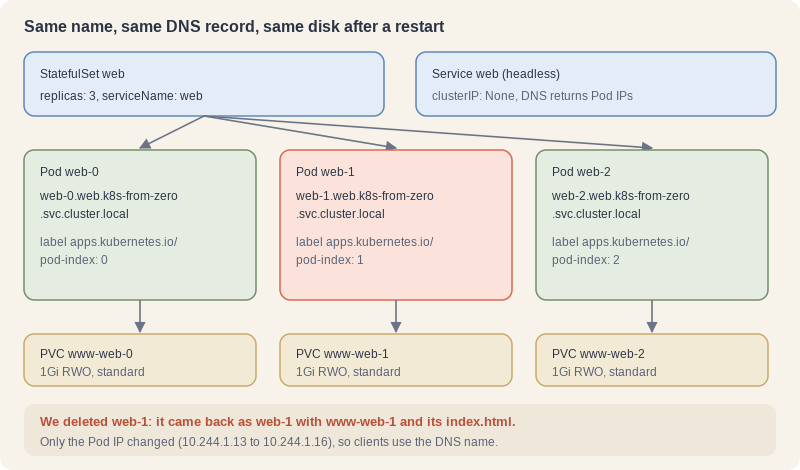
The StatefulSets page describes it as a controller that manages Pods based on an identical spec, while keeping a sticky identity for each one. For N replicas the Pods are numbered with an ordinal from 0 to N-1, and the name is the set’s name plus the ordinal: web-0, web-1, web-2. Each Pod also gets the labels statefulset.kubernetes.io/pod-name and, stable since v1.32, apps.kubernetes.io/pod-index with its ordinal. A Deployment’s replacement Pod gets a new random name; a StatefulSet’s replacement for web-1 is web-1 again.
Three things make up that identity:
- A stable name, derived from the ordinal.
- A stable network identity. A StatefulSet needs a headless Service: a Service with
clusterIP: None. Part 8 introduced the type. The DNS page says a lookup of a headless Service returns one answer per Pod rather than one virtual IP. The StatefulSet adds a per-Pod record:web-0.web.k8s-from-zero.svc.cluster.local, the Pod name, then the Service name, then the namespace. The docs also say you are responsible for creating this Service; the StatefulSet only refers to it withserviceName. - Stable storage.
volumeClaimTemplatesstamps out one PersistentVolumeClaim per Pod, named template plus Pod:www-web-0. A replacement Pod reattaches the same claim.
Use a StatefulSet for databases, queues and clustered systems where members know each other by name. If your replicas are identical and keep no local state, a Deployment is simpler.
One claim per Pod, kept on purpose
In part 13 you wrote the claim yourself. Here you write a template and the controller makes the claims. The important rule, in the docs’ words: “Deleting and/or scaling a StatefulSet down will not delete the volumes associated with the StatefulSet.” Data is treated as more valuable than tidiness.
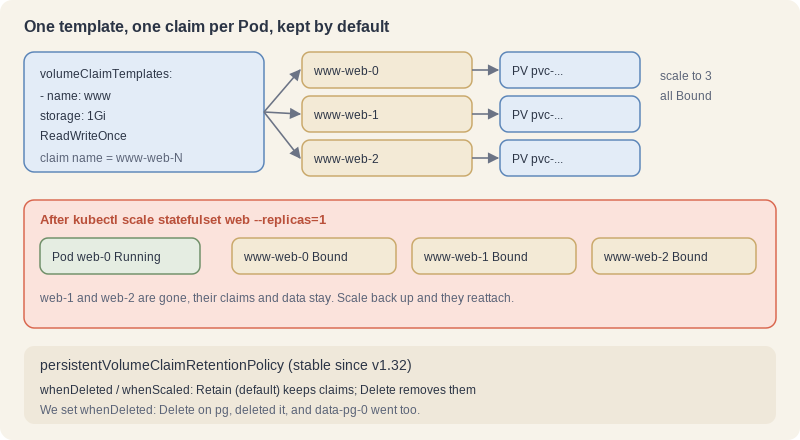
Since v1.32 you can change that with persistentVolumeClaimRetentionPolicy, which has two settings:
whenDeleted: what happens to the claims when the StatefulSet is deleted.whenScaled: what happens to the claims of Pods removed by a scale down.
Each is Retain (the default) or Delete. The docs add that these only apply when Pods are removed by deletion or scaling. If a Pod dies because its node failed, the replacement keeps the existing claim.
Order: start up, then down
By default (podManagementPolicy: OrderedReady) the controller creates Pods one at a time, from 0 upward, and waits for each to be Running and Ready before the next. Scaling down goes in reverse, from the highest ordinal, and each Pod must be fully gone before the next one stops. Readiness comes from the probe you met in part 10, so a probe that never passes stops the whole line. You will hit that in “When it goes wrong”, because we did.
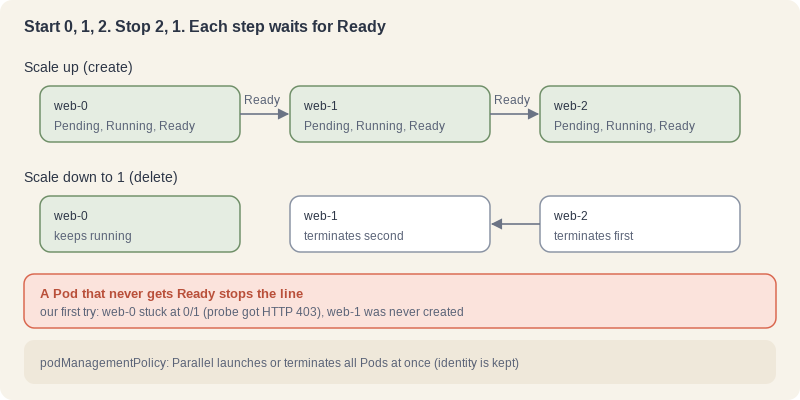
podManagementPolicy: Parallel keeps the identities but drops the waiting: all Pods start or stop at once. It suits systems whose members do not need a fixed boot order.
Updates follow updateStrategy. RollingUpdate (the default) replaces Pods from the highest ordinal down, one at a time. A partition number lets you update only the Pods with an ordinal at or above it, a simple way to stage a change. The docs list maxUnavailable for rolling updates as beta and enabled by default in v1.37, and a Recreate strategy as alpha, behind a feature gate. OnDelete updates a Pod only when you delete it yourself. One caveat from the docs: if a rolling update brings in a template that never becomes Ready, reverting the template is not enough; you must also delete the Pod that was stuck on the bad version.
Try it: a StatefulSet you can find by name
Set your context namespace to k8s-from-zero. The box we tested on has no internet inside the cluster, so we preloaded nginx:1.29-alpine, busybox:1.37 and postgres:18-alpine with kind load docker-image; on your laptop they pull normally.
- Write the Service and the StatefulSet. Save as
web-sts.yaml:
apiVersion: v1
kind: Service
metadata:
  name: web
  namespace: k8s-from-zero
  labels:
    app.kubernetes.io/name: web
spec:
  clusterIP: None # headless: DNS returns the Pod IPs, no virtual IP
  selector:
    app.kubernetes.io/name: web
  ports:
    - name: http
      port: 80
---
apiVersion: apps/v1
kind: StatefulSet
metadata:
  name: web
  namespace: k8s-from-zero
spec:
  serviceName: web
  replicas: 3
  selector:
    matchLabels:
      app.kubernetes.io/name: web
  template:
    metadata:
      labels:
        app.kubernetes.io/name: web
    spec:
      containers:
        - name: nginx
          image: nginx:1.29-alpine
          ports:
            - name: http
              containerPort: 80
          readinessProbe:
            tcpSocket:
              port: http
          volumeMounts:
            - name: www
              mountPath: /usr/share/nginx/html
  volumeClaimTemplates:
    - metadata:
        name: www
      spec:
        accessModes:
          - ReadWriteOnce
        resources:
          requests:
            storage: 1Gi
The claim is mounted over nginx’s web root, so each Pod starts with an empty site. The readiness probe only checks that port 80 accepts connections; the first item under “When it goes wrong” explains why.
- Apply it and watch the order. In a second terminal, start a watch first. The custom columns make the order easy to read:
kubectl get pods -l app.kubernetes.io/name=web -w -o custom-columns=NAME:.metadata.name,STATUS:.status.phase,READY:.status.containerStatuses[0].ready,NODE:.spec.nodeNameExplain this command
kubectl get pods -l app.kubernetes.io/name=web -w -o custom-columns=NAME:.metadata.name,STATUS:.status.phase,READY:.status.containerStatuses[0].ready,NODE:.spec.nodeNamekubectlThe Kubernetes command-line client. Subcommands and flags are documented under kubernetes.io/docs/reference/kubectl/.getDisplay one or many resources. kubectl get prints a table of the most important information about the resources you name.podsThe resource type to display. kubectl get points you to kubectl api-resources for the full list of types the server supports.-lShort form of --selector. A label query. The get docs say it supports '=', '==', '!=', 'in' and 'notin', and that matching objects must satisfy every constraint.app.kubernetes.io/name=webThe label query passed to --selector: app.kubernetes.io/name=web.-wShort form of --watch. After listing the requested object, watch for changes.-oShort form of --output. It selects the output format. For get, the formats include json, yaml, name, jsonpath, custom-columns and wide.custom-columns=NAME:.metadata.name,STATUS:.status.phase,READY:.status.containerStatuses[0].ready,NODE:.spec.nodeNamecustom-columns is an output format. The get examples write each column as a heading, a colon, and a JSONPath. The headings here are NAME, STATUS, READY, NODE.
Then apply and wait in the first terminal:
kubectl apply -f web-sts.yaml
kubectl rollout status statefulset/web --timeout=180sExplain this command
kubectl apply -f web-sts.yaml
kubectl rollout status statefulset/web --timeout=180skubectlThe Kubernetes command-line client. Subcommands and flags are documented under kubernetes.io/docs/reference/kubectl/.applyApply a configuration to a resource by file name or stdin. The apply docs say the resource is created if it does not exist yet. JSON and YAML are accepted.-fShort form of --filename. The file, directory or URL that contains the configuration to apply.web-sts.yamlThe file named by --filename. apply creates the objects or updates them to match this file.kubectlThe Kubernetes command-line client. Subcommands and flags are documented under kubernetes.io/docs/reference/kubectl/.rolloutThe command group for rollout actions.statusShow the status of a rollout and wait until it finishes.statefulset/webThe resource written as type/name: statefulset/web.--timeout=180sHow long to wait before giving up. This command passes 180s.
service/web created
statefulset.apps/web created
Waiting for 3 pods to be ready...
Waiting for 2 pods to be ready...
Waiting for 2 pods to be ready...
Waiting for 1 pods to be ready...
Waiting for 1 pods to be ready...
partitioned roll out complete: 3 new pods have been updated...
The watch shows each Pod reach Ready before the next one is even created:
NAME    STATUS    READY    NODE
web-0   Pending   <none>   <none>
web-0   Pending   <none>   <none>
web-0   Pending   <none>   k8s-ep13-worker2
web-0   Pending   false    k8s-ep13-worker2
web-0   Pending   false    k8s-ep13-worker2
web-0   Running   false    k8s-ep13-worker2
web-0   Running   true     k8s-ep13-worker2
web-1   Pending   <none>   <none>
web-1   Pending   <none>   <none>
web-1   Pending   <none>   k8s-ep13-worker
web-1   Pending   false    k8s-ep13-worker
web-1   Pending   false    k8s-ep13-worker
web-1   Running   false    k8s-ep13-worker
web-1   Running   true     k8s-ep13-worker
web-2   Pending   <none>   <none>
web-2   Pending   <none>   <none>
web-2   Pending   <none>   k8s-ep13-worker
web-2   Pending   false    k8s-ep13-worker
web-2   Pending   false    k8s-ep13-worker
web-2   Running   false    k8s-ep13-worker
web-2 Running true k8s-ep13-worker- Look at names, labels and claims.
kubectl get pods -l app.kubernetes.io/name=web -o wide
kubectl get pods -l app.kubernetes.io/name=web -L apps.kubernetes.io/pod-index
kubectl get pvc
kubectl get svc webExplain this command
kubectl get pods -l app.kubernetes.io/name=web -o wide
kubectl get pods -l app.kubernetes.io/name=web -L apps.kubernetes.io/pod-index
kubectl get pvc
kubectl get svc webkubectlThe Kubernetes command-line client. Subcommands and flags are documented under kubernetes.io/docs/reference/kubectl/.getDisplay one or many resources. kubectl get prints a table of the most important information about the resources you name.podsThe resource type to display. kubectl get points you to kubectl api-resources for the full list of types the server supports.-lShort form of --selector. A label query. The get docs say it supports '=', '==', '!=', 'in' and 'notin', and that matching objects must satisfy every constraint.app.kubernetes.io/name=webThe label query passed to --selector: app.kubernetes.io/name=web.-oShort form of --output. It selects the output format. For get, the formats include json, yaml, name, jsonpath, custom-columns and wide.wideAn output format. The get examples say wide adds more information, such as the node name. For Pods the lesson's table adds IP, NODE, NOMINATED NODE and READINESS GATES.kubectlThe Kubernetes command-line client. Subcommands and flags are documented under kubernetes.io/docs/reference/kubectl/.getDisplay one or many resources. kubectl get prints a table of the most important information about the resources you name.podsThe resource type to display. kubectl get points you to kubectl api-resources for the full list of types the server supports.-lShort form of --selector. A label query. The get docs say it supports '=', '==', '!=', 'in' and 'notin', and that matching objects must satisfy every constraint.app.kubernetes.io/name=webThe label query passed to --selector: app.kubernetes.io/name=web.-LShort form of --label-columns. The get docs say it accepts a comma-separated list of labels to present as columns, and that names are case-sensitive.apps.kubernetes.io/pod-indexA label key for --label-columns. The get docs present it as a column.kubectlThe Kubernetes command-line client. Subcommands and flags are documented under kubernetes.io/docs/reference/kubectl/.getDisplay one or many resources. kubectl get prints a table of the most important information about the resources you name.pvcThe resource type to display. kubectl get points you to kubectl api-resources for the full list of types the server supports.kubectlThe Kubernetes command-line client. Subcommands and flags are documented under kubernetes.io/docs/reference/kubectl/.getDisplay one or many resources. kubectl get prints a table of the most important information about the resources you name.svcThe resource type to display. kubectl get points you to kubectl api-resources for the full list of types the server supports.webThe object name.
NAME    READY   STATUS    RESTARTS   AGE   IP            NODE               NOMINATED NODE   READINESS GATES
web-0   1/1     Running   0          14s   10.244.2.11   k8s-ep13-worker2   <none>           <none>
web-1   1/1     Running   0          10s   10.244.1.13   k8s-ep13-worker    <none>           <none>
web-2   1/1     Running   0          5s    10.244.1.15   k8s-ep13-worker    <none>           <none>
NAME    READY   STATUS    RESTARTS   AGE   POD-INDEX
web-0   1/1     Running   0          14s   0
web-1   1/1     Running   0          10s   1
web-2   1/1     Running   0          5s    2
NAME        STATUS   VOLUME                                     CAPACITY   ACCESS MODES   STORAGECLASS   VOLUMEATTRIBUTESCLASS   AGE
www-web-0   Bound    pvc-c94d238a-7a0c-4d41-87ad-9fc837f929d4   1Gi        RWO            standard       <unset>                 14s
www-web-1   Bound    pvc-16e455b5-dcd0-4790-a941-c825f94560bf   1Gi        RWO            standard       <unset>                 10s
www-web-2   Bound    pvc-058fe3a5-7dbb-4b9e-9f87-872860516d74   1Gi        RWO            standard       <unset>                 5s
NAME   TYPE        CLUSTER-IP   EXTERNAL-IP   PORT(S)   AGE
web    ClusterIP   None         <none>        80/TCP    15s
Ages 14, 10 and 5 seconds: one at a time. CLUSTER-IP None is the headless Service.
- Give each Pod a page that names it.
for i in 0 1 2; do kubectl exec web-$i -- sh -c "echo hello from \$(hostname) > /usr/share/nginx/html/index.html"; doneExplain this command
for i in 0 1 2; do kubectl exec web-$i -- sh -c "echo hello from \$(hostname) > /usr/share/nginx/html/index.html"; doneforShell. Starts a for loop.iAn argument of this command: i.inShell. Names the list a for loop walks.0A numeric argument in this command.1A numeric argument in this command.2A numeric argument in this command.;Shell. Runs the next command after this one finishes, whatever its exit status.doShell. Starts the body of a for, while or if.kubectlThe Kubernetes command-line client. Subcommands and flags are documented under kubernetes.io/docs/reference/kubectl/.execExecute a command in a container. The synopsis is kubectl exec (POD | TYPE/NAME) [-c CONTAINER] [flags] -- COMMAND [args...].web-$iAn argument of this command: web-$i.--Ends kubectl's flags. The exec examples say to use two dashes so the command's own flags are read as that command's flags.shAn argument of the command inside the container: sh.-cA flag of the command inside the container: -c. sh -c runs the next argument as a shell command."echo hello from \$(hostname) > /usr/share/nginx/html/index.html"A quoted command string run inside the container.;Shell. Runs the next command after this one finishes, whatever its exit status.doneShell. Ends a for, while or until loop.
The file lands on each Pod’s own claim.
- Find the Pods through DNS. Run a throwaway client Pod that looks up the Service and fetches one page:
kubectl run dns-test --image=busybox:1.37 --restart=Never --rm -i --quiet -- sh -c "nslookup web-0.web; nslookup web; wget -qO- http://web-1.web"Explain this command
kubectl run dns-test --image=busybox:1.37 --restart=Never --rm -i --quiet -- sh -c "nslookup web-0.web; nslookup web; wget -qO- http://web-1.web"kubectlThe Kubernetes command-line client. Subcommands and flags are documented under kubernetes.io/docs/reference/kubectl/.runCreate and run a particular image in a pod. The run synopsis is kubectl run NAME --image=image [--env="key=value"] [--port=port] [--dry-run=server|client] [--overrides=inline-json] [--command] -- [COMMAND] [args...].dns-testThe NAME in kubectl run NAME. This command names the Pod dns-test.--image=busybox:1.37The image for the container to run. This command passes busybox:1.37.--restart=NeverThe restart policy for this Pod. The run docs list Always, OnFailure and Never. This command passes Never.--rmIf true, delete the Pod after it exits. The run docs say this is only valid when attaching to the container.-iShort form of --stdin. Pass stdin to the container.--quietSuppress the extra messages kubectl would otherwise print.--Ends kubectl's flags. The exec examples say to use two dashes so the command's own flags are read as that command's flags.shAn argument of the command inside the container: sh.-cAn argument of sh. It tells sh to run the command string that follows."nslookup web-0.web; nslookup web; wget -qO- http://web-1.web"The command string sh runs: two nslookup lookups, then wget fetches web-1's page.
Server:		10.96.0.10
Address:	10.96.0.10:53

** server can't find web-0.web: SERVFAIL

*** Can't find web-0.web: No answer

Server:		10.96.0.10
Address:	10.96.0.10:53

Name:	web.k8s-from-zero.svc.cluster.local
Address: 10.244.1.15
Name:	web.k8s-from-zero.svc.cluster.local
Address: 10.244.1.13
Name:	web.k8s-from-zero.svc.cluster.local
Address: 10.244.2.11

...
hello from web-1
The Service name returns all three Pod IPs, one answer per Pod. The short Pod name web-1.web worked for wget, yet busybox’s nslookup gave up on web-0.web with SERVFAIL. Use the full name with nslookup:
kubectl run dns-test --image=busybox:1.37 --restart=Never --rm -i --quiet -- sh -c "nslookup web-0.web.k8s-from-zero.svc.cluster.local; for i in 0 1 2; do wget -qO- http://web-\$i.web; done"Explain this command
kubectl run dns-test --image=busybox:1.37 --restart=Never --rm -i --quiet -- sh -c "nslookup web-0.web.k8s-from-zero.svc.cluster.local; for i in 0 1 2; do wget -qO- http://web-\$i.web; done"kubectlThe Kubernetes command-line client. Subcommands and flags are documented under kubernetes.io/docs/reference/kubectl/.runCreate and run a particular image in a pod. The run synopsis is kubectl run NAME --image=image [--env="key=value"] [--port=port] [--dry-run=server|client] [--overrides=inline-json] [--command] -- [COMMAND] [args...].dns-testThe NAME in kubectl run NAME. This command names the Pod dns-test.--image=busybox:1.37The image for the container to run. This command passes busybox:1.37.--restart=NeverThe restart policy for this Pod. The run docs list Always, OnFailure and Never. This command passes Never.--rmIf true, delete the Pod after it exits. The run docs say this is only valid when attaching to the container.-iShort form of --stdin. Pass stdin to the container.--quietSuppress the extra messages kubectl would otherwise print.--Ends kubectl's flags. The exec examples say to use two dashes so the command's own flags are read as that command's flags.shAn argument of the command inside the container: sh.-cAn argument of sh. It tells sh to run the command string that follows."nslookup web-0.web.k8s-from-zero.svc.cluster.local; for i in 0 1 2; do wget -qO- http://web-\$i.web; done"The command string sh runs: a full-name nslookup, then wget fetches each Pod's page.
Server:		10.96.0.10
Address:	10.96.0.10:53


Name:	web-0.web.k8s-from-zero.svc.cluster.local
Address: 10.244.2.11

hello from web-0
hello from web-1
hello from web-2
Every Pod answers at its own name with its own page.
- Delete a Pod and watch the identity return.
kubectl delete pod web-1
kubectl get pods -l app.kubernetes.io/name=web -o wide
kubectl exec web-1 -- cat /usr/share/nginx/html/index.htmlExplain this command
kubectl delete pod web-1
kubectl get pods -l app.kubernetes.io/name=web -o wide
kubectl exec web-1 -- cat /usr/share/nginx/html/index.htmlkubectlThe Kubernetes command-line client. Subcommands and flags are documented under kubernetes.io/docs/reference/kubectl/.deleteDelete resources by file names, stdin, resources and names, or by resources and label selector.podThe resource type.web-1The object name.kubectlThe Kubernetes command-line client. Subcommands and flags are documented under kubernetes.io/docs/reference/kubectl/.getDisplay one or many resources. kubectl get prints a table of the most important information about the resources you name.podsThe resource type to display. kubectl get points you to kubectl api-resources for the full list of types the server supports.-lShort form of --selector. A label query. The get docs say it supports '=', '==', '!=', 'in' and 'notin', and that matching objects must satisfy every constraint.app.kubernetes.io/name=webThe label query passed to --selector: app.kubernetes.io/name=web.-oShort form of --output. It selects the output format. For get, the formats include json, yaml, name, jsonpath, custom-columns and wide.wideAn output format. The get examples say wide adds more information, such as the node name. For Pods the lesson's table adds IP, NODE, NOMINATED NODE and READINESS GATES.kubectlThe Kubernetes command-line client. Subcommands and flags are documented under kubernetes.io/docs/reference/kubectl/.execExecute a command in a container. The synopsis is kubectl exec (POD | TYPE/NAME) [-c CONTAINER] [flags] -- COMMAND [args...].web-1An argument of this command: web-1.--Ends kubectl's flags. The exec examples say to use two dashes so the command's own flags are read as that command's flags.catcat, run inside the container. It writes the named files to standard output./usr/share/nginx/html/index.htmlA path inside the container: /usr/share/nginx/html/index.html.
pod "web-1" deleted from k8s-from-zero namespace
NAME    READY   STATUS    RESTARTS   AGE   IP            NODE               NOMINATED NODE   READINESS GATES
web-0   1/1     Running   0          36s   10.244.2.11   k8s-ep13-worker2   <none>           <none>
web-1   1/1     Running   0          6s    10.244.1.16   k8s-ep13-worker    <none>           <none>
web-2   1/1     Running   0          27s   10.244.1.15   k8s-ep13-worker    <none>           <none>
hello from web-1
Same name, same node (its claim is node-local, part 13), same page. The IP changed from 10.244.1.13 to 10.244.1.16, which is why clients should use the DNS name.
- Scale down and back up.
kubectl scale statefulset web --replicas=1
kubectl rollout status statefulset/web --timeout=120s
kubectl get pods -l app.kubernetes.io/name=web
kubectl get pvcExplain this command
kubectl scale statefulset web --replicas=1
kubectl rollout status statefulset/web --timeout=120s
kubectl get pods -l app.kubernetes.io/name=web
kubectl get pvckubectlThe Kubernetes command-line client. Subcommands and flags are documented under kubernetes.io/docs/reference/kubectl/.scaleSet a new size for a deployment, replica set, replication controller, or stateful set.statefulsetThe resource type.webThe object name.--replicas=1The number of desired replicas. This command passes 1.kubectlThe Kubernetes command-line client. Subcommands and flags are documented under kubernetes.io/docs/reference/kubectl/.rolloutThe command group for rollout actions.statusShow the status of a rollout and wait until it finishes.statefulset/webThe resource written as type/name: statefulset/web.--timeout=120sHow long to wait before giving up. This command passes 120s.kubectlThe Kubernetes command-line client. Subcommands and flags are documented under kubernetes.io/docs/reference/kubectl/.getDisplay one or many resources. kubectl get prints a table of the most important information about the resources you name.podsThe resource type to display. kubectl get points you to kubectl api-resources for the full list of types the server supports.-lShort form of --selector. A label query. The get docs say it supports '=', '==', '!=', 'in' and 'notin', and that matching objects must satisfy every constraint.app.kubernetes.io/name=webThe label query passed to --selector: app.kubernetes.io/name=web.kubectlThe Kubernetes command-line client. Subcommands and flags are documented under kubernetes.io/docs/reference/kubectl/.getDisplay one or many resources. kubectl get prints a table of the most important information about the resources you name.pvcThe resource type to display. kubectl get points you to kubectl api-resources for the full list of types the server supports.
statefulset.apps/web scaled
partitioned roll out complete: 2 new pods have been updated...
NAME    READY   STATUS    RESTARTS   AGE
web-0   1/1     Running   0          40s
NAME        STATUS   VOLUME                                     CAPACITY   ACCESS MODES   STORAGECLASS   VOLUMEATTRIBUTESCLASS   AGE
www-web-0   Bound    pvc-c94d238a-7a0c-4d41-87ad-9fc837f929d4   1Gi        RWO            standard       <unset>                 40s
www-web-1   Bound    pvc-16e455b5-dcd0-4790-a941-c825f94560bf   1Gi        RWO            standard       <unset>                 36s
www-web-2   Bound    pvc-058fe3a5-7dbb-4b9e-9f87-872860516d74   1Gi        RWO            standard       <unset>                 31s
Our watch showed web-2 get its deletion mark first and web-1 right after it. All three claims are still Bound. Scale back up:
kubectl scale statefulset web --replicas=3
kubectl rollout status statefulset/web --timeout=120s
kubectl exec web-2 -- cat /usr/share/nginx/html/index.htmlExplain this command
kubectl scale statefulset web --replicas=3
kubectl rollout status statefulset/web --timeout=120s
kubectl exec web-2 -- cat /usr/share/nginx/html/index.htmlkubectlThe Kubernetes command-line client. Subcommands and flags are documented under kubernetes.io/docs/reference/kubectl/.scaleSet a new size for a deployment, replica set, replication controller, or stateful set.statefulsetThe resource type.webThe object name.--replicas=3The number of desired replicas. This command passes 3.kubectlThe Kubernetes command-line client. Subcommands and flags are documented under kubernetes.io/docs/reference/kubectl/.rolloutThe command group for rollout actions.statusShow the status of a rollout and wait until it finishes.statefulset/webThe resource written as type/name: statefulset/web.--timeout=120sHow long to wait before giving up. This command passes 120s.kubectlThe Kubernetes command-line client. Subcommands and flags are documented under kubernetes.io/docs/reference/kubectl/.execExecute a command in a container. The synopsis is kubectl exec (POD | TYPE/NAME) [-c CONTAINER] [flags] -- COMMAND [args...].web-2An argument of this command: web-2.--Ends kubectl's flags. The exec examples say to use two dashes so the command's own flags are read as that command's flags.catcat, run inside the container. It writes the named files to standard output./usr/share/nginx/html/index.htmlA path inside the container: /usr/share/nginx/html/index.html.
statefulset.apps/web scaled
Waiting for 2 pods to be ready...
Waiting for 1 pods to be ready...
Waiting for 1 pods to be ready...
partitioned roll out complete: 3 new pods have been updated...
hello from web-2
The new web-2 found the old claim and the page you wrote in step 4.
- Delete the set and clean up the claims yourself.
kubectl delete -f web-sts.yaml
kubectl get pods,pvc
kubectl delete pvc -l app.kubernetes.io/name=webExplain this command
kubectl delete -f web-sts.yaml
kubectl get pods,pvc
kubectl delete pvc -l app.kubernetes.io/name=webkubectlThe Kubernetes command-line client. Subcommands and flags are documented under kubernetes.io/docs/reference/kubectl/.deleteDelete resources by file names, stdin, resources and names, or by resources and label selector.-fShort form of --filename. For delete, the file that contains the resource to delete.web-sts.yamlThe file named by --filename. delete removes the resources that file describes.kubectlThe Kubernetes command-line client. Subcommands and flags are documented under kubernetes.io/docs/reference/kubectl/.getDisplay one or many resources. kubectl get prints a table of the most important information about the resources you name.pods,pvcAn argument of this command: pods,pvc.kubectlThe Kubernetes command-line client. Subcommands and flags are documented under kubernetes.io/docs/reference/kubectl/.deleteDelete resources by file names, stdin, resources and names, or by resources and label selector.pvcThe resource type.-lShort form of --selector. A label query. The get docs say it supports '=', '==', '!=', 'in' and 'notin', and that matching objects must satisfy every constraint.app.kubernetes.io/name=webThe label query passed to --selector: app.kubernetes.io/name=web.
service "web" deleted from k8s-from-zero namespace
statefulset.apps "web" deleted from k8s-from-zero namespace
NAME                              STATUS   VOLUME                                     CAPACITY   ACCESS MODES   STORAGECLASS   VOLUMEATTRIBUTESCLASS   AGE
persistentvolumeclaim/www-web-0   Bound    pvc-c94d238a-7a0c-4d41-87ad-9fc837f929d4   1Gi        RWO            standard       <unset>                 62s
persistentvolumeclaim/www-web-1   Bound    pvc-16e455b5-dcd0-4790-a941-c825f94560bf   1Gi        RWO            standard       <unset>                 58s
persistentvolumeclaim/www-web-2   Bound    pvc-058fe3a5-7dbb-4b9e-9f87-872860516d74   1Gi        RWO            standard       <unset>                 53s
persistentvolumeclaim "www-web-0" deleted from k8s-from-zero namespace
persistentvolumeclaim "www-web-1" deleted from k8s-from-zero namespace
persistentvolumeclaim "www-web-2" deleted from k8s-from-zero namespace
The claims outlived the set. On our cluster they carried the Pod template’s app.kubernetes.io/name: web label, which made one selector enough to remove them.
- Run a learning Postgres. This is for practice: one replica, no backups, no replication, a throwaway password. Save as
pg.yaml:
apiVersion: v1
kind: Secret
metadata:
  name: pg-auth
  namespace: k8s-from-zero
type: Opaque
stringData:
  POSTGRES_PASSWORD: learning-only-change-me
---
apiVersion: v1
kind: Service
metadata:
  name: pg
  namespace: k8s-from-zero
  labels:
    app.kubernetes.io/name: postgres
spec:
  clusterIP: None
  selector:
    app.kubernetes.io/name: postgres
  ports:
    - name: postgres
      port: 5432
---
apiVersion: apps/v1
kind: StatefulSet
metadata:
  name: pg
  namespace: k8s-from-zero
spec:
  serviceName: pg
  replicas: 1
  selector:
    matchLabels:
      app.kubernetes.io/name: postgres
  template:
    metadata:
      labels:
        app.kubernetes.io/name: postgres
    spec:
      terminationGracePeriodSeconds: 30
      containers:
        - name: postgres
          image: postgres:18-alpine
          ports:
            - name: postgres
              containerPort: 5432
          envFrom:
            - secretRef:
                name: pg-auth
          readinessProbe:
            exec:
              command: ["pg_isready", "-U", "postgres"]
            periodSeconds: 5
          resources:
            requests:
              cpu: 100m
              memory: 256Mi
            limits:
              memory: 512Mi
          volumeMounts:
            - name: data
              mountPath: /var/lib/postgresql # PostgreSQL 18+ image layout
  volumeClaimTemplates:
    - metadata:
        name: data
      spec:
        accessModes:
          - ReadWriteOnce
        resources:
          requests:
            storage: 1Gi
The password comes from a Secret (part 9), readiness from pg_isready, and the requests and limits follow part 11. Note the mount path. The postgres image page says that from PostgreSQL 18 the image keeps its data in a version-specific folder, /var/lib/postgresql/18/docker, and that volumes should be mounted at /var/lib/postgresql. Older guides mount /var/lib/postgresql/data, which is right only for version 17 and below.
kubectl apply -f pg.yaml
kubectl rollout status statefulset/pg --timeout=180s
kubectl get pods,pvc -l app.kubernetes.io/name=postgres
kubectl exec pg-0 -- sh -c 'echo PGDATA=$PGDATA; ls /var/lib/postgresql'Explain this command
kubectl apply -f pg.yaml
kubectl rollout status statefulset/pg --timeout=180s
kubectl get pods,pvc -l app.kubernetes.io/name=postgres
kubectl exec pg-0 -- sh -c 'echo PGDATA=$PGDATA; ls /var/lib/postgresql'kubectlThe Kubernetes command-line client. Subcommands and flags are documented under kubernetes.io/docs/reference/kubectl/.applyApply a configuration to a resource by file name or stdin. The apply docs say the resource is created if it does not exist yet. JSON and YAML are accepted.-fShort form of --filename. The file, directory or URL that contains the configuration to apply.pg.yamlThe file named by --filename. apply creates the objects or updates them to match this file.kubectlThe Kubernetes command-line client. Subcommands and flags are documented under kubernetes.io/docs/reference/kubectl/.rolloutThe command group for rollout actions.statusShow the status of a rollout and wait until it finishes.statefulset/pgThe resource written as type/name: statefulset/pg.--timeout=180sHow long to wait before giving up. This command passes 180s.kubectlThe Kubernetes command-line client. Subcommands and flags are documented under kubernetes.io/docs/reference/kubectl/.getDisplay one or many resources. kubectl get prints a table of the most important information about the resources you name.pods,pvcAn argument of this command: pods,pvc.-lShort form of --selector. A label query. The get docs say it supports '=', '==', '!=', 'in' and 'notin', and that matching objects must satisfy every constraint.app.kubernetes.io/name=postgresThe label query passed to --selector: app.kubernetes.io/name=postgres.kubectlThe Kubernetes command-line client. Subcommands and flags are documented under kubernetes.io/docs/reference/kubectl/.execExecute a command in a container. The synopsis is kubectl exec (POD | TYPE/NAME) [-c CONTAINER] [flags] -- COMMAND [args...].pg-0An argument of this command: pg-0.--Ends kubectl's flags. The exec examples say to use two dashes so the command's own flags are read as that command's flags.shAn argument of the command inside the container: sh.-cA flag of the command inside the container: -c. sh -c runs the next argument as a shell command.'echo PGDATA=$PGDATA; ls /var/lib/postgresql'An argument of the command inside the container: 'echo PGDATA=$PGDATA; ls /var/lib/postgresql'.
secret/pg-auth created
service/pg created
statefulset.apps/pg created
Waiting for 1 pods to be ready...
partitioned roll out complete: 1 new pods have been updated...
NAME       READY   STATUS    RESTARTS   AGE
pod/pg-0   1/1     Running   0          11s

NAME                              STATUS   VOLUME                                     CAPACITY   ACCESS MODES   STORAGECLASS   VOLUMEATTRIBUTESCLASS   AGE
persistentvolumeclaim/data-pg-0   Bound    pvc-f2b21047-3c60-42bd-a693-9e7c6512da04   1Gi        RWO            standard       <unset>                 11s
PGDATA=/var/lib/postgresql/18/docker
18- Write a row, kill the Pod, read the row.
kubectl exec pg-0 -- psql -U postgres -c "CREATE TABLE notes (id serial PRIMARY KEY, body text);" -c "INSERT INTO notes (body) VALUES ('survives a restart');"
kubectl delete pod pg-0
kubectl wait --for=condition=Ready pod/pg-0 --timeout=120s
kubectl exec pg-0 -- psql -U postgres -c "SELECT * FROM notes;"Explain this command
kubectl exec pg-0 -- psql -U postgres -c "CREATE TABLE notes (id serial PRIMARY KEY, body text);" -c "INSERT INTO notes (body) VALUES ('survives a restart');"
kubectl delete pod pg-0
kubectl wait --for=condition=Ready pod/pg-0 --timeout=120s
kubectl exec pg-0 -- psql -U postgres -c "SELECT * FROM notes;"kubectlThe Kubernetes command-line client. Subcommands and flags are documented under kubernetes.io/docs/reference/kubectl/.execExecute a command in a container. The synopsis is kubectl exec (POD | TYPE/NAME) [-c CONTAINER] [flags] -- COMMAND [args...].pg-0An argument of this command: pg-0.--Ends kubectl's flags. The exec examples say to use two dashes so the command's own flags are read as that command's flags.psqlThe Postgres client.-UA flag of the command inside the container: -U.postgresAn argument of the command inside the container: postgres.-cpsql's -c (--command) option: run the given command string, then exit. psql accepts several -c options and runs them in order; here each string holds one SQL statement."CREATE TABLE notes (id serial PRIMARY KEY, body text);"An argument of the command inside the container: "CREATE TABLE notes (id serial PRIMARY KEY, body text);".-cpsql's -c (--command) option: run the given command string, then exit. psql accepts several -c options and runs them in order; here each string holds one SQL statement."INSERT INTO notes (body) VALUES ('survives a restart');"An argument of the command inside the container: "INSERT INTO notes (body) VALUES ('survives a restart');".kubectlThe Kubernetes command-line client. Subcommands and flags are documented under kubernetes.io/docs/reference/kubectl/.deleteDelete resources by file names, stdin, resources and names, or by resources and label selector.podThe resource type.pg-0The object name.kubectlThe Kubernetes command-line client. Subcommands and flags are documented under kubernetes.io/docs/reference/kubectl/.waitWait for a condition on one or more resources.--for=condition=ReadyThe condition to wait for. The wait command takes --for. This command passes condition=Ready.pod/pg-0The resource written as type/name: pod/pg-0.--timeout=120sHow long to wait before giving up. This command passes 120s.kubectlThe Kubernetes command-line client. Subcommands and flags are documented under kubernetes.io/docs/reference/kubectl/.execExecute a command in a container. The synopsis is kubectl exec (POD | TYPE/NAME) [-c CONTAINER] [flags] -- COMMAND [args...].pg-0An argument of this command: pg-0.--Ends kubectl's flags. The exec examples say to use two dashes so the command's own flags are read as that command's flags.psqlThe Postgres client.-UA flag of the command inside the container: -U.postgresAn argument of the command inside the container: postgres.-cpsql's -c (--command) option: run the given command string, then exit. psql accepts several -c options and runs them in order; here each string holds one SQL statement."SELECT * FROM notes;"An argument of the command inside the container: "SELECT * FROM notes;".
CREATE TABLE
INSERT 0 1
pod "pg-0" deleted from k8s-from-zero namespace
pod/pg-0 condition met
 id |        body
----+--------------------
  1 | survives a restart
(1 row)
Now connect the way an app would, by the Pod’s DNS name:
kubectl run psql --image=postgres:18-alpine --restart=Never --rm -i --quiet --env=PGPASSWORD=learning-only-change-me -- psql -h pg-0.pg -U postgres -c "SELECT now(), body FROM notes;"Explain this command
kubectl run psql --image=postgres:18-alpine --restart=Never --rm -i --quiet --env=PGPASSWORD=learning-only-change-me -- psql -h pg-0.pg -U postgres -c "SELECT now(), body FROM notes;"kubectlThe Kubernetes command-line client. Subcommands and flags are documented under kubernetes.io/docs/reference/kubectl/.runCreate and run a particular image in a pod. The run synopsis is kubectl run NAME --image=image [--env="key=value"] [--port=port] [--dry-run=server|client] [--overrides=inline-json] [--command] -- [COMMAND] [args...].psqlThe NAME in kubectl run NAME. This command names the Pod psql.--image=postgres:18-alpineThe image for the container to run. This command passes postgres:18-alpine.--restart=NeverThe restart policy for this Pod. The run docs list Always, OnFailure and Never. This command passes Never.--rmIf true, delete the Pod after it exits. The run docs say this is only valid when attaching to the container.-iShort form of --stdin. Pass stdin to the container.--quietSuppress the extra messages kubectl would otherwise print.--env=PGPASSWORD=learning-only-change-meAn environment variable for the container, as KEY=VALUE. This command passes PGPASSWORD=learning-only-change-me.--Ends kubectl's flags. The exec examples say to use two dashes so the command's own flags are read as that command's flags.psqlThe Postgres client.-hA flag of the command inside the container: -h.pg-0.pgAn argument of the command inside the container: pg-0.pg.-UA flag of the command inside the container: -U.postgresAn argument of the command inside the container: postgres.-cpsql's -c (--command): run this command string, then exit."SELECT now(), body FROM notes;"An argument of the command inside the container: "SELECT now(), body FROM notes;".
              now              |        body
-------------------------------+--------------------
 2026-11-10 21:08:14.532734+00 | survives a restart
(1 row)
Typing the password on the command line is fine for a lab; in a real app it would come from the same Secret.
- Let the set delete its claim. Turn on the retention policy, then delete:
kubectl patch statefulset pg --type=merge -p '{"spec":{"persistentVolumeClaimRetentionPolicy":{"whenDeleted":"Delete","whenScaled":"Retain"}}}'
kubectl get statefulset pg -o jsonpath='{.spec.persistentVolumeClaimRetentionPolicy}{"\n"}'
kubectl delete statefulset pg
kubectl get pvc
kubectl delete -f pg.yaml --ignore-not-foundExplain this command
kubectl patch statefulset pg --type=merge -p '{"spec":{"persistentVolumeClaimRetentionPolicy":{"whenDeleted":"Delete","whenScaled":"Retain"}}}'
kubectl get statefulset pg -o jsonpath='{.spec.persistentVolumeClaimRetentionPolicy}{"\n"}'
kubectl delete statefulset pg
kubectl get pvc
kubectl delete -f pg.yaml --ignore-not-foundkubectlThe Kubernetes command-line client. Subcommands and flags are documented under kubernetes.io/docs/reference/kubectl/.patchUpdate fields of a resource using a strategic merge patch, a JSON merge patch, or a JSON patch. The patch docs say JSON and YAML are accepted.statefulsetThe resource type.pgThe object name.--type=mergeThe type of patch being provided. The patch docs list json, merge and strategic, and the default is strategic. merge is a JSON merge patch.-pShort form of --patch. The patch to be applied to the resource JSON file. The patch examples pass it as JSON.'{"spec":{"persistentVolumeClaimRetentionPolicy":{"whenDeleted":"Delete","whenScaled":"Retain"}}}'A quoted argument in this command.kubectlThe Kubernetes command-line client. Subcommands and flags are documented under kubernetes.io/docs/reference/kubectl/.getDisplay one or many resources. kubectl get prints a table of the most important information about the resources you name.statefulsetThe resource type to display. kubectl get points you to kubectl api-resources for the full list of types the server supports.pgThe object name.-oShort form of --output. It selects the output format. For get, the formats include json, yaml, name, jsonpath, custom-columns and wide.jsonpath='{.spec.persistentVolumeClaimRetentionPolicy}{"\n"}'jsonpath is an output format. A template is JSONPath expressions in curly braces. The JSONPath page says a double-quoted string inserts text, and its example uses a quoted backslash-n for a newline. This token is the template in the lesson command.kubectlThe Kubernetes command-line client. Subcommands and flags are documented under kubernetes.io/docs/reference/kubectl/.deleteDelete resources by file names, stdin, resources and names, or by resources and label selector.statefulsetThe resource type.pgThe object name.kubectlThe Kubernetes command-line client. Subcommands and flags are documented under kubernetes.io/docs/reference/kubectl/.getDisplay one or many resources. kubectl get prints a table of the most important information about the resources you name.pvcThe resource type to display. kubectl get points you to kubectl api-resources for the full list of types the server supports.kubectlThe Kubernetes command-line client. Subcommands and flags are documented under kubernetes.io/docs/reference/kubectl/.deleteDelete resources by file names, stdin, resources and names, or by resources and label selector.-fShort form of --filename. For delete, the file that contains the resource to delete.pg.yamlThe file named by --filename. delete removes the resources that file describes.--ignore-not-foundTreat a missing object as a successful delete.
statefulset.apps/pg patched
{"whenDeleted":"Delete","whenScaled":"Retain"}
statefulset.apps "pg" deleted from k8s-from-zero namespace
No resources found in k8s-from-zero namespace.
secret "pg-auth" deleted from k8s-from-zero namespace
service "pg" deleted from k8s-from-zero namespace
data-pg-0 went with the set, and with it the table. That is the trade you choose with Delete.
When it goes wrong
- The first Pod never becomes Ready and the others never appear. Our first version of
web-sts.yamlused anhttpGetreadiness probe on/. The empty claim hid nginx’s default page, nginx answered 403, andweb-0sat at0/1for three minutes whileweb-1was never created:
Warning Unhealthy 5s (x20 over 3m4s) kubelet spec.containers{nginx}: Readiness probe failed: HTTP probe failed with statuscode: 403Fix the probe or the content. With OrderedReady, one unready Pod blocks every higher ordinal.
spec.volumeClaimTemplates: ... field is immutable. We changed the template’s storage from 1Gi to 2Gi and re-applied; the API refused. Grow existing claims directly if the class allows expansion (allowVolumeExpansion, part 13), or create a new StatefulSet.- Pods start but cannot find each other by name. The headless Service is missing, has a different name from
serviceName, or its selector does not match. Checkkubectl get svcforCLUSTER-IP Noneand compare names. - A rollout to a bad template stays stuck after you revert. The docs call this a known issue with
OrderedReady: after reverting the template, delete the Pod that was running the bad version so the controller can recreate it. - Old data shows up in a new set. Claims with the same names were left behind. List
kubectl get pvcbefore reusing a StatefulSet name, and delete what you do not want.
Cheat sheet
| Task | Command or field | Note |
|---|---|---|
| Headless Service | spec.clusterIP: None |
you create it yourself |
| Link the set to it | spec.serviceName: web |
must match the Service name |
| Pod names | web-0, web-1, … |
set name plus ordinal |
| Pod DNS name | web-0.web.k8s-from-zero.svc.cluster.local |
short web-0.web in the namespace |
| One claim per Pod | spec.volumeClaimTemplates |
claims named www-web-0, … |
| Watch the ordered start | kubectl get pods -l app.kubernetes.io/name=web -w |
each Pod waits for Ready |
| Wait for a rollout | kubectl rollout status statefulset/web |
works like Deployments |
| Scale | kubectl scale statefulset web --replicas=1 |
highest ordinal stops first |
| Start all at once | podManagementPolicy: Parallel |
keeps identities |
| Stage an update | updateStrategy.rollingUpdate.partition: 2 |
only ordinals at or above 2 |
| Show the ordinal | kubectl get pods -L apps.kubernetes.io/pod-index |
stable since v1.32 |
| Delete claims with the set | persistentVolumeClaimRetentionPolicy.whenDeleted: Delete |
default Retain |
| Delete claims on scale down | persistentVolumeClaimRetentionPolicy.whenScaled: Delete |
default Retain |
| Remove leftover claims | kubectl delete pvc -l app.kubernetes.io/name=web |
check the list first |
| Postgres 18 mount path | /var/lib/postgresql |
17 and older: /var/lib/postgresql/data |
apiVersion: apps/v1
kind: StatefulSet
metadata:
  name: web
  namespace: k8s-from-zero
spec:
  serviceName: web
  replicas: 3
  selector:
    matchLabels:
      app.kubernetes.io/name: web
  template:
    metadata:
      labels:
        app.kubernetes.io/name: web
    spec:
      containers:
        - name: nginx
          image: nginx:1.29-alpine
  volumeClaimTemplates:
    - metadata:
        name: www
      spec:
        accessModes: ["ReadWriteOnce"]
        resources:
          requests:
            storage: 1Gi
Recap and what is next
- A StatefulSet gives each Pod a stable name, a DNS record through a headless Service, and its own claim.
- Pods start in ordinal order and stop in reverse; a Pod that is never Ready stops the line unless you choose
Parallel. - Claims survive scale downs and deletion by default;
persistentVolumeClaimRetentionPolicychanges that. - Running a database this way works for learning. Production needs replication, backups and tested restores, which later episodes cover.
Next: Kubernetes from Zero, part 15, DaemonSets, Jobs and CronJobs, coming tomorrow.
Command explanations and quoted passages in this lesson come from or adapt the kubectl reference and the Kubernetes documentation, © The Kubernetes Authors, licensed under CC BY 4.0. We shortened and edited some passages. Kubernetes® is a registered trademark of The Linux Foundation. aitamer.news is not affiliated with or endorsed by The Linux Foundation or the CNCF.
The Campfire
CommentsThanks. Your comment is waiting for the desk. Once it is approved it appears here within about a minute.
Add a comment