
Part 12 closed the first arc with a two-tier app. Every Pod you have run so far had one weakness: delete it and anything it wrote is gone. This episode opens the second arc with storage. By the end you can give a Pod scratch space that lives as long as the Pod, ask the cluster for a disk that outlives any Pod, read the chain from Pod to claim to volume to real storage, and choose what happens to the data when you are done. You need the three-node kind cluster from part 3 and the k8s-from-zero namespace from part 4. We tested on kind v0.33.0 (node image v1.37.0) with kubectl v1.37.2; our cluster is called k8s-ep13, so your node names will differ.
What you will build
You will run a Pod with two containers that share an emptyDir and watch it vanish when the Pod is deleted. Then you will claim 1 GiB of storage, watch the claim wait for a Pod, see the cluster create a volume for it, write a file, replace the Pod and read the file back. Finally you will make your own StorageClass that keeps volumes after their claim is gone, and break two claims on purpose so you know the error messages.
Volumes live and die with their Pod
A container’s own filesystem is thrown away when the container restarts. A volume is a directory that the Pod declares once, in spec.volumes, and each container mounts where it wants with volumeMounts. The volumes page lists many types. Two matter right now.
emptyDirstarts empty when the Pod lands on a node and is shared by all containers in the Pod. The docs say that when the Pod is removed from the node, the data in theemptyDiris deleted permanently. The data survives a container crash and is deleted with the Pod. Setmedium: Memoryand you get a RAM-backed tmpfs, which is fast, and the files count against the memory limit of the container that wrote them.hostPathmounts a directory from the node itself. The docs warn that it presents many security risks and suggest avoiding it. A Pod withhostPathcan read the node’s files, and its data is stuck on one node.
The docs group emptyDir, ConfigMap and Secret volumes (part 9) as ephemeral: they follow the Pod’s lifetime. For data that must survive the Pod, you need the persistent kind.
Claims, volumes and classes
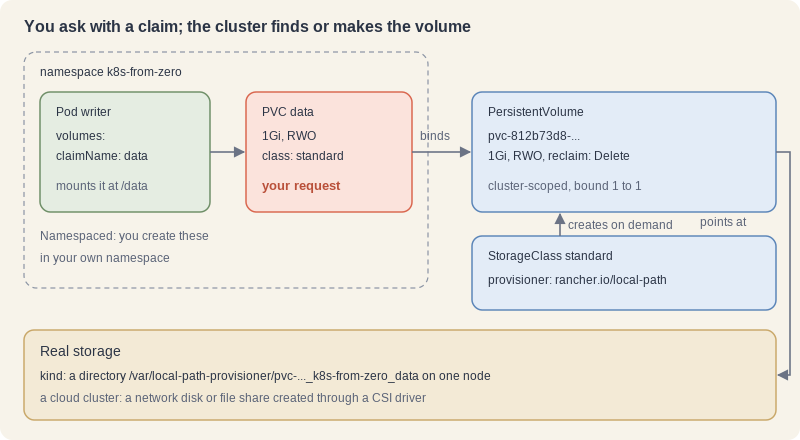
Kubernetes splits persistent storage into two objects, described on the persistent volumes page:
- A PersistentVolume (PV) is a piece of real storage: a cloud disk, an NFS export, a directory on a node. It is cluster-scoped, like a Node, and has its own lifecycle separate from any Pod.
- A PersistentVolumeClaim (PVC) is a request for storage by a user: “1 GiB, mountable read-write”. It lives in your namespace, like a Pod. The docs compare it to a Pod: Pods consume node resources, claims consume PV resources.
A control loop matches each new claim to a volume and binds them. The binding is one to one and exclusive. A Pod never names the PV; it names the claim with persistentVolumeClaim.claimName. That indirection lets an app manifest stay the same on kind, on AKS and on EKS.
Someone has to make the PVs. An administrator can create them ahead of time (static provisioning), or the cluster can create one on demand for each claim (dynamic provisioning). Dynamic provisioning is driven by a StorageClass, a cluster-scoped object that names a provisioner (the program that creates real storage) and a few policies. The storage classes page describes the fields you will see in the lab:
provisioner: who creates the volume. On cloud clusters this is a CSI driver. CSI, the Container Storage Interface, is the standard plug-in API that lets storage vendors ship drivers outside the Kubernetes code. The volume types reference notes that Kubernetes 1.37 no longer includes the in-tree drivers for several older volume types, and that it redirects some of them, such asgcePersistentDiskand Portworx, to their CSI drivers.reclaimPolicy:DeleteorRetain, copied onto each volume it creates. If unset, it defaults toDelete.volumeBindingMode:Immediate(the default) creates and binds the volume as soon as the claim exists.WaitForFirstConsumerwaits until a Pod uses the claim, so the volume is created where the Pod is scheduled. The docs explain why: storage that is not reachable from every node can otherwise end up on the wrong node and leave the Pod unschedulable.allowVolumeExpansion: whether a claim may grow later.
A claim with no storageClassName gets the cluster’s default class, marked with the annotation storageclass.kubernetes.io/is-default-class. kind ships one called standard, backed by Rancher’s local-path provisioner, which makes a directory on the node. It is not a CSI driver; our cluster listed no CSIDriver objects at all.
Access modes and reclaim policies
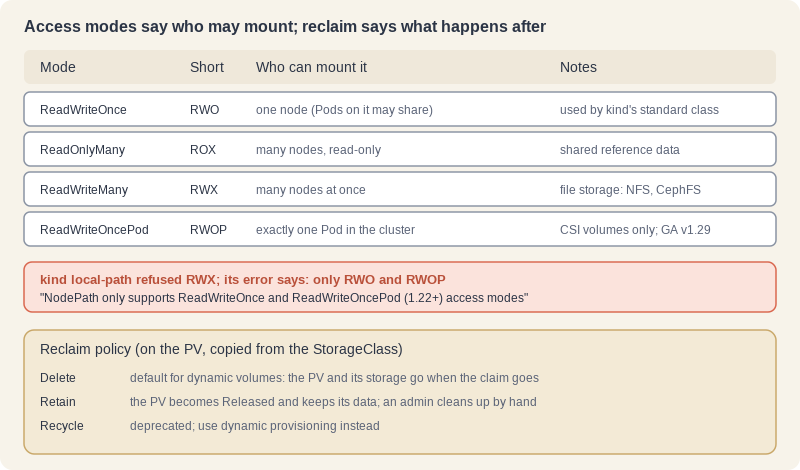
Every claim lists the access modes it needs, and a volume lists the ones it supports. The docs define four:
ReadWriteOnce(RWO): read-write by a single node. Several Pods on that same node can still share it.ReadOnlyMany(ROX): read-only by many nodes.ReadWriteMany(RWX): read-write by many nodes. File storage such as NFS or CephFS offers it.ReadWriteOncePod(RWOP): read-write by a single Pod in the whole cluster. Stable since v1.29, CSI volumes only.
Two warnings from the docs. Access modes are used to match claims to volumes; apart from RWOP they do not enforce write protection once mounted. And a volume is mounted with one mode at a time even if it supports several. Each storage driver supports its own subset, so check its documentation before you write RWX into a manifest.
The reclaim policy decides what happens to a PV after its claim is deleted:
Delete: the PV and the real storage behind it are removed. This is the default for dynamically provisioned volumes.Retain: the PV stays, in phaseReleased, with the data. It is not handed to a new claim automatically; an administrator inspects it, saves what matters and deletes it by hand.Recycle: deprecated. The docs recommend dynamic provisioning instead.
One more safety net: a claim that a Pod is using carries the finalizer kubernetes.io/pvc-protection. If you delete it, it waits in Terminating until no Pod uses it. You will see that in the lab.
Try it: give a Pod a disk that outlives it
Set your context namespace to k8s-from-zero first (part 6 showed how). The box we tested on has no internet access inside the cluster, so we preloaded busybox:1.37 into the nodes with kind load docker-image; on your laptop the image simply pulls.
- Look at the storage the cluster offers.
kubectl get storageclassExplain this command
kubectl get storageclasskubectlThe Kubernetes command-line client. Subcommands and flags are documented under kubernetes.io/docs/reference/kubectl/.getDisplay one or many resources. kubectl get prints a table of the most important information about the resources you name.storageclassThe resource type to display. kubectl get points you to kubectl api-resources for the full list of types the server supports.
NAME                 PROVISIONER             RECLAIMPOLICY   VOLUMEBINDINGMODE      ALLOWVOLUMEEXPANSION   AGE
standard (default)   rancher.io/local-path   Delete          WaitForFirstConsumer   false                  96s
One class, marked default, that deletes volumes with their claim and waits for a consumer.
- Share an emptyDir between two containers. Save as
scratch-pod.yaml:
apiVersion: v1
kind: Pod
metadata:
  name: scratch
  namespace: k8s-from-zero
  labels:
    app.kubernetes.io/name: scratch
spec:
  containers:
    - name: writer
      image: busybox:1.37
      command: ["sh", "-c", "date > /cache/started && sleep 3600"]
      volumeMounts:
        - name: cache
          mountPath: /cache
    - name: reader
      image: busybox:1.37
      command: ["sh", "-c", "sleep 3600"]
      volumeMounts:
        - name: cache
          mountPath: /data
  volumes:
    - name: cache
      emptyDir: {}
The volume is declared once and mounted at different paths in each container.
kubectl apply -f scratch-pod.yaml
kubectl wait --for=condition=Ready pod/scratch --timeout=60s
kubectl exec scratch -c writer -- sh -c "echo hello > /cache/note.txt"
kubectl exec scratch -c reader -- ls /dataExplain this command
kubectl apply -f scratch-pod.yaml
kubectl wait --for=condition=Ready pod/scratch --timeout=60s
kubectl exec scratch -c writer -- sh -c "echo hello > /cache/note.txt"
kubectl exec scratch -c reader -- ls /datakubectlThe Kubernetes command-line client. Subcommands and flags are documented under kubernetes.io/docs/reference/kubectl/.applyApply a configuration to a resource by file name or stdin. The apply docs say the resource is created if it does not exist yet. JSON and YAML are accepted.-fShort form of --filename. The file, directory or URL that contains the configuration to apply.scratch-pod.yamlThe file named by --filename. apply creates the objects or updates them to match this file.kubectlThe Kubernetes command-line client. Subcommands and flags are documented under kubernetes.io/docs/reference/kubectl/.waitWait for a condition on one or more resources.--for=condition=ReadyThe condition to wait for. The wait command takes --for. This command passes condition=Ready.pod/scratchThe resource written as type/name: pod/scratch.--timeout=60sHow long to wait before giving up. This command passes 60s.kubectlThe Kubernetes command-line client. Subcommands and flags are documented under kubernetes.io/docs/reference/kubectl/.execExecute a command in a container. The synopsis is kubectl exec (POD | TYPE/NAME) [-c CONTAINER] [flags] -- COMMAND [args...].scratchAn argument of this command: scratch.-cShort form of --container. It names which container in the Pod receives this request.writerAn argument of this command: writer.--Ends kubectl's flags. The exec examples say to use two dashes so the command's own flags are read as that command's flags.shAn argument of the command inside the container: sh.-cA flag of the command inside the container: -c. sh -c runs the next argument as a shell command."echo hello > /cache/note.txt"A quoted command string run inside the container.kubectlThe Kubernetes command-line client. Subcommands and flags are documented under kubernetes.io/docs/reference/kubectl/.execExecute a command in a container. The synopsis is kubectl exec (POD | TYPE/NAME) [-c CONTAINER] [flags] -- COMMAND [args...].scratchAn argument of this command: scratch.-cShort form of --container. It names which container in the Pod receives this request.readerAn argument of this command: reader.--Ends kubectl's flags. The exec examples say to use two dashes so the command's own flags are read as that command's flags.lsLists files at the path that follows./dataA path inside the container: /data.
pod/scratch created
pod/scratch condition met
note.txt
started
The reader sees both files the writer made. Now replace the Pod:
kubectl delete pod scratch
kubectl apply -f scratch-pod.yaml
kubectl wait --for=condition=Ready pod/scratch --timeout=60s
kubectl exec scratch -c reader -- ls /data
kubectl delete pod scratchExplain this command
kubectl delete pod scratch
kubectl apply -f scratch-pod.yaml
kubectl wait --for=condition=Ready pod/scratch --timeout=60s
kubectl exec scratch -c reader -- ls /data
kubectl delete pod scratchkubectlThe Kubernetes command-line client. Subcommands and flags are documented under kubernetes.io/docs/reference/kubectl/.deleteDelete resources by file names, stdin, resources and names, or by resources and label selector.podThe resource type.scratchThe object name.kubectlThe Kubernetes command-line client. Subcommands and flags are documented under kubernetes.io/docs/reference/kubectl/.applyApply a configuration to a resource by file name or stdin. The apply docs say the resource is created if it does not exist yet. JSON and YAML are accepted.-fShort form of --filename. The file, directory or URL that contains the configuration to apply.scratch-pod.yamlThe file named by --filename. apply creates the objects or updates them to match this file.kubectlThe Kubernetes command-line client. Subcommands and flags are documented under kubernetes.io/docs/reference/kubectl/.waitWait for a condition on one or more resources.--for=condition=ReadyThe condition to wait for. The wait command takes --for. This command passes condition=Ready.pod/scratchThe resource written as type/name: pod/scratch.--timeout=60sHow long to wait before giving up. This command passes 60s.kubectlThe Kubernetes command-line client. Subcommands and flags are documented under kubernetes.io/docs/reference/kubectl/.execExecute a command in a container. The synopsis is kubectl exec (POD | TYPE/NAME) [-c CONTAINER] [flags] -- COMMAND [args...].scratchAn argument of this command: scratch.-cShort form of --container. It names which container in the Pod receives this request.readerAn argument of this command: reader.--Ends kubectl's flags. The exec examples say to use two dashes so the command's own flags are read as that command's flags.lsLists files at the path that follows./dataA path inside the container: /data.kubectlThe Kubernetes command-line client. Subcommands and flags are documented under kubernetes.io/docs/reference/kubectl/.deleteDelete resources by file names, stdin, resources and names, or by resources and label selector.podThe resource type.scratchThe object name.
pod "scratch" deleted from k8s-from-zero namespace
pod/scratch created
pod/scratch condition met
started
pod "scratch" deleted from k8s-from-zero namespace
note.txt is gone. Only started, written again by the new Pod’s startup command, is there. The delete takes about 30 seconds because neither container’s process 1 handles SIGTERM, so the kubelet waits out the 30-second grace period; part 10 explained why.
- Claim some storage. Save as
data-pvc.yaml:
apiVersion: v1
kind: PersistentVolumeClaim
metadata:
  name: data
  namespace: k8s-from-zero
spec:
  accessModes:
    - ReadWriteOnce
  resources:
    requests:
      storage: 1Gi
No storageClassName, so the default class applies.
kubectl apply -f data-pvc.yaml
kubectl get pvc data
kubectl describe pvc data | tail -4
kubectl get pvExplain this command
kubectl apply -f data-pvc.yaml
kubectl get pvc data
kubectl describe pvc data | tail -4
kubectl get pvkubectlThe Kubernetes command-line client. Subcommands and flags are documented under kubernetes.io/docs/reference/kubectl/.applyApply a configuration to a resource by file name or stdin. The apply docs say the resource is created if it does not exist yet. JSON and YAML are accepted.-fShort form of --filename. The file, directory or URL that contains the configuration to apply.data-pvc.yamlThe file named by --filename. apply creates the objects or updates them to match this file.kubectlThe Kubernetes command-line client. Subcommands and flags are documented under kubernetes.io/docs/reference/kubectl/.getDisplay one or many resources. kubectl get prints a table of the most important information about the resources you name.pvcThe resource type to display. kubectl get points you to kubectl api-resources for the full list of types the server supports.dataThe object name.kubectlThe Kubernetes command-line client. Subcommands and flags are documented under kubernetes.io/docs/reference/kubectl/.describeShow details of a specific resource or group of resources. The describe docs say this includes related resources such as events or controllers.pvcThe resource type.dataThe object name.|Shell. Sends the previous command's standard output to the next command.tailShell. Prints the end of its input.-4An argument of this command: -4.kubectlThe Kubernetes command-line client. Subcommands and flags are documented under kubernetes.io/docs/reference/kubectl/.getDisplay one or many resources. kubectl get prints a table of the most important information about the resources you name.pvThe resource type to display. kubectl get points you to kubectl api-resources for the full list of types the server supports.
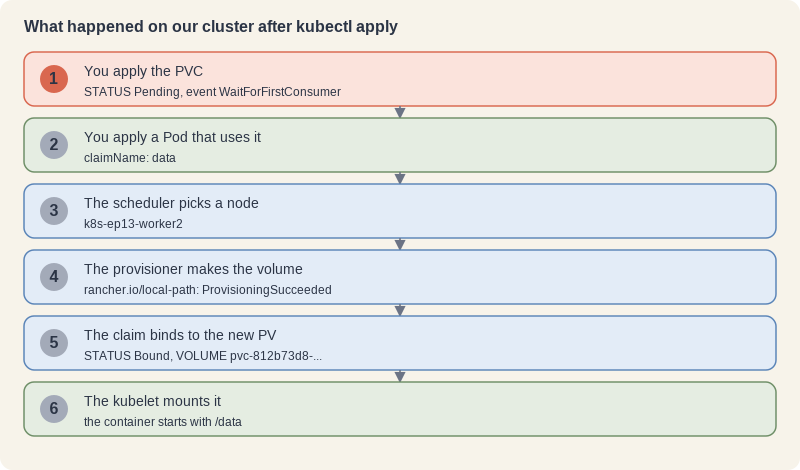
persistentvolumeclaim/data created
NAME   STATUS    VOLUME   CAPACITY   ACCESS MODES   STORAGECLASS   VOLUMEATTRIBUTESCLASS   AGE
data   Pending                                      standard       <unset>                 1s
Events:
  Type    Reason                Age   From                         Message
  ----    ------                ----  ----                         -------
  Normal  WaitForFirstConsumer  1s    persistentvolume-controller  waiting for first consumer to be created before binding
No resources found
Pending is expected here. The class waits for a Pod, so no volume exists yet.
- Use the claim from a Pod. Save as
writer.yaml:
apiVersion: v1
kind: Pod
metadata:
  name: writer
  namespace: k8s-from-zero
  labels:
    app.kubernetes.io/name: writer
spec:
  containers:
    - name: writer
      image: busybox:1.37
      command: ["sh", "-c", "echo \"written by $(hostname) at $(date)\" >> /data/notes.txt && sleep 3600"]
      volumeMounts:
        - name: data
          mountPath: /data
  volumes:
    - name: data
      persistentVolumeClaim:
claimName: datakubectl apply -f writer.yaml
kubectl wait --for=condition=Ready pod/writer --timeout=90s
kubectl get pvc data
kubectl get pv
kubectl get pod writer -o wideExplain this command
kubectl apply -f writer.yaml
kubectl wait --for=condition=Ready pod/writer --timeout=90s
kubectl get pvc data
kubectl get pv
kubectl get pod writer -o widekubectlThe Kubernetes command-line client. Subcommands and flags are documented under kubernetes.io/docs/reference/kubectl/.applyApply a configuration to a resource by file name or stdin. The apply docs say the resource is created if it does not exist yet. JSON and YAML are accepted.-fShort form of --filename. The file, directory or URL that contains the configuration to apply.writer.yamlThe file named by --filename. apply creates the objects or updates them to match this file.kubectlThe Kubernetes command-line client. Subcommands and flags are documented under kubernetes.io/docs/reference/kubectl/.waitWait for a condition on one or more resources.--for=condition=ReadyThe condition to wait for. The wait command takes --for. This command passes condition=Ready.pod/writerThe resource written as type/name: pod/writer.--timeout=90sHow long to wait before giving up. This command passes 90s.kubectlThe Kubernetes command-line client. Subcommands and flags are documented under kubernetes.io/docs/reference/kubectl/.getDisplay one or many resources. kubectl get prints a table of the most important information about the resources you name.pvcThe resource type to display. kubectl get points you to kubectl api-resources for the full list of types the server supports.dataThe object name.kubectlThe Kubernetes command-line client. Subcommands and flags are documented under kubernetes.io/docs/reference/kubectl/.getDisplay one or many resources. kubectl get prints a table of the most important information about the resources you name.pvThe resource type to display. kubectl get points you to kubectl api-resources for the full list of types the server supports.kubectlThe Kubernetes command-line client. Subcommands and flags are documented under kubernetes.io/docs/reference/kubectl/.getDisplay one or many resources. kubectl get prints a table of the most important information about the resources you name.podThe resource type to display. kubectl get points you to kubectl api-resources for the full list of types the server supports.writerThe object name.-oShort form of --output. It selects the output format. For get, the formats include json, yaml, name, jsonpath, custom-columns and wide.wideAn output format. The get examples say wide adds more information, such as the node name. For Pods the lesson's table adds IP, NODE, NOMINATED NODE and READINESS GATES.
pod/writer created
pod/writer condition met
NAME   STATUS   VOLUME                                     CAPACITY   ACCESS MODES   STORAGECLASS   VOLUMEATTRIBUTESCLASS   AGE
data   Bound    pvc-812b73d8-c1b0-412a-ac3c-479d5eb3c148   1Gi        RWO            standard       <unset>                 46s
NAME                                       CAPACITY   ACCESS MODES   RECLAIM POLICY   STATUS   CLAIM                STORAGECLASS   VOLUMEATTRIBUTESCLASS   REASON   AGE
pvc-812b73d8-c1b0-412a-ac3c-479d5eb3c148   1Gi        RWO            Delete           Bound    k8s-from-zero/data   standard       <unset>                          2s
NAME     READY   STATUS    RESTARTS   AGE   IP           NODE               NOMINATED NODE   READINESS GATES
writer   1/1     Running   0          5s    10.244.2.4   k8s-ep13-worker2   <none>           <none>
A PV appeared, named after the claim’s ID, with reclaim policy Delete copied from the class. The events tell the story in order:
kubectl get events --field-selector involvedObject.name=data -o custom-columns=REASON:.reason,MESSAGE:.messageExplain this command
kubectl get events --field-selector involvedObject.name=data -o custom-columns=REASON:.reason,MESSAGE:.messagekubectlThe Kubernetes command-line client. Subcommands and flags are documented under kubernetes.io/docs/reference/kubectl/.getDisplay one or many resources. kubectl get prints a table of the most important information about the resources you name.eventsThe resource type to display. kubectl get points you to kubectl api-resources for the full list of types the server supports.--field-selectorFilter the list by field. The get docs treat --field-selector as separate from a label selector.involvedObject.name=dataAn argument of this command: involvedObject.name=data.-oShort form of --output. It selects the output format. For get, the formats include json, yaml, name, jsonpath, custom-columns and wide.custom-columns=REASON:.reason,MESSAGE:.messagecustom-columns is an output format. The get examples write each column as a heading, a colon, and a JSONPath. The headings here are REASON, MESSAGE.
REASON                  MESSAGE
WaitForFirstConsumer    waiting for first consumer to be created before binding
ExternalProvisioning    Waiting for a volume to be created either by the external provisioner 'rancher.io/local-path' or manually by the system administrator. If volume creation is delayed, please verify that the provisioner is running and correctly registered.
Provisioning            External provisioner is provisioning volume for claim "k8s-from-zero/data"
ProvisioningSucceeded Successfully provisioned volume pvc-812b73d8-c1b0-412a-ac3c-479d5eb3c148- Replace the Pod and keep the data.
kubectl exec writer -- cat /data/notes.txt
kubectl delete pod writer
kubectl apply -f writer.yaml
kubectl wait --for=condition=Ready pod/writer --timeout=90s
kubectl exec writer -- cat /data/notes.txtExplain this command
kubectl exec writer -- cat /data/notes.txt
kubectl delete pod writer
kubectl apply -f writer.yaml
kubectl wait --for=condition=Ready pod/writer --timeout=90s
kubectl exec writer -- cat /data/notes.txtkubectlThe Kubernetes command-line client. Subcommands and flags are documented under kubernetes.io/docs/reference/kubectl/.execExecute a command in a container. The synopsis is kubectl exec (POD | TYPE/NAME) [-c CONTAINER] [flags] -- COMMAND [args...].writerAn argument of this command: writer.--Ends kubectl's flags. The exec examples say to use two dashes so the command's own flags are read as that command's flags.catcat, run inside the container. It writes the named files to standard output./data/notes.txtA path inside the container: /data/notes.txt.kubectlThe Kubernetes command-line client. Subcommands and flags are documented under kubernetes.io/docs/reference/kubectl/.deleteDelete resources by file names, stdin, resources and names, or by resources and label selector.podThe resource type.writerThe object name.kubectlThe Kubernetes command-line client. Subcommands and flags are documented under kubernetes.io/docs/reference/kubectl/.applyApply a configuration to a resource by file name or stdin. The apply docs say the resource is created if it does not exist yet. JSON and YAML are accepted.-fShort form of --filename. The file, directory or URL that contains the configuration to apply.writer.yamlThe file named by --filename. apply creates the objects or updates them to match this file.kubectlThe Kubernetes command-line client. Subcommands and flags are documented under kubernetes.io/docs/reference/kubectl/.waitWait for a condition on one or more resources.--for=condition=ReadyThe condition to wait for. The wait command takes --for. This command passes condition=Ready.pod/writerThe resource written as type/name: pod/writer.--timeout=90sHow long to wait before giving up. This command passes 90s.kubectlThe Kubernetes command-line client. Subcommands and flags are documented under kubernetes.io/docs/reference/kubectl/.execExecute a command in a container. The synopsis is kubectl exec (POD | TYPE/NAME) [-c CONTAINER] [flags] -- COMMAND [args...].writerAn argument of this command: writer.--Ends kubectl's flags. The exec examples say to use two dashes so the command's own flags are read as that command's flags.catcat, run inside the container. It writes the named files to standard output./data/notes.txtA path inside the container: /data/notes.txt.
written by writer at Tue Nov 10 20:59:24 UTC 2026
pod "writer" deleted from k8s-from-zero namespace
pod/writer created
pod/writer condition met
written by writer at Tue Nov 10 20:59:24 UTC 2026
written by writer at Tue Nov 10 21:00:02 UTC 2026
The second Pod appended a line next to the first one. Compare that with step 2.
- Try to delete a claim that is in use.
kubectl delete pvc data --wait=false
kubectl get pvc data
kubectl get pvc data -o jsonpath='{.metadata.finalizers}{"\n"}'Explain this command
kubectl delete pvc data --wait=false
kubectl get pvc data
kubectl get pvc data -o jsonpath='{.metadata.finalizers}{"\n"}'kubectlThe Kubernetes command-line client. Subcommands and flags are documented under kubernetes.io/docs/reference/kubectl/.deleteDelete resources by file names, stdin, resources and names, or by resources and label selector.pvcThe resource type.dataThe object name.--wait=falseDo not wait for the objects to finish deleting. The delete docs say --wait defaults to true.kubectlThe Kubernetes command-line client. Subcommands and flags are documented under kubernetes.io/docs/reference/kubectl/.getDisplay one or many resources. kubectl get prints a table of the most important information about the resources you name.pvcThe resource type to display. kubectl get points you to kubectl api-resources for the full list of types the server supports.dataThe object name.kubectlThe Kubernetes command-line client. Subcommands and flags are documented under kubernetes.io/docs/reference/kubectl/.getDisplay one or many resources. kubectl get prints a table of the most important information about the resources you name.pvcThe resource type to display. kubectl get points you to kubectl api-resources for the full list of types the server supports.dataThe object name.-oShort form of --output. It selects the output format. For get, the formats include json, yaml, name, jsonpath, custom-columns and wide.jsonpath='{.metadata.finalizers}{"\n"}'jsonpath is an output format. A template is JSONPath expressions in curly braces. The JSONPath page says a double-quoted string inserts text, and its example uses a quoted backslash-n for a newline. This token is the template in the lesson command.
persistentvolumeclaim "data" deleted from k8s-from-zero namespace
NAME   STATUS        VOLUME                                     CAPACITY   ACCESS MODES   STORAGECLASS   VOLUMEATTRIBUTESCLASS   AGE
data   Terminating   pvc-812b73d8-c1b0-412a-ac3c-479d5eb3c148   1Gi        RWO            standard       <unset>                 84s
["kubernetes.io/pvc-protection"]
The protection finalizer holds the claim while writer uses it. Delete the Pod and both the claim and, because of Delete, the volume go:
kubectl delete pod writer
kubectl get pvc,pvExplain this command
kubectl delete pod writer
kubectl get pvc,pvkubectlThe Kubernetes command-line client. Subcommands and flags are documented under kubernetes.io/docs/reference/kubectl/.deleteDelete resources by file names, stdin, resources and names, or by resources and label selector.podThe resource type.writerThe object name.kubectlThe Kubernetes command-line client. Subcommands and flags are documented under kubernetes.io/docs/reference/kubectl/.getDisplay one or many resources. kubectl get prints a table of the most important information about the resources you name.pvc,pvAn argument of this command: pvc,pv.
pod "writer" deleted from k8s-from-zero namespace
No resources found- Make a class that keeps volumes. StorageClasses are cluster-scoped, so on a shared cluster this step needs admin rights; on your kind cluster you have them. Save as
keep-class.yaml:
apiVersion: storage.k8s.io/v1
kind: StorageClass
metadata:
  name: keep
provisioner: rancher.io/local-path
reclaimPolicy: Retain
volumeBindingMode: WaitForFirstConsumer
Save as keep-pvc.yaml a claim that asks for it, plus a Pod that writes one file:
apiVersion: v1
kind: PersistentVolumeClaim
metadata:
  name: keep-me
  namespace: k8s-from-zero
spec:
  storageClassName: keep
  accessModes:
    - ReadWriteOnce
  resources:
    requests:
      storage: 1Gi
---
apiVersion: v1
kind: Pod
metadata:
  name: keeper
  namespace: k8s-from-zero
spec:
  containers:
    - name: keeper
      image: busybox:1.37
      command: ["sh", "-c", "echo important > /data/keep.txt && sleep 3600"]
      volumeMounts:
        - name: data
          mountPath: /data
  volumes:
    - name: data
      persistentVolumeClaim:
claimName: keep-mekubectl apply -f keep-class.yaml -f keep-pvc.yaml
kubectl wait --for=condition=Ready pod/keeper --timeout=90s
kubectl get pvExplain this command
kubectl apply -f keep-class.yaml -f keep-pvc.yaml
kubectl wait --for=condition=Ready pod/keeper --timeout=90s
kubectl get pvkubectlThe Kubernetes command-line client. Subcommands and flags are documented under kubernetes.io/docs/reference/kubectl/.applyApply a configuration to a resource by file name or stdin. The apply docs say the resource is created if it does not exist yet. JSON and YAML are accepted.-fShort form of --filename. The file, directory or URL that contains the configuration to apply.keep-class.yamlThe file named by --filename. apply creates the objects or updates them to match this file.-fShort form of --filename. The file, directory or URL that contains the configuration to apply.keep-pvc.yamlThe file named by --filename. apply creates the objects or updates them to match this file.kubectlThe Kubernetes command-line client. Subcommands and flags are documented under kubernetes.io/docs/reference/kubectl/.waitWait for a condition on one or more resources.--for=condition=ReadyThe condition to wait for. The wait command takes --for. This command passes condition=Ready.pod/keeperThe resource written as type/name: pod/keeper.--timeout=90sHow long to wait before giving up. This command passes 90s.kubectlThe Kubernetes command-line client. Subcommands and flags are documented under kubernetes.io/docs/reference/kubectl/.getDisplay one or many resources. kubectl get prints a table of the most important information about the resources you name.pvThe resource type to display. kubectl get points you to kubectl api-resources for the full list of types the server supports.
storageclass.storage.k8s.io/keep created
persistentvolumeclaim/keep-me created
pod/keeper created
pod/keeper condition met
NAME                                       CAPACITY   ACCESS MODES   RECLAIM POLICY   STATUS   CLAIM                   STORAGECLASS   VOLUMEATTRIBUTESCLASS   REASON   AGE
pvc-c57f4df6-f5d7-478f-af6e-e91cb3b65c45 1Gi RWO Retain Bound k8s-from-zero/keep-me keep <unset> 1s- See where the data really is. The PV spec shows the directory and the node it is tied to:
kubectl get pv pvc-c57f4df6-f5d7-478f-af6e-e91cb3b65c45 -o yamlExplain this command
kubectl get pv pvc-c57f4df6-f5d7-478f-af6e-e91cb3b65c45 -o yamlkubectlThe Kubernetes command-line client. Subcommands and flags are documented under kubernetes.io/docs/reference/kubectl/.getDisplay one or many resources. kubectl get prints a table of the most important information about the resources you name.pvThe resource type to display. kubectl get points you to kubectl api-resources for the full list of types the server supports.pvc-c57f4df6-f5d7-478f-af6e-e91cb3b65c45The object name.-oShort form of --output. It selects the output format. For get, the formats include json, yaml, name, jsonpath, custom-columns and wide.yamlAn output format. It prints the object as YAML.
...
spec:
  accessModes:
  - ReadWriteOnce
  capacity:
    storage: 1Gi
  claimRef:
    apiVersion: v1
    kind: PersistentVolumeClaim
    name: keep-me
    namespace: k8s-from-zero
    ...
  hostPath:
    path: /var/local-path-provisioner/pvc-c57f4df6-f5d7-478f-af6e-e91cb3b65c45_k8s-from-zero_keep-me
    type: DirectoryOrCreate
  nodeAffinity:
    required:
      nodeSelectorTerms:
      - matchExpressions:
        - key: kubernetes.io/hostname
          operator: In
          values:
          - k8s-ep13-worker
  persistentVolumeReclaimPolicy: Retain
  storageClassName: keep
  volumeMode: Filesystem
...
nodeAffinity pins this volume to k8s-ep13-worker. Any Pod that uses the claim will be scheduled there. That is the price of node-local storage, and the reason network disks exist.
- Delete the claim and watch the volume stay.
kubectl delete -f keep-pvc.yaml
kubectl get pvExplain this command
kubectl delete -f keep-pvc.yaml
kubectl get pvkubectlThe Kubernetes command-line client. Subcommands and flags are documented under kubernetes.io/docs/reference/kubectl/.deleteDelete resources by file names, stdin, resources and names, or by resources and label selector.-fShort form of --filename. For delete, the file that contains the resource to delete.keep-pvc.yamlThe file named by --filename. delete removes the resources that file describes.kubectlThe Kubernetes command-line client. Subcommands and flags are documented under kubernetes.io/docs/reference/kubectl/.getDisplay one or many resources. kubectl get prints a table of the most important information about the resources you name.pvThe resource type to display. kubectl get points you to kubectl api-resources for the full list of types the server supports.
persistentvolumeclaim "keep-me" deleted from k8s-from-zero namespace
pod "keeper" deleted from k8s-from-zero namespace
NAME                                       CAPACITY   ACCESS MODES   RECLAIM POLICY   STATUS     CLAIM                   STORAGECLASS   VOLUMEATTRIBUTESCLASS   REASON   AGE
pvc-c57f4df6-f5d7-478f-af6e-e91cb3b65c45 1Gi RWO Retain Released k8s-from-zero/keep-me keep <unset> 33sReleased, and still remembering its old claim. kind nodes are Docker containers (part 3), so you can look at the file directly on the node:
docker exec k8s-ep13-worker cat /var/local-path-provisioner/pvc-c57f4df6-f5d7-478f-af6e-e91cb3b65c45_k8s-from-zero_keep-me/keep.txtExplain this command
docker exec k8s-ep13-worker cat /var/local-path-provisioner/pvc-c57f4df6-f5d7-478f-af6e-e91cb3b65c45_k8s-from-zero_keep-me/keep.txtdockerThe Docker CLI. kind nodes are Docker containers (part 3).execdocker exec: run a command in a running container.k8s-ep13-workerThe node container to run in.catcat, run inside the container. It writes the named files to standard output./var/local-path-provisioner/pvc-c57f4df6-f5d7-478f-af6e-e91cb3b65c45_k8s-from-zero_keep-me/keep.txtA path in this command: /var/local-path-provisioner/pvc-c57f4df6-f5d7-478f-af6e-e91cb3b65c45_k8s-from-zero_keep-me/keep.txt.
important- Re-create the claim. A new claim with the same name does not get the old volume back:
kubectl apply -f keep-pvc.yaml
kubectl wait --for=condition=Ready pod/keeper --timeout=90s
kubectl get pvExplain this command
kubectl apply -f keep-pvc.yaml
kubectl wait --for=condition=Ready pod/keeper --timeout=90s
kubectl get pvkubectlThe Kubernetes command-line client. Subcommands and flags are documented under kubernetes.io/docs/reference/kubectl/.applyApply a configuration to a resource by file name or stdin. The apply docs say the resource is created if it does not exist yet. JSON and YAML are accepted.-fShort form of --filename. The file, directory or URL that contains the configuration to apply.keep-pvc.yamlThe file named by --filename. apply creates the objects or updates them to match this file.kubectlThe Kubernetes command-line client. Subcommands and flags are documented under kubernetes.io/docs/reference/kubectl/.waitWait for a condition on one or more resources.--for=condition=ReadyThe condition to wait for. The wait command takes --for. This command passes condition=Ready.pod/keeperThe resource written as type/name: pod/keeper.--timeout=90sHow long to wait before giving up. This command passes 90s.kubectlThe Kubernetes command-line client. Subcommands and flags are documented under kubernetes.io/docs/reference/kubectl/.getDisplay one or many resources. kubectl get prints a table of the most important information about the resources you name.pvThe resource type to display. kubectl get points you to kubectl api-resources for the full list of types the server supports.
persistentvolumeclaim/keep-me created
pod/keeper created
pod/keeper condition met
NAME                                       CAPACITY   ACCESS MODES   RECLAIM POLICY   STATUS     CLAIM                   STORAGECLASS   VOLUMEATTRIBUTESCLASS   REASON   AGE
pvc-72b61615-c9f5-41fd-a37e-3bf137eaf90f   1Gi        RWO            Retain           Bound      k8s-from-zero/keep-me   keep           <unset>                          1s
pvc-c57f4df6-f5d7-478f-af6e-e91cb3b65c45   1Gi        RWO            Retain           Released   k8s-from-zero/keep-me   keep           <unset>                          45s
A fresh volume was made. Getting data back from a Released volume is a manual job, which is exactly what Retain promises: nothing is deleted or reused without a person deciding.
- Clean up. With
Retainyou delete the PVs yourself. Deleting a PV object does not tell local-path to remove the directory, so on a real cluster you would also clean the storage behind it.
kubectl delete -f keep-pvc.yaml
kubectl delete pv pvc-72b61615-c9f5-41fd-a37e-3bf137eaf90f pvc-c57f4df6-f5d7-478f-af6e-e91cb3b65c45
kubectl delete storageclass keepExplain this command
kubectl delete -f keep-pvc.yaml
kubectl delete pv pvc-72b61615-c9f5-41fd-a37e-3bf137eaf90f pvc-c57f4df6-f5d7-478f-af6e-e91cb3b65c45
kubectl delete storageclass keepkubectlThe Kubernetes command-line client. Subcommands and flags are documented under kubernetes.io/docs/reference/kubectl/.deleteDelete resources by file names, stdin, resources and names, or by resources and label selector.-fShort form of --filename. For delete, the file that contains the resource to delete.keep-pvc.yamlThe file named by --filename. delete removes the resources that file describes.kubectlThe Kubernetes command-line client. Subcommands and flags are documented under kubernetes.io/docs/reference/kubectl/.deleteDelete resources by file names, stdin, resources and names, or by resources and label selector.pvThe resource type.pvc-72b61615-c9f5-41fd-a37e-3bf137eaf90fThe object name.pvc-c57f4df6-f5d7-478f-af6e-e91cb3b65c45The object name.kubectlThe Kubernetes command-line client. Subcommands and flags are documented under kubernetes.io/docs/reference/kubectl/.deleteDelete resources by file names, stdin, resources and names, or by resources and label selector.storageclassThe resource type.keepThe object name.
persistentvolumeclaim "keep-me" deleted from k8s-from-zero namespace
pod "keeper" deleted from k8s-from-zero namespace
persistentvolume "pvc-72b61615-c9f5-41fd-a37e-3bf137eaf90f" deleted
persistentvolume "pvc-c57f4df6-f5d7-478f-af6e-e91cb3b65c45" deleted
storageclass.storage.k8s.io "keep" deleted
When it goes wrong
- The claim stays Pending with
WaitForFirstConsumer. That is normal until a Pod uses it. If a Pod exists and the claim is still Pending, read the claim’s events withkubectl describe pvc <name>. - The driver cannot provide the access mode. We asked kind for
ReadWriteMany(rwx-pvc.yamlin the lab files). Claim and Pod both stayed Pending, and the claim’s events said:
Warning ProvisioningFailed 5s (x2 over 20s) rancher.io/local-path_local-path-provisioner-... failed to provision volume with StorageClass "standard": NodePath only supports ReadWriteOnce and ReadWriteOncePod (1.22+) access modesThe Pod itself showed Events: <none>, so read the claim’s events. Fix: use RWO, or a storage class whose driver supports RWX.
- A typo in the class name. A claim with
storageClassName: faston a cluster with no such class stays Pending withstorageclass.storage.k8s.io "fast" not found. Checkkubectl get storageclass. - A claim is stuck in Terminating. A Pod still uses it (
kubernetes.io/pvc-protection). Find and delete that Pod first; do not strip the finalizer. - Data you expected is gone, or data you expected gone is still there. Check the PV’s
RECLAIM POLICYbefore deleting a claim.Deletetakes the storage with it;Retainleaves aReleasedPV and the bytes behind it for someone to clean up.
Cheat sheet
| Task | Command or field | Note |
|---|---|---|
| List storage classes | kubectl get storageclass |
(default) marks the default |
| List claims and volumes | kubectl get pvc,pv |
PVCs are namespaced, PVs are not |
| Why is a claim Pending | kubectl describe pvc data |
read the Events |
| Scratch space for one Pod | volumes: - name: cache + emptyDir: {} |
deleted with the Pod |
| RAM-backed scratch | emptyDir: {medium: Memory} |
counts against memory |
| Mount a claim | persistentVolumeClaim: {claimName: data} |
the Pod never names the PV |
| Use a specific class | spec.storageClassName: keep |
omit for the default class |
| Wait for a Pod before creating | volumeBindingMode: WaitForFirstConsumer |
default is Immediate |
| Keep volumes after the claim | reclaimPolicy: Retain |
PV becomes Released |
| Remove volumes with the claim | reclaimPolicy: Delete |
default for dynamic volumes |
| Single node read-write | ReadWriteOnce (RWO) |
Pods on that node can share |
| Many nodes read-write | ReadWriteMany (RWX) |
needs file storage that supports it |
| Exactly one Pod | ReadWriteOncePod (RWOP) |
CSI volumes only |
| Where a PV lives | kubectl get pv <name> -o yaml |
look at nodeAffinity |
| Installed CSI drivers | kubectl get csidrivers |
none on a stock kind cluster |
apiVersion: v1
kind: PersistentVolumeClaim
metadata:
  name: data
  namespace: k8s-from-zero
spec:
  accessModes:
    - ReadWriteOnce
  resources:
    requests:
      storage: 1Gi
Recap and what is next
emptyDiris shared scratch space that disappears with the Pod; avoidhostPath.- A PersistentVolumeClaim is your namespaced request; a PersistentVolume is the cluster-scoped storage it binds to, one to one.
- A StorageClass names a provisioner (on clouds, a CSI driver) and creates volumes on demand;
WaitForFirstConsumerwaits for the Pod’s node. - Access modes say who may mount: RWO per node, RWX many nodes, RWOP one Pod. Your driver decides which you get.
- Reclaim policy decides the data’s fate:
Deleteby default,Retainwhen a person must decide.
Next: Kubernetes from Zero, part 14, StatefulSets, coming tomorrow.
Command explanations and quoted passages in this lesson come from or adapt the kubectl reference and the Kubernetes documentation, © The Kubernetes Authors, licensed under CC BY 4.0. We shortened and edited some passages. Kubernetes® is a registered trademark of The Linux Foundation. aitamer.news is not affiliated with or endorsed by The Linux Foundation or the CNCF.
The Campfire
CommentsThanks. Your comment is waiting for the desk. Once it is approved it appears here within about a minute.
Add a comment