
In part 11 you sized containers with requests and limits. That closes the first arc of this series. You can now explain the architecture, run a local cluster, and deploy, expose, configure, health-check and size an app. This part checks that it all fits together. It is a timed lab in the style of the CKAD exam: a list of tasks, a time budget, a grading script, and full solutions at the end. Try the tasks first without scrolling down. You need the kind cluster from part 3 (the k8s-from-zero namespace is created in task 1), kubectl, and 45 minutes. We tested every step on kind v0.33.0 (node image v1.37.0) with kubectl v1.37.2.
What you will build
A visit counter in two tiers. The web tier is two busybox Pods running a tiny HTTP server with one CGI script. Each request to /cgi-bin/hits adds one to a counter in the Redis tier and prints the total and the name of the Pod that answered. Redis needs a password, which comes from a Secret. Both tiers get their files from ConfigMaps, have probes and sized resources, and sit behind a Service. A client Pod in the same namespace plays the browser.
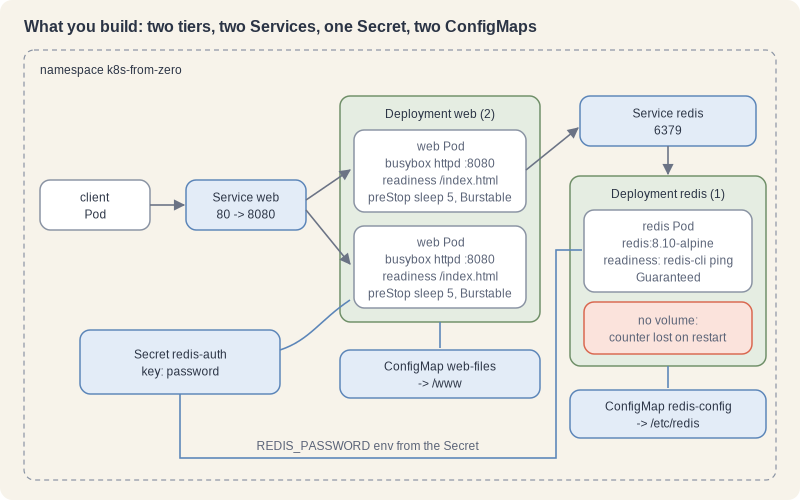
How the lab works
The real CKAD is an online, proctored, performance-based exam: you solve tasks on a command line within 2 hours, and the exam is currently based on Kubernetes v1.37. Its curriculum has five domains: application design and build (20%), application deployment (20%), application observability and maintenance (15%), application environment, configuration and security (25%), and services and networking (20%). This lab touches all five, but it is our own task set, built only from what parts 1 to 11 taught. It is not exam content, and it covers only part of the exam.
House rules, the same spirit as the exam:
- Work in the namespace
k8s-from-zero. Use any kubectl command and the official kubernetes.io docs; no copying from this page’s solutions until the clock stops. - Pin images:
busybox:1.37andredis:8.10-alpine. (Redis 8 is published under a choice of three licences, RSALv2, SSPLv1 or AGPLv3, per Redis; for a local lab it makes no difference; check it before you ship Redis in a product.) - Generate YAML instead of typing it from memory where you can:
kubectl create ... --dry-run=client -o yaml(part 5). - Start the clock now.
The tasks
| # | Task | Budget |
|---|---|---|
| 1 | Create the namespace k8s-from-zero (skip if it exists) and a Secret redis-auth with the key password set to change-me-123. |
3 min |
| 2 | Create a ConfigMap redis-config with a key redis.conf that sets maxmemory 48mb, maxmemory-policy allkeys-lru, appendonly no and save "". |
4 min |
| 3 | Create a Deployment redis with 1 replica of redis:8.10-alpine. It runs redis-server /etc/redis/redis.conf --requirepass <password>, with the password taken from the Secret as the environment variable REDIS_PASSWORD. Mount redis-config at /etc/redis. Add a readiness probe that runs redis-cli ... ping with the password, and a TCP liveness probe on 6379. Make the Pod Guaranteed with 100m CPU and 64Mi memory. |
10 min |
| 4 | Create a Service redis on port 6379 for the redis Pods. |
2 min |
| 5 | Create a ConfigMap web-files with two keys: index.html (any small page) and hits (the CGI script below). |
4 min |
| 6 | Create a Deployment web with 2 replicas of busybox:1.37 running httpd -f -p 8080 -h /www. Mount web-files at /www so that index.html lands at /www/index.html and hits at /www/cgi-bin/hits with mode 0755. Mount the Secret at /etc/redis-auth. Set the environment variable REDIS_HOST=redis. Add a readiness probe on GET /index.html port 8080, a TCP liveness probe on 8080, a preStop sleep of 5 seconds and a 15-second grace period. Make the Pods Burstable: requests 25m and 16Mi, limits 100m and 32Mi. |
12 min |
| 7 | Create a Service web on port 80 that targets 8080. |
2 min |
| 8 | Start a client Pod client (busybox:1.37, sleep 3600) and fetch http://web/cgi-bin/hits four times from it. The count must go up. |
3 min |
| 9 | Run the grading script. Then restart the web Deployment while a loop sends requests, and count failures. | 5 min |
This is the CGI script for task 5. It sends three Redis commands over a plain TCP connection with nc: log in, add one to the key hits, quit. Then it prints the reply as a web page:
#!/bin/sh
# Count one visit in Redis and print the total.
PASS=$(cat /etc/redis-auth/password)
N=$(printf 'AUTH %s\r\nINCR hits\r\nQUIT\r\n' "$PASS" | nc -w 2 "$REDIS_HOST" 6379 | sed -n 's/^:\([0-9]*\).*/\1/p')
echo "Content-Type: text/plain"
echo
if [ -n "$N" ]; then echo "visits: $N (served by $HOSTNAME)"; else echo "redis unavailable"; fiExplain this command
#!/bin/sh
# Count one visit in Redis and print the total.
PASS=$(cat /etc/redis-auth/password)
N=$(printf 'AUTH %s\r\nINCR hits\r\nQUIT\r\n' "$PASS" | nc -w 2 "$REDIS_HOST" 6379 | sed -n 's/^:\([0-9]*\).*/\1/p')
echo "Content-Type: text/plain"
echo
if [ -n "$N" ]; then echo "visits: $N (served by $HOSTNAME)"; else echo "redis unavailable"; fi#!/bin/shThe shebang line: run this script with /bin/sh.# Count one visit in Redis and print the total.A comment; the shell ignores it.PASS=$(cat /etc/redis-auth/password)Shell. Sets the variable PASS to the password file's contents.N=$(printf 'AUTH %s\r\nINCR hits\r\nQUIT\r\n' "$PASS" | nc -w 2 "$REDIS_HOST" 6379 | sed -n 's/^:\([0-9]*\).*/\1/p')Shell. Sets the variable N to the counter value that Redis returns; nothing else runs on this line.echoShell. Writes its arguments to standard output, then a newline."Content-Type: text/plain"A quoted argument in this command.echoShell. Writes its arguments to standard output, then a newline.ifShell. Starts a conditional.[Shell. The test command.-ntest's -n operator: true when the string that follows is not empty."$N"A quoted argument in this command.]Shell. Closes a test.;Shell. Runs the next command after this one finishes, whatever its exit status.thenShell. The commands that run when the test succeeds.echoShell. Writes its arguments to standard output, then a newline."visits: $N (served by $HOSTNAME)"A quoted argument in this command.;Shell. Runs the next command after this one finishes, whatever its exit status.elseShell. The commands that run when the test fails.echoShell. Writes its arguments to standard output, then a newline."redis unavailable"A quoted argument in this command.;Shell. Runs the next command after this one finishes, whatever its exit status.fiShell. Ends an if.
Grade yourself
Save this as check.sh and make it executable (chmod +x check.sh). It reads your work through the API and prints one line per check. Run it before you start, to see it fail, and after every task.
#!/bin/sh
# Grade the checkpoint lab. Each line prints PASS or FAIL.
NS=${NS:-k8s-from-zero}
k() { kubectl -n "$NS" "$@" 2>/dev/null; }
check() { if [ "$2" = "$3" ]; then echo "PASS $1"; else echo "FAIL $1 (got '$2', want '$3')"; fi; }
check "secret redis-auth has a password" "$(k get secret redis-auth -o jsonpath='{.data.password}' | grep -q . && echo yes)" "yes"
check "redis has 1 ready replica" "$(k get deploy redis -o jsonpath='{.status.readyReplicas}')" "1"
check "redis runs redis:8.10-alpine" "$(k get deploy redis -o jsonpath='{.spec.template.spec.containers[0].image}')" "redis:8.10-alpine"
check "redis has a readiness probe" "$(k get deploy redis -o jsonpath='{.spec.template.spec.containers[0].readinessProbe.exec.command[0]}')" "sh"
check "redis Pod is Guaranteed" "$(k get pods -l app.kubernetes.io/name=redis -o jsonpath='{.items[0].status.qosClass}')" "Guaranteed"
check "redis maxmemory is 48mb" "$(k exec deploy/redis -- sh -c 'redis-cli -a "$REDIS_PASSWORD" --no-auth-warning CONFIG GET maxmemory' | tail -1)" "50331648"
check "redis refuses clients without the password" "$(k exec deploy/redis -- redis-cli ping | cut -d' ' -f1)" "NOAUTH"
check "web has 2 ready replicas" "$(k get deploy web -o jsonpath='{.status.readyReplicas}')" "2"
check "web has a readiness probe on /index.html" "$(k get deploy web -o jsonpath='{.spec.template.spec.containers[0].readinessProbe.httpGet.path}')" "/index.html"
check "web has a preStop hook" "$(k get deploy web -o jsonpath='{.spec.template.spec.containers[0].lifecycle.preStop.sleep.seconds}')" "5"
check "web Pods are Burstable" "$(k get pods -l app.kubernetes.io/name=web -o jsonpath='{.items[*].status.qosClass}')" "Burstable Burstable"
check "Service web has 2 ready endpoints" "$(k get endpointslice -l kubernetes.io/service-name=web -o jsonpath='{range .items[*].endpoints[?(@.conditions.ready==true)]}x{end}')" "xx"
check "the counter answers through the Service" "$(k exec client -- wget -qO- -T 5 http://web/cgi-bin/hits | cut -d: -f1)" "visits"Explain this command
#!/bin/sh
# Grade the checkpoint lab. Each line prints PASS or FAIL.
NS=${NS:-k8s-from-zero}
k() { kubectl -n "$NS" "$@" 2>/dev/null; }
check() { if [ "$2" = "$3" ]; then echo "PASS $1"; else echo "FAIL $1 (got '$2', want '$3')"; fi; }
check "secret redis-auth has a password" "$(k get secret redis-auth -o jsonpath='{.data.password}' | grep -q . && echo yes)" "yes"
check "redis has 1 ready replica" "$(k get deploy redis -o jsonpath='{.status.readyReplicas}')" "1"
check "redis runs redis:8.10-alpine" "$(k get deploy redis -o jsonpath='{.spec.template.spec.containers[0].image}')" "redis:8.10-alpine"
check "redis has a readiness probe" "$(k get deploy redis -o jsonpath='{.spec.template.spec.containers[0].readinessProbe.exec.command[0]}')" "sh"
check "redis Pod is Guaranteed" "$(k get pods -l app.kubernetes.io/name=redis -o jsonpath='{.items[0].status.qosClass}')" "Guaranteed"
check "redis maxmemory is 48mb" "$(k exec deploy/redis -- sh -c 'redis-cli -a "$REDIS_PASSWORD" --no-auth-warning CONFIG GET maxmemory' | tail -1)" "50331648"
check "redis refuses clients without the password" "$(k exec deploy/redis -- redis-cli ping | cut -d' ' -f1)" "NOAUTH"
check "web has 2 ready replicas" "$(k get deploy web -o jsonpath='{.status.readyReplicas}')" "2"
check "web has a readiness probe on /index.html" "$(k get deploy web -o jsonpath='{.spec.template.spec.containers[0].readinessProbe.httpGet.path}')" "/index.html"
check "web has a preStop hook" "$(k get deploy web -o jsonpath='{.spec.template.spec.containers[0].lifecycle.preStop.sleep.seconds}')" "5"
check "web Pods are Burstable" "$(k get pods -l app.kubernetes.io/name=web -o jsonpath='{.items[*].status.qosClass}')" "Burstable Burstable"
check "Service web has 2 ready endpoints" "$(k get endpointslice -l kubernetes.io/service-name=web -o jsonpath='{range .items[*].endpoints[?(@.conditions.ready==true)]}x{end}')" "xx"
check "the counter answers through the Service" "$(k exec client -- wget -qO- -T 5 http://web/cgi-bin/hits | cut -d: -f1)" "visits"#!/bin/shThe shebang line: run this script with /bin/sh.# Grade the checkpoint lab. Each line prints PASS or FAIL.A comment; the shell ignores it.NS=${NS:-k8s-from-zero}Shell. Keeps NS if it is already set and not empty, otherwise sets it to k8s-from-zero.k()Shell. Defines a function for the rest of this script.{Shell. Opens the function body.kubectlThe Kubernetes command-line client. Subcommands and flags are documented under kubernetes.io/docs/reference/kubectl/.-nShort form of --namespace. If present, the namespace scope for this CLI request."$NS"A quoted argument in this command."$@"A quoted argument in this command.2>/dev/nullShell. Sends standard error to /dev/null, so those messages are discarded.;Shell. Runs the next command after this one finishes, whatever its exit status.}Shell. Closes the function body.check()Shell. Defines a function for the rest of this script.{Shell. Opens the function body.ifShell. Starts a conditional.[Shell. The test command."$2"A quoted argument in this command.=test's string comparison: true when the two strings are equal."$3"A quoted argument in this command.]Shell. Closes a test.;Shell. Runs the next command after this one finishes, whatever its exit status.thenShell. The commands that run when the test succeeds.echoShell. Writes its arguments to standard output, then a newline."PASS $1"A quoted argument in this command.;Shell. Runs the next command after this one finishes, whatever its exit status.elseShell. The commands that run when the test fails.echoShell. Writes its arguments to standard output, then a newline."FAIL $1 (got '$2', want '$3')"A quoted argument in this command.;Shell. Runs the next command after this one finishes, whatever its exit status.fiShell. Ends an if.;Shell. Runs the next command after this one finishes, whatever its exit status.}Shell. Closes the function body.checkCalls the check function defined above: a label, the actual value, the expected value."secret redis-auth has a password"A quoted argument in this command."$(k get secret redis-auth -o jsonpath='{.data.password}' | grep -q . && echo yes)"A quoted argument in this command."yes"A quoted argument in this command.checkCalls the check function defined above: a label, the actual value, the expected value."redis has 1 ready replica"A quoted argument in this command."$(k get deploy redis -o jsonpath='{.status.readyReplicas}')"A quoted argument in this command."1"A quoted argument in this command.
Explain the rest of this command
#!/bin/sh
# Grade the checkpoint lab. Each line prints PASS or FAIL.
NS=${NS:-k8s-from-zero}
k() { kubectl -n "$NS" "$@" 2>/dev/null; }
check() { if [ "$2" = "$3" ]; then echo "PASS $1"; else echo "FAIL $1 (got '$2', want '$3')"; fi; }
check "secret redis-auth has a password" "$(k get secret redis-auth -o jsonpath='{.data.password}' | grep -q . && echo yes)" "yes"
check "redis has 1 ready replica" "$(k get deploy redis -o jsonpath='{.status.readyReplicas}')" "1"
check "redis runs redis:8.10-alpine" "$(k get deploy redis -o jsonpath='{.spec.template.spec.containers[0].image}')" "redis:8.10-alpine"
check "redis has a readiness probe" "$(k get deploy redis -o jsonpath='{.spec.template.spec.containers[0].readinessProbe.exec.command[0]}')" "sh"
check "redis Pod is Guaranteed" "$(k get pods -l app.kubernetes.io/name=redis -o jsonpath='{.items[0].status.qosClass}')" "Guaranteed"
check "redis maxmemory is 48mb" "$(k exec deploy/redis -- sh -c 'redis-cli -a "$REDIS_PASSWORD" --no-auth-warning CONFIG GET maxmemory' | tail -1)" "50331648"
check "redis refuses clients without the password" "$(k exec deploy/redis -- redis-cli ping | cut -d' ' -f1)" "NOAUTH"
check "web has 2 ready replicas" "$(k get deploy web -o jsonpath='{.status.readyReplicas}')" "2"
check "web has a readiness probe on /index.html" "$(k get deploy web -o jsonpath='{.spec.template.spec.containers[0].readinessProbe.httpGet.path}')" "/index.html"
check "web has a preStop hook" "$(k get deploy web -o jsonpath='{.spec.template.spec.containers[0].lifecycle.preStop.sleep.seconds}')" "5"
check "web Pods are Burstable" "$(k get pods -l app.kubernetes.io/name=web -o jsonpath='{.items[*].status.qosClass}')" "Burstable Burstable"
check "Service web has 2 ready endpoints" "$(k get endpointslice -l kubernetes.io/service-name=web -o jsonpath='{range .items[*].endpoints[?(@.conditions.ready==true)]}x{end}')" "xx"
check "the counter answers through the Service" "$(k exec client -- wget -qO- -T 5 http://web/cgi-bin/hits | cut -d: -f1)" "visits"checkCalls the check function defined above: a label, the actual value, the expected value."redis runs redis:8.10-alpine"A quoted argument in this command."$(k get deploy redis -o jsonpath='{.spec.template.spec.containers[0].image}')"A quoted argument in this command."redis:8.10-alpine"A quoted argument in this command.checkCalls the check function defined above: a label, the actual value, the expected value."redis has a readiness probe"A quoted argument in this command."$(k get deploy redis -o jsonpath='{.spec.template.spec.containers[0].readinessProbe.exec.command[0]}')"A quoted argument in this command."sh"A quoted argument in this command.checkCalls the check function defined above: a label, the actual value, the expected value."redis Pod is Guaranteed"A quoted argument in this command."$(k get pods -l app.kubernetes.io/name=redis -o jsonpath='{.items[0].status.qosClass}')"A quoted argument in this command."Guaranteed"A quoted argument in this command.checkCalls the check function defined above: a label, the actual value, the expected value."redis maxmemory is 48mb"A quoted argument in this command."$(k exec deploy/redis -- sh -c 'redis-cli -a "$REDIS_PASSWORD" --no-auth-warning CONFIG GET maxmemory' | tail -1)"A quoted argument in this command."50331648"A quoted argument in this command.checkCalls the check function defined above: a label, the actual value, the expected value."redis refuses clients without the password"A quoted argument in this command."$(k exec deploy/redis -- redis-cli ping | cut -d' ' -f1)"A quoted argument in this command."NOAUTH"A quoted argument in this command.checkCalls the check function defined above: a label, the actual value, the expected value."web has 2 ready replicas"A quoted argument in this command."$(k get deploy web -o jsonpath='{.status.readyReplicas}')"A quoted argument in this command."2"A quoted argument in this command.checkCalls the check function defined above: a label, the actual value, the expected value."web has a readiness probe on /index.html"A quoted argument in this command."$(k get deploy web -o jsonpath='{.spec.template.spec.containers[0].readinessProbe.httpGet.path}')"A quoted argument in this command."/index.html"A quoted argument in this command.checkCalls the check function defined above: a label, the actual value, the expected value."web has a preStop hook"A quoted argument in this command."$(k get deploy web -o jsonpath='{.spec.template.spec.containers[0].lifecycle.preStop.sleep.seconds}')"A quoted argument in this command."5"A quoted argument in this command.checkCalls the check function defined above: a label, the actual value, the expected value."web Pods are Burstable"A quoted argument in this command."$(k get pods -l app.kubernetes.io/name=web -o jsonpath='{.items[*].status.qosClass}')"A quoted argument in this command."Burstable Burstable"A quoted argument in this command.checkCalls the check function defined above: a label, the actual value, the expected value."Service web has 2 ready endpoints"A quoted argument in this command."$(k get endpointslice -l kubernetes.io/service-name=web -o jsonpath='{range .items[*].endpoints[?(@.conditions.ready==true)]}x{end}')"A quoted argument in this command."xx"A quoted argument in this command.
Explain the last part of this command
#!/bin/sh
# Grade the checkpoint lab. Each line prints PASS or FAIL.
NS=${NS:-k8s-from-zero}
k() { kubectl -n "$NS" "$@" 2>/dev/null; }
check() { if [ "$2" = "$3" ]; then echo "PASS $1"; else echo "FAIL $1 (got '$2', want '$3')"; fi; }
check "secret redis-auth has a password" "$(k get secret redis-auth -o jsonpath='{.data.password}' | grep -q . && echo yes)" "yes"
check "redis has 1 ready replica" "$(k get deploy redis -o jsonpath='{.status.readyReplicas}')" "1"
check "redis runs redis:8.10-alpine" "$(k get deploy redis -o jsonpath='{.spec.template.spec.containers[0].image}')" "redis:8.10-alpine"
check "redis has a readiness probe" "$(k get deploy redis -o jsonpath='{.spec.template.spec.containers[0].readinessProbe.exec.command[0]}')" "sh"
check "redis Pod is Guaranteed" "$(k get pods -l app.kubernetes.io/name=redis -o jsonpath='{.items[0].status.qosClass}')" "Guaranteed"
check "redis maxmemory is 48mb" "$(k exec deploy/redis -- sh -c 'redis-cli -a "$REDIS_PASSWORD" --no-auth-warning CONFIG GET maxmemory' | tail -1)" "50331648"
check "redis refuses clients without the password" "$(k exec deploy/redis -- redis-cli ping | cut -d' ' -f1)" "NOAUTH"
check "web has 2 ready replicas" "$(k get deploy web -o jsonpath='{.status.readyReplicas}')" "2"
check "web has a readiness probe on /index.html" "$(k get deploy web -o jsonpath='{.spec.template.spec.containers[0].readinessProbe.httpGet.path}')" "/index.html"
check "web has a preStop hook" "$(k get deploy web -o jsonpath='{.spec.template.spec.containers[0].lifecycle.preStop.sleep.seconds}')" "5"
check "web Pods are Burstable" "$(k get pods -l app.kubernetes.io/name=web -o jsonpath='{.items[*].status.qosClass}')" "Burstable Burstable"
check "Service web has 2 ready endpoints" "$(k get endpointslice -l kubernetes.io/service-name=web -o jsonpath='{range .items[*].endpoints[?(@.conditions.ready==true)]}x{end}')" "xx"
check "the counter answers through the Service" "$(k exec client -- wget -qO- -T 5 http://web/cgi-bin/hits | cut -d: -f1)" "visits"checkCalls the check function defined above: a label, the actual value, the expected value."the counter answers through the Service"A quoted argument in this command."$(k exec client -- wget -qO- -T 5 http://web/cgi-bin/hits | cut -d: -f1)"A quoted argument in this command."visits"A quoted argument in this command.
Here is what it printed on our empty namespace:
FAIL secret redis-auth has a password (got '', want 'yes')
FAIL redis has 1 ready replica (got '', want '1')
...
FAIL the counter answers through the Service (got '', want 'visits')Each check maps to the part of the series that taught it, so a failure tells you what to reread:
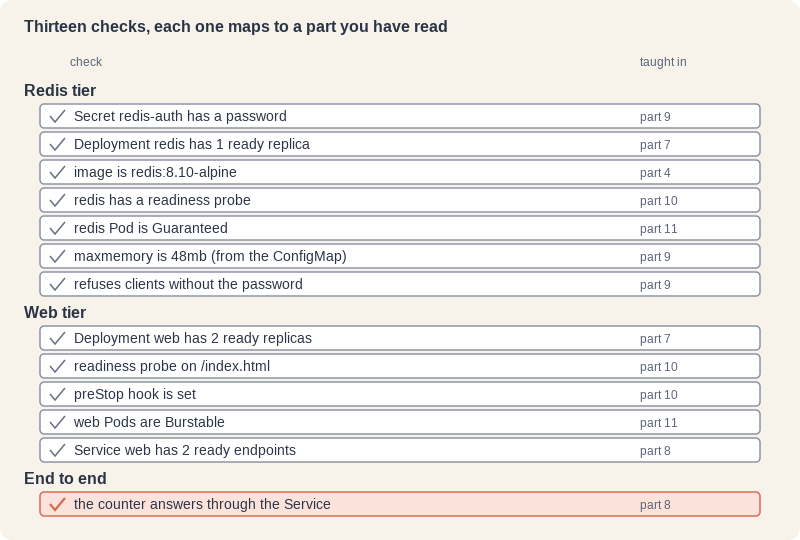
Stop the clock when all thirteen lines say PASS. Under 45 minutes is a good result for a first attempt; under 30 means the foundations are in your fingers.
Try it: full solutions
- Namespace and Secret (part 9). A literal on the command line ends up in your shell history; that is fine for a lab, and
--from-fileis the better habit for real secrets.
kubectl create namespace k8s-from-zero
kubectl create secret generic redis-auth -n k8s-from-zero --from-literal=password=change-me-123Explain this command
kubectl create namespace k8s-from-zero
kubectl create secret generic redis-auth -n k8s-from-zero --from-literal=password=change-me-123kubectlThe Kubernetes command-line client. Subcommands and flags are documented under kubernetes.io/docs/reference/kubectl/.createCreate a resource from a file or from stdin, or through a subcommand such as namespace.namespaceThe resource type.k8s-from-zeroThe object name.kubectlThe Kubernetes command-line client. Subcommands and flags are documented under kubernetes.io/docs/reference/kubectl/.createCreate a resource from a file or from stdin, or through a subcommand such as namespace.secretThe resource type.genericThe secret subcommand form. kubectl create secret generic creates a Secret from literal values or files.redis-authThe object name.-nShort form of --namespace. If present, the namespace scope for this CLI request.k8s-from-zeroThe namespace name passed to --namespace.--from-literal=password=change-me-123A key=value to store in the new object. create secret and create configmap both take --from-literal. This command passes password=change-me-123.
namespace/k8s-from-zero created
secret/redis-auth created- The Redis tier, tasks 2 to 4, in one file. Save this as
redis.yaml. Two details to notice.$(REDIS_PASSWORD)inargsis expanded by Kubernetes from the container’s environment; the parentheses are required (command and arguments). The readiness probe runs throughsh -cso that the shell can read the same variable.
apiVersion: v1
kind: ConfigMap
metadata:
name: redis-config
namespace: k8s-from-zero
labels:
app.kubernetes.io/name: redis
app.kubernetes.io/part-of: hits
data:
redis.conf: |
maxmemory 48mb
maxmemory-policy allkeys-lru
appendonly no
save ""
---
apiVersion: apps/v1
kind: Deployment
metadata:
name: redis
namespace: k8s-from-zero
labels:
app.kubernetes.io/name: redis
app.kubernetes.io/part-of: hits
spec:
replicas: 1
selector:
matchLabels:
app.kubernetes.io/name: redis
template:
metadata:
labels:
app.kubernetes.io/name: redis
app.kubernetes.io/part-of: hits
spec:
containers:
- name: redis
image: redis:8.10-alpine
args: ["redis-server", "/etc/redis/redis.conf", "--requirepass", "$(REDIS_PASSWORD)"]
env:
- name: REDIS_PASSWORD
valueFrom:
secretKeyRef:
name: redis-auth
key: password
ports:
- containerPort: 6379
readinessProbe:
exec:
command: ["sh", "-c", "redis-cli -a \"$REDIS_PASSWORD\" --no-auth-warning ping | grep -q PONG"]
periodSeconds: 5
livenessProbe:
tcpSocket:
port: 6379
periodSeconds: 10
resources:
requests:
cpu: 100m
memory: 64Mi
limits:
cpu: 100m
memory: 64Mi
volumeMounts:
- name: config
mountPath: /etc/redis
volumes:
- name: config
configMap:
name: redis-config
---
apiVersion: v1
kind: Service
metadata:
name: redis
namespace: k8s-from-zero
labels:
app.kubernetes.io/name: redis
app.kubernetes.io/part-of: hits
spec:
selector:
app.kubernetes.io/name: redis
ports:
- port: 6379
targetPort: 6379kubectl apply -f redis.yaml
kubectl rollout status deployment/redis -n k8s-from-zero --timeout=90sExplain this command
kubectl apply -f redis.yaml
kubectl rollout status deployment/redis -n k8s-from-zero --timeout=90skubectlThe Kubernetes command-line client. Subcommands and flags are documented under kubernetes.io/docs/reference/kubectl/.applyApply a configuration to a resource by file name or stdin. The apply docs say the resource is created if it does not exist yet. JSON and YAML are accepted.-fShort form of --filename. The file, directory or URL that contains the configuration to apply.redis.yamlThe file named by --filename. apply creates the objects or updates them to match this file.kubectlThe Kubernetes command-line client. Subcommands and flags are documented under kubernetes.io/docs/reference/kubectl/.rolloutThe command group for rollout actions.statusShow the status of a rollout and wait until it finishes.deployment/redisThe resource written as type/name: deployment/redis.-nShort form of --namespace. If present, the namespace scope for this CLI request.k8s-from-zeroThe namespace name passed to --namespace.--timeout=90sHow long to wait before giving up. This command passes 90s.
configmap/redis-config created
deployment.apps/redis created
service/redis created
Waiting for deployment "redis" rollout to finish: 0 of 1 updated replicas are available...
deployment "redis" successfully rolled out- The web tier, tasks 5 to 7. Save this as
web.yaml. Theitemslist under the ConfigMap volume places each key at its own path and gives the script its execute bit withmode: 0755. The Secret is mounted as a file, so the script reads the password withcat; mounted files are updated if the Secret changes, environment variables are not (part 9).
apiVersion: v1
kind: ConfigMap
metadata:
name: web-files
namespace: k8s-from-zero
labels:
app.kubernetes.io/name: web
app.kubernetes.io/part-of: hits
data:
index.html: |
<h1>hits</h1><p>Open /cgi-bin/hits to count a visit.</p>
hits: |
#!/bin/sh
# Count one visit in Redis and print the total.
PASS=$(cat /etc/redis-auth/password)
N=$(printf 'AUTH %s\r\nINCR hits\r\nQUIT\r\n' "$PASS" | nc -w 2 "$REDIS_HOST" 6379 | sed -n 's/^:\([0-9]*\).*/\1/p')
echo "Content-Type: text/plain"
echo
if [ -n "$N" ]; then echo "visits: $N (served by $HOSTNAME)"; else echo "redis unavailable"; fi
---
apiVersion: apps/v1
kind: Deployment
metadata:
name: web
namespace: k8s-from-zero
labels:
app.kubernetes.io/name: web
app.kubernetes.io/part-of: hits
spec:
replicas: 2
selector:
matchLabels:
app.kubernetes.io/name: web
template:
metadata:
labels:
app.kubernetes.io/name: web
app.kubernetes.io/part-of: hits
spec:
terminationGracePeriodSeconds: 15
containers:
- name: web
image: busybox:1.37
command: ["httpd", "-f", "-p", "8080", "-h", "/www"]
env:
- name: REDIS_HOST
value: redis
ports:
- containerPort: 8080
readinessProbe:
httpGet:
path: /index.html
port: 8080
periodSeconds: 5
livenessProbe:
tcpSocket:
port: 8080
periodSeconds: 10
lifecycle:
preStop:
sleep:
seconds: 5
resources:
requests:
cpu: 25m
memory: 16Mi
limits:
cpu: 100m
memory: 32Mi
volumeMounts:
- name: files
mountPath: /www
- name: redis-auth
mountPath: /etc/redis-auth
readOnly: true
volumes:
- name: files
configMap:
name: web-files
items:
- key: index.html
path: index.html
- key: hits
path: cgi-bin/hits
mode: 0755
- name: redis-auth
secret:
secretName: redis-auth
---
apiVersion: v1
kind: Service
metadata:
name: web
namespace: k8s-from-zero
labels:
app.kubernetes.io/name: web
app.kubernetes.io/part-of: hits
spec:
selector:
app.kubernetes.io/name: web
ports:
- port: 80
targetPort: 8080kubectl apply -f web.yaml
kubectl rollout status deployment/web -n k8s-from-zero --timeout=90sExplain this command
kubectl apply -f web.yaml
kubectl rollout status deployment/web -n k8s-from-zero --timeout=90skubectlThe Kubernetes command-line client. Subcommands and flags are documented under kubernetes.io/docs/reference/kubectl/.applyApply a configuration to a resource by file name or stdin. The apply docs say the resource is created if it does not exist yet. JSON and YAML are accepted.-fShort form of --filename. The file, directory or URL that contains the configuration to apply.web.yamlThe file named by --filename. apply creates the objects or updates them to match this file.kubectlThe Kubernetes command-line client. Subcommands and flags are documented under kubernetes.io/docs/reference/kubectl/.rolloutThe command group for rollout actions.statusShow the status of a rollout and wait until it finishes.deployment/webThe resource written as type/name: deployment/web.-nShort form of --namespace. If present, the namespace scope for this CLI request.k8s-from-zeroThe namespace name passed to --namespace.--timeout=90sHow long to wait before giving up. This command passes 90s.
configmap/web-files created
deployment.apps/web created
service/web created
Waiting for deployment "web" rollout to finish: 0 of 2 updated replicas are available...
Waiting for deployment "web" rollout to finish: 1 of 2 updated replicas are available...
deployment "web" successfully rolled out- The client, task 8. The short name
webworks because the client is in the same namespace; from elsewhere you would useweb.k8s-from-zero.svc.cluster.local(DNS for Services).
kubectl run client -n k8s-from-zero --image=busybox:1.37 -- sleep 3600
kubectl get pods,svc -n k8s-from-zero
for i in 1 2 3 4; do kubectl exec -n k8s-from-zero client -- wget -qO- -T 5 http://web/cgi-bin/hits; doneExplain this command
kubectl run client -n k8s-from-zero --image=busybox:1.37 -- sleep 3600
kubectl get pods,svc -n k8s-from-zero
for i in 1 2 3 4; do kubectl exec -n k8s-from-zero client -- wget -qO- -T 5 http://web/cgi-bin/hits; donekubectlThe Kubernetes command-line client. Subcommands and flags are documented under kubernetes.io/docs/reference/kubectl/.runCreate and run a particular image in a pod. The run synopsis is kubectl run NAME --image=image [--env="key=value"] [--port=port] [--dry-run=server|client] [--overrides=inline-json] [--command] -- [COMMAND] [args...].clientThe NAME in kubectl run NAME. This command names the Pod client.-nShort form of --namespace. If present, the namespace scope for this CLI request.k8s-from-zeroThe namespace name passed to --namespace.--image=busybox:1.37The image for the container to run. This command passes busybox:1.37.--Ends kubectl's flags. The exec examples say to use two dashes so the command's own flags are read as that command's flags.sleepThe command run in the container, or a shell pause. It waits the given time.3600A numeric argument in this command.kubectlThe Kubernetes command-line client. Subcommands and flags are documented under kubernetes.io/docs/reference/kubectl/.getDisplay one or many resources. kubectl get prints a table of the most important information about the resources you name.pods,svcAn argument of this command: pods,svc.-nShort form of --namespace. If present, the namespace scope for this CLI request.k8s-from-zeroThe namespace name passed to --namespace.forShell. Starts a for loop.iAn argument of this command: i.inShell. Names the list a for loop walks.1A numeric argument in this command.2A numeric argument in this command.3A numeric argument in this command.4A numeric argument in this command.;Shell. Runs the next command after this one finishes, whatever its exit status.doShell. Starts the body of a for, while or if.kubectlThe Kubernetes command-line client. Subcommands and flags are documented under kubernetes.io/docs/reference/kubectl/.execExecute a command in a container. The synopsis is kubectl exec (POD | TYPE/NAME) [-c CONTAINER] [flags] -- COMMAND [args...].-nShort form of --namespace. If present, the namespace scope for this CLI request.k8s-from-zeroThe namespace name passed to --namespace.clientAn argument of this command: client.--Ends kubectl's flags. The exec examples say to use two dashes so the command's own flags are read as that command's flags.wgetThe command run in the container. It fetches a URL.-qO-A flag of the command inside the container: -qO-.-TA flag of the command inside the container: -T.5A number passed to the command inside the container.http://web/cgi-bin/hitsThe URL requested inside the container: http://web/cgi-bin/hits.;Shell. Runs the next command after this one finishes, whatever its exit status.doneShell. Ends a for, while or until loop.
pod/client created
NAME                         READY   STATUS    RESTARTS   AGE
pod/client                   1/1     Running   0          0s
pod/redis-68cb99c797-b7j5c   1/1     Running   0          7s
pod/web-846b6685b7-cmvxc     1/1     Running   0          1s
pod/web-846b6685b7-qxfqx     1/1     Running   0          1s

NAME            TYPE        CLUSTER-IP      EXTERNAL-IP   PORT(S)    AGE
service/redis   ClusterIP   10.96.129.161   <none>        6379/TCP   7s
service/web     ClusterIP   10.96.107.47    <none>        80/TCP     1s
visits: 1 (served by web-846b6685b7-qxfqx)
visits: 2 (served by web-846b6685b7-cmvxc)
visits: 3 (served by web-846b6685b7-qxfqx)
visits: 4 (served by web-846b6685b7-qxfqx)
One counter, two web Pods: the Service spreads requests and both Pods share the state in Redis.
- Grade it, task 9:
./check.sh
kubectl get pods -n k8s-from-zero -o custom-columns=NAME:.metadata.name,QOS:.status.qosClassExplain this command
./check.sh
kubectl get pods -n k8s-from-zero -o custom-columns=NAME:.metadata.name,QOS:.status.qosClass./check.shRuns the grading script check.sh from the current directory (made executable with chmod +x).kubectlThe Kubernetes command-line client. Subcommands and flags are documented under kubernetes.io/docs/reference/kubectl/.getDisplay one or many resources. kubectl get prints a table of the most important information about the resources you name.podsThe resource type to display. kubectl get points you to kubectl api-resources for the full list of types the server supports.-nShort form of --namespace. If present, the namespace scope for this CLI request.k8s-from-zeroThe namespace name passed to --namespace.-oShort form of --output. It selects the output format. For get, the formats include json, yaml, name, jsonpath, custom-columns and wide.custom-columns=NAME:.metadata.name,QOS:.status.qosClasscustom-columns is an output format. The get examples write each column as a heading, a colon, and a JSONPath. The headings here are NAME, QOS.
PASS  secret redis-auth has a password
PASS  redis has 1 ready replica
PASS  redis runs redis:8.10-alpine
PASS  redis has a readiness probe
PASS  redis Pod is Guaranteed
PASS  redis maxmemory is 48mb
PASS  redis refuses clients without the password
PASS  web has 2 ready replicas
PASS  web has a readiness probe on /index.html
PASS  web has a preStop hook
PASS  web Pods are Burstable
PASS  Service web has 2 ready endpoints
PASS  the counter answers through the Service
NAME                     QOS
client                   BestEffort
redis-68cb99c797-b7j5c   Guaranteed
web-846b6685b7-cmvxc     Burstable
web-846b6685b7-qxfqx Burstable- A restart under load. Start a loader Pod that sends 120 requests, a quarter of a second apart, and counts failures; five seconds later restart the web Deployment, which replaces both Pods one at a time (part 7).
kubectl run loader -n k8s-from-zero --image=busybox:1.37 --restart=Never -- sh -c 'ok=0; bad=0; for i in $(seq 1 120); do if wget -qO- -T 2 http://web/cgi-bin/hits | grep -q visits; then ok=$((ok+1)); else bad=$((bad+1)); fi; sleep 0.25; done; echo "ok=$ok failed=$bad"'
kubectl rollout restart deployment/web -n k8s-from-zero
kubectl rollout status deployment/web -n k8s-from-zero
kubectl logs loader -n k8s-from-zeroExplain this command
kubectl run loader -n k8s-from-zero --image=busybox:1.37 --restart=Never -- sh -c 'ok=0; bad=0; for i in $(seq 1 120); do if wget -qO- -T 2 http://web/cgi-bin/hits | grep -q visits; then ok=$((ok+1)); else bad=$((bad+1)); fi; sleep 0.25; done; echo "ok=$ok failed=$bad"'
kubectl rollout restart deployment/web -n k8s-from-zero
kubectl rollout status deployment/web -n k8s-from-zero
kubectl logs loader -n k8s-from-zerokubectlThe Kubernetes command-line client. Subcommands and flags are documented under kubernetes.io/docs/reference/kubectl/.runCreate and run a particular image in a pod. The run synopsis is kubectl run NAME --image=image [--env="key=value"] [--port=port] [--dry-run=server|client] [--overrides=inline-json] [--command] -- [COMMAND] [args...].loaderThe NAME in kubectl run NAME. This command names the Pod loader.-nShort form of --namespace. If present, the namespace scope for this CLI request.k8s-from-zeroThe namespace name passed to --namespace.--image=busybox:1.37The image for the container to run. This command passes busybox:1.37.--restart=NeverThe restart policy for this Pod. The run docs list Always, OnFailure and Never. This command passes Never.--Ends kubectl's flags. The exec examples say to use two dashes so the command's own flags are read as that command's flags.shAn argument of this command: sh.-cAn argument of sh. It tells sh to run the command string that follows.'ok=0; bad=0; for i in $(seq 1 120); do if wget -qO- -T 2 http://web/cgi-bin/hits | grep -q visits; then ok=$((ok+1)); else bad=$((bad+1)); fi; sleep 0.25; done; echo "ok=$ok failed=$bad"'A quoted argument in this command.kubectlThe Kubernetes command-line client. Subcommands and flags are documented under kubernetes.io/docs/reference/kubectl/.rolloutThe command group for rollout actions.restartRestart a resource by rolling its Pods.deployment/webThe resource written as type/name: deployment/web.-nShort form of --namespace. If present, the namespace scope for this CLI request.k8s-from-zeroThe namespace name passed to --namespace.kubectlThe Kubernetes command-line client. Subcommands and flags are documented under kubernetes.io/docs/reference/kubectl/.rolloutThe command group for rollout actions.statusShow the status of a rollout and wait until it finishes.deployment/webThe resource written as type/name: deployment/web.-nShort form of --namespace. If present, the namespace scope for this CLI request.k8s-from-zeroThe namespace name passed to --namespace.kubectlThe Kubernetes command-line client. Subcommands and flags are documented under kubernetes.io/docs/reference/kubectl/.logsPrint the logs for a container in a pod or specified resource. If the pod has only one container, the container name is optional.loaderAn argument of this command: loader.-nShort form of --namespace. If present, the namespace scope for this CLI request.k8s-from-zeroThe namespace name passed to --namespace.
pod/loader created
deployment.apps/web restarted
Waiting for deployment "web" rollout to finish: 1 out of 2 new replicas have been updated...
...
Waiting for deployment "web" rollout to finish: 1 old replicas are pending termination...
deployment "web" successfully rolled out
ok=120 failed=0
Zero failures while every web Pod was replaced. Readiness kept new Pods out of the Service until they could answer, and terminating Pods left it before they stopped. An honest note: on our one-node lab we also saw zero failures with the preStop hook removed, because endpoint updates reach the only node almost at once. The hook is insurance for clusters where that update takes longer to reach every proxy (part 10).
- Optional: lose the data. Redis here has no volume, so its data lives only in the container.
kubectl delete pod -n k8s-from-zero -l app.kubernetes.io/name=redis --wait=false
kubectl exec -n k8s-from-zero client -- wget -qO- -T 5 http://web/cgi-bin/hits
kubectl rollout status deployment/redis -n k8s-from-zero
kubectl exec -n k8s-from-zero client -- wget -qO- -T 5 http://web/cgi-bin/hitsExplain this command
kubectl delete pod -n k8s-from-zero -l app.kubernetes.io/name=redis --wait=false
kubectl exec -n k8s-from-zero client -- wget -qO- -T 5 http://web/cgi-bin/hits
kubectl rollout status deployment/redis -n k8s-from-zero
kubectl exec -n k8s-from-zero client -- wget -qO- -T 5 http://web/cgi-bin/hitskubectlThe Kubernetes command-line client. Subcommands and flags are documented under kubernetes.io/docs/reference/kubectl/.deleteDelete resources by file names, stdin, resources and names, or by resources and label selector.podThe resource type.-nShort form of --namespace. If present, the namespace scope for this CLI request.k8s-from-zeroThe namespace name passed to --namespace.-lShort form of --selector. A label query. The get docs say it supports '=', '==', '!=', 'in' and 'notin', and that matching objects must satisfy every constraint.app.kubernetes.io/name=redisThe label query passed to --selector: app.kubernetes.io/name=redis.--wait=falseDo not wait for the objects to finish deleting. The delete docs say --wait defaults to true.kubectlThe Kubernetes command-line client. Subcommands and flags are documented under kubernetes.io/docs/reference/kubectl/.execExecute a command in a container. The synopsis is kubectl exec (POD | TYPE/NAME) [-c CONTAINER] [flags] -- COMMAND [args...].-nShort form of --namespace. If present, the namespace scope for this CLI request.k8s-from-zeroThe namespace name passed to --namespace.clientAn argument of this command: client.--Ends kubectl's flags. The exec examples say to use two dashes so the command's own flags are read as that command's flags.wgetThe command run in the container. It fetches a URL.-qO-A flag of the command inside the container: -qO-.-TA flag of the command inside the container: -T.5A number passed to the command inside the container.http://web/cgi-bin/hitsThe URL requested inside the container: http://web/cgi-bin/hits.kubectlThe Kubernetes command-line client. Subcommands and flags are documented under kubernetes.io/docs/reference/kubectl/.rolloutThe command group for rollout actions.statusShow the status of a rollout and wait until it finishes.deployment/redisThe resource written as type/name: deployment/redis.-nShort form of --namespace. If present, the namespace scope for this CLI request.k8s-from-zeroThe namespace name passed to --namespace.kubectlThe Kubernetes command-line client. Subcommands and flags are documented under kubernetes.io/docs/reference/kubectl/.execExecute a command in a container. The synopsis is kubectl exec (POD | TYPE/NAME) [-c CONTAINER] [flags] -- COMMAND [args...].-nShort form of --namespace. If present, the namespace scope for this CLI request.k8s-from-zeroThe namespace name passed to --namespace.clientAn argument of this command: client.--Ends kubectl's flags. The exec examples say to use two dashes so the command's own flags are read as that command's flags.wgetThe command run in the container. It fetches a URL.-qO-A flag of the command inside the container: -qO-.-TA flag of the command inside the container: -T.5A number passed to the command inside the container.http://web/cgi-bin/hitsThe URL requested inside the container: http://web/cgi-bin/hits.
pod "redis-68cb99c797-b7j5c" deleted from k8s-from-zero namespace
visits: 127 (served by web-5496bf89dd-6rcw9)
deployment "redis" successfully rolled out
visits: 1 (served by web-5496bf89dd-lx2jl)
The first request still reached the old Pod during its shutdown. In another run the timing differed and we got redis unavailable for a moment instead. Either way, the new Pod starts at 1: the counter is gone. Keeping data across Pod restarts is what the next arc starts with.
- Clean up when you are done:
kubectl delete namespace k8s-from-zeroExplain this command
kubectl delete namespace k8s-from-zerokubectlThe Kubernetes command-line client. Subcommands and flags are documented under kubernetes.io/docs/reference/kubectl/.deleteDelete resources by file names, stdin, resources and names, or by resources and label selector.namespaceThe resource type.k8s-from-zeroThe object name.
When it goes wrong
These are failures we hit or caused on purpose while building the lab.
CreateContainerConfigErroron the redis Pod. We appliedredis.yamlbefore creating the Secret.kubectl describe podshowsError: secret "redis-auth" not found. Create the Secret; the kubelet retries, and the Pod wasRunningabout 20 seconds later without any other change.404 Not Foundfrom/cgi-bin/hitswhileindex.htmlworks. We left outmode: 0755, so the script was mounted as-rw-r--r--and busybox httpd would not run it.kubectl exec deploy/web -- ls -lL /www/cgi-bin/hitsshows the mode. Note that the Pods were still ready: the readiness probe only checksindex.html.- Requests that hang for minutes while Redis restarts. Our first script called
ncwithout-w 2. While the Redis Pod was being replaced, one request hung until we killed it; with-w 2the same situation returns within seconds. Give every network call a timeout. When you fix the script, remember that a ConfigMap mounted as a volume is updated in place only after the kubelet’s next periodic sync plus a cache delay, so running Pods see the change after a while, not at once (ConfigMaps). NOAUTH Authentication required.That is Redis refusing a client without the password, which is what check 7 expects. If your ownredis-clicalls see it, pass-a "$REDIS_PASSWORD" --no-auth-warning.wget: bad address 'web'. The client cannot resolve the Service name. Check that the client is in the same namespace, that the Service exists, and that CoreDNS Pods are running inkube-system.
Cheat sheet
| Task | Command or field | Note |
|---|---|---|
| Secret from a literal | kubectl create secret generic redis-auth --from-literal=password=... |
key password |
| Env var from a Secret | env[].valueFrom.secretKeyRef |
name and key |
| Use an env var in args | args: ["--requirepass", "$(REDIS_PASSWORD)"] |
parentheses required |
| Mount one key at a path | configMap.items: [{key: hits, path: cgi-bin/hits, mode: 0755}] |
mode sets the execute bit |
| Mount a Secret as files | volumes[].secret.secretName |
one file per key |
| Probe with a shell | exec: {command: ["sh", "-c", "..."]} |
lets the probe read env vars |
| Guaranteed Pod | requests == limits for cpu and memory | check .status.qosClass |
| Short Service name | http://web |
works inside the same namespace |
| Full Service name | web.k8s-from-zero.svc.cluster.local |
from any namespace |
| Long-lived test client | kubectl run client --image=busybox:1.37 -- sleep 3600 |
then kubectl exec client -- wget ... |
| Restart all Pods of a Deployment | kubectl rollout restart deployment/web |
one at a time, per the rollout strategy |
| Ready endpoints only | -o jsonpath='{range .items[*].endpoints[?(@.conditions.ready==true)]}x{end}' |
counts ready endpoints |
| Generate YAML | kubectl create deployment web --image=busybox:1.37 --dry-run=client -o yaml |
then edit |
| Grade | ./check.sh |
NS=other ./check.sh for another namespace |
Recap and what is next
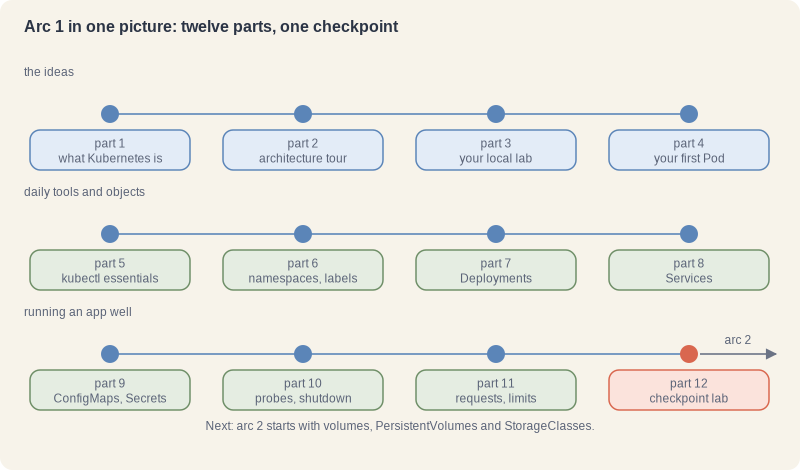
- You built a two-tier app from an empty namespace: Deployments, Services, a Secret, two ConfigMaps, probes, a preStop hook and sized resources.
- A grading script that reads the API is a good habit for any lab, and for real clusters too.
- Readiness and graceful shutdown together gave zero failed requests during a full rolling restart in our lab.
- The counter vanished when Redis restarted, because nothing in arc 1 keeps data outside a container.
Next: part 13, volumes, PersistentVolumes and StorageClasses, the start of arc 2, where your Pods get storage that outlives them. Coming tomorrow.
Command explanations and quoted passages in this lesson come from or adapt the kubectl reference and the Kubernetes documentation, © The Kubernetes Authors, licensed under CC BY 4.0. We shortened and edited some passages. Kubernetes® is a registered trademark of The Linux Foundation. aitamer.news is not affiliated with or endorsed by The Linux Foundation or the CNCF.
The Campfire
CommentsThanks. Your comment is waiting for the desk. Once it is approved it appears here within about a minute.
Add a comment