
In part 9 you fed configuration into Pods with ConfigMaps and Secrets. Your app now starts with the right settings, but Kubernetes still knows almost nothing about whether it is healthy. So far “Running” has only meant “the main process has not exited”. In this part you teach the cluster three questions to ask your containers: have you started, are you still alive, and are you ready for traffic. Then you look at the other end of a container’s life: how Kubernetes stops it, and how your app can finish its work before it goes. You need the kind cluster and the k8s-from-zero namespace from part 4. We tested everything on kind v0.33.0 (node image v1.37.0) with kubectl v1.37.2; our cluster is called k8s-ep10, so node names below carry that name.
What you will build
Five small workloads, each built to show one behaviour. A two-replica nginx Deployment with a Service, where you break one Pod’s readiness and watch it drop out of the Service without being restarted. A Pod that “hangs” after 20 seconds, so its liveness probe restarts it. A slow starter that a startup probe protects, and an impatient copy that gets killed for being slow. Finally, two Pods that you delete: one that shuts down cleanly in eight seconds, and one that ignores the stop signal and makes you wait thirty.
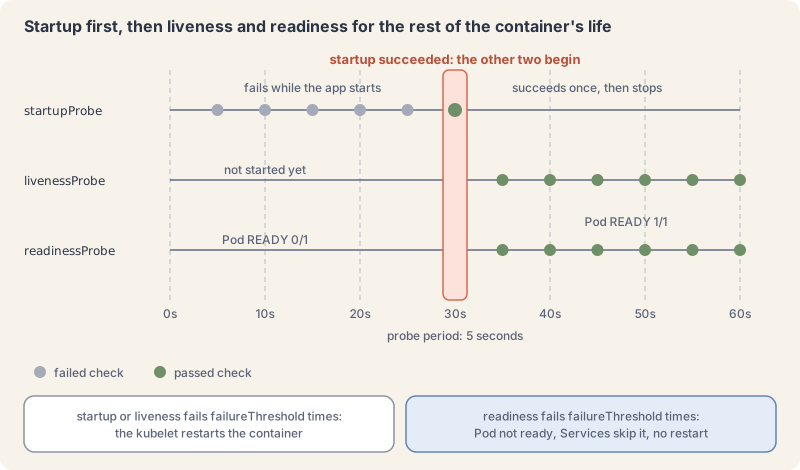
Three probes, three questions
A probe is a check that the kubelet (the agent on each node, part 2) runs against one container, again and again. Each probe answers one question and triggers one kind of action, as described in the probes concept page:
- Startup probe: has the app finished starting? While it is configured and has not yet succeeded, the kubelet runs no liveness or readiness checks. When it succeeds once, it stops running. If it fails too often, the kubelet kills the container and the restart policy applies.
- Liveness probe: is the app still alive? If it fails
failureThresholdtimes in a row, the kubelet restarts the container. Use it for states the app cannot leave on its own, such as a deadlock. - Readiness probe: can the app take traffic right now? If it fails, the container is marked not ready, the Pod’s
Readycondition turns false, and the EndpointSlice controller marks that Pod’s endpoint as not ready in every Service that selects it. Nothing is restarted. Readiness checks keep running for the container’s whole life, so a Pod can leave and rejoin a Service many times.
If you configure no probe of a type, the kubelet treats that check as always passing. That is why every Pod you have run so far was “ready” the moment its process started.
Each probe uses one of four mechanisms: exec runs a command in the container and passes on exit code 0; httpGet passes on a status code from 200 to 399; tcpSocket passes if a TCP connection opens; grpc asks a gRPC health service. The timing fields are the same for all three probe types. These are the defaults from the docs, and kubectl explain confirms them on your cluster:
| Field | Default | Meaning |
|---|---|---|
initialDelaySeconds |
0 | wait this long after the container starts |
periodSeconds |
10 | run the check this often |
timeoutSeconds |
1 | a check that takes longer counts as failed |
failureThreshold |
3 | this many failures in a row trip the probe |
successThreshold |
1 | must be 1 for liveness and startup probes |
kubectl explain pod.spec.containers.readinessProbe.periodSecondsExplain this command
kubectl explain pod.spec.containers.readinessProbe.periodSecondskubectlThe Kubernetes command-line client. Subcommands and flags are documented under kubernetes.io/docs/reference/kubectl/.explainGet documentation for a resource or a field. The explain docs say fields are named as TYPE.FIELDNAME.FIELDNAME and the text comes from the API server OpenAPI schema.pod.spec.containers.readinessProbe.periodSecondsAn argument of this command: pod.spec.containers.readinessProbe.periodSeconds.
FIELD: periodSeconds <integer>

DESCRIPTION:
    How often (in seconds) to perform the probe. Default to 10 seconds. Minimum
    value is 1.
A rule of thumb follows from the table: a liveness probe with defaults restarts a container about 30 seconds (3 x 10) after it stops answering. A startup probe gives a slow app failureThreshold x periodSeconds seconds to start.
Readiness decides who gets traffic
In part 8 you saw that a Service sends traffic to the Pods listed in its EndpointSlices. Each endpoint in a slice carries conditions: ready, serving and terminating. A failing readiness probe sets ready to false, and Service proxies such as kube-proxy stop sending regular traffic there. The Pod keeps running; it simply stops getting new requests until the probe passes again.
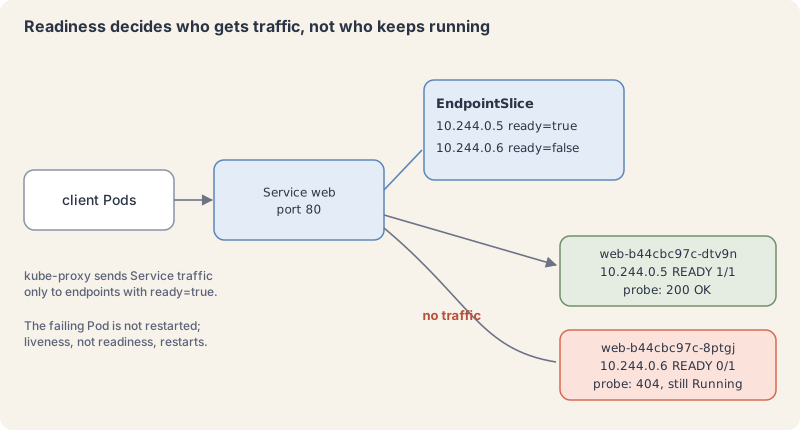
The nginx Deployment you build next uses two different probes: readiness asks for the page /index.html over HTTP, and liveness only checks that port 80 accepts connections. That split matters. If the page disappears, the Pod should stop getting traffic, but restarting nginx would not bring the file back.
Try it: probes that fail on purpose
- Save this as
web.yaml. It is the Deployment and Service pattern from parts 7 and 8, plus probes, a grace period and apreStophook that the shutdown section explains.
apiVersion: apps/v1
kind: Deployment
metadata:
  name: web
  namespace: k8s-from-zero
  labels:
    app.kubernetes.io/name: web
spec:
  replicas: 2
  selector:
    matchLabels:
      app.kubernetes.io/name: web
  template:
    metadata:
      labels:
        app.kubernetes.io/name: web
    spec:
      terminationGracePeriodSeconds: 30
      containers:
        - name: nginx
          image: nginx:1.29-alpine
          ports:
            - containerPort: 80
          readinessProbe:
            httpGet:
              path: /index.html
              port: 80
            periodSeconds: 5
            failureThreshold: 2
          livenessProbe:
            tcpSocket:
              port: 80
            periodSeconds: 10
            failureThreshold: 3
          lifecycle:
            preStop:
              sleep:
                seconds: 5
---
apiVersion: v1
kind: Service
metadata:
  name: web
  namespace: k8s-from-zero
spec:
  selector:
    app.kubernetes.io/name: web
  ports:
    - port: 80
targetPort: 80- Apply it and wait for the rollout.
kubectl apply -f web.yaml
kubectl rollout status deployment/web -n k8s-from-zero
kubectl get pods -n k8s-from-zeroExplain this command
kubectl apply -f web.yaml
kubectl rollout status deployment/web -n k8s-from-zero
kubectl get pods -n k8s-from-zerokubectlThe Kubernetes command-line client. Subcommands and flags are documented under kubernetes.io/docs/reference/kubectl/.applyApply a configuration to a resource by file name or stdin. The apply docs say the resource is created if it does not exist yet. JSON and YAML are accepted.-fShort form of --filename. The file, directory or URL that contains the configuration to apply.web.yamlThe file named by --filename. apply creates the objects or updates them to match this file.kubectlThe Kubernetes command-line client. Subcommands and flags are documented under kubernetes.io/docs/reference/kubectl/.rolloutThe command group for rollout actions.statusShow the status of a rollout and wait until it finishes.deployment/webThe resource written as type/name: deployment/web.-nShort form of --namespace. If present, the namespace scope for this CLI request.k8s-from-zeroThe namespace name passed to --namespace.kubectlThe Kubernetes command-line client. Subcommands and flags are documented under kubernetes.io/docs/reference/kubectl/.getDisplay one or many resources. kubectl get prints a table of the most important information about the resources you name.podsThe resource type to display. kubectl get points you to kubectl api-resources for the full list of types the server supports.-nShort form of --namespace. If present, the namespace scope for this CLI request.k8s-from-zeroThe namespace name passed to --namespace.
deployment.apps/web created
service/web created
deployment "web" successfully rolled out
NAME                  READY   STATUS    RESTARTS   AGE
web-b44cbc97c-8ptgj   1/1     Running   0          6s
web-b44cbc97c-dtv9n 1/1 Running 0 6s- Break readiness in one Pod by deleting the page the probe asks for. Use your own Pod name.
kubectl exec -n k8s-from-zero web-b44cbc97c-8ptgj -- rm /usr/share/nginx/html/index.htmlExplain this command
kubectl exec -n k8s-from-zero web-b44cbc97c-8ptgj -- rm /usr/share/nginx/html/index.htmlkubectlThe Kubernetes command-line client. Subcommands and flags are documented under kubernetes.io/docs/reference/kubectl/.execExecute a command in a container. The synopsis is kubectl exec (POD | TYPE/NAME) [-c CONTAINER] [flags] -- COMMAND [args...].-nShort form of --namespace. If present, the namespace scope for this CLI request.k8s-from-zeroThe namespace name passed to --namespace.web-b44cbc97c-8ptgjAn argument of this command: web-b44cbc97c-8ptgj.--Ends kubectl's flags. The exec examples say to use two dashes so the command's own flags are read as that command's flags.rmRemoves the named files./usr/share/nginx/html/index.htmlA path inside the container: /usr/share/nginx/html/index.html.
After about ten seconds (two failures, five seconds apart) the Pod shows 0/1 but Running, with no restarts:
kubectl get pods -n k8s-from-zeroExplain this command
kubectl get pods -n k8s-from-zerokubectlThe Kubernetes command-line client. Subcommands and flags are documented under kubernetes.io/docs/reference/kubectl/.getDisplay one or many resources. kubectl get prints a table of the most important information about the resources you name.podsThe resource type to display. kubectl get points you to kubectl api-resources for the full list of types the server supports.-nShort form of --namespace. If present, the namespace scope for this CLI request.k8s-from-zeroThe namespace name passed to --namespace.
NAME                  READY   STATUS    RESTARTS   AGE
web-b44cbc97c-8ptgj   0/1     Running   0          25s
web-b44cbc97c-dtv9n 1/1 Running 0 25s- Look at the EndpointSlice conditions. The default table view still lists both addresses, so print the
readycondition per endpoint with jsonpath (part 5):
kubectl get endpointslice -n k8s-from-zero -l kubernetes.io/service-name=web \
-o jsonpath='{range .items[*].endpoints[*]}{.addresses[0]}{" "}{.targetRef.name}{" ready="}{.conditions.ready}{"\n"}{end}'Explain this command
kubectl get endpointslice -n k8s-from-zero -l kubernetes.io/service-name=web \
-o jsonpath='{range .items[*].endpoints[*]}{.addresses[0]}{" "}{.targetRef.name}{" ready="}{.conditions.ready}{"\n"}{end}'kubectlThe Kubernetes command-line client. Subcommands and flags are documented under kubernetes.io/docs/reference/kubectl/.getDisplay one or many resources. kubectl get prints a table of the most important information about the resources you name.endpointsliceThe resource type to display. kubectl get points you to kubectl api-resources for the full list of types the server supports.-nShort form of --namespace. If present, the namespace scope for this CLI request.k8s-from-zeroThe namespace name passed to --namespace.-lShort form of --selector. A label query. The get docs say it supports '=', '==', '!=', 'in' and 'notin', and that matching objects must satisfy every constraint.kubernetes.io/service-name=webThe label query passed to --selector: kubernetes.io/service-name=web.\Shell. Continues the command on the next line.-oShort form of --output. It selects the output format. For get, the formats include json, yaml, name, jsonpath, custom-columns and wide.jsonpath='{range .items[*].endpoints[*]}{.addresses[0]}{" "}{.targetRef.name}{" ready="}{.conditions.ready}{"\n"}{end}'jsonpath is an output format. A template is JSONPath expressions in curly braces. The JSONPath page says a double-quoted string inserts text, and its example uses a quoted backslash-n for a newline. This token is the template in the lesson command.
10.244.0.5  web-b44cbc97c-dtv9n  ready=true
10.244.0.6  web-b44cbc97c-8ptgj  ready=false
The events tell the whole story, including one honest failure right at startup, when nginx had not opened its port yet:
kubectl describe pod -n k8s-from-zero web-b44cbc97c-8ptgjExplain this command
kubectl describe pod -n k8s-from-zero web-b44cbc97c-8ptgjkubectlThe Kubernetes command-line client. Subcommands and flags are documented under kubernetes.io/docs/reference/kubectl/.describeShow details of a specific resource or group of resources. The describe docs say this includes related resources such as events or controllers.podThe resource type.-nShort form of --namespace. If present, the namespace scope for this CLI request.k8s-from-zeroThe namespace name passed to --namespace.web-b44cbc97c-8ptgjAn argument of this command: web-b44cbc97c-8ptgj.
...
  Warning  Unhealthy  24s              kubelet            spec.containers{nginx}: Readiness probe failed: Get "http://10.244.0.6:80/index.html": dial tcp 10.244.0.6:80: connect: connection refused
Warning Unhealthy 4s (x3 over 9s) kubelet spec.containers{nginx}: Readiness probe failed: HTTP probe failed with statuscode: 404- Put the page back. Within one probe period the Pod is
1/1again and back in the Service.
kubectl exec -n k8s-from-zero web-b44cbc97c-8ptgj -- sh -c 'echo back > /usr/share/nginx/html/index.html'
kubectl get pods -n k8s-from-zeroExplain this command
kubectl exec -n k8s-from-zero web-b44cbc97c-8ptgj -- sh -c 'echo back > /usr/share/nginx/html/index.html'
kubectl get pods -n k8s-from-zerokubectlThe Kubernetes command-line client. Subcommands and flags are documented under kubernetes.io/docs/reference/kubectl/.execExecute a command in a container. The synopsis is kubectl exec (POD | TYPE/NAME) [-c CONTAINER] [flags] -- COMMAND [args...].-nShort form of --namespace. If present, the namespace scope for this CLI request.k8s-from-zeroThe namespace name passed to --namespace.web-b44cbc97c-8ptgjAn argument of this command: web-b44cbc97c-8ptgj.--Ends kubectl's flags. The exec examples say to use two dashes so the command's own flags are read as that command's flags.shAn argument of the command inside the container: sh.-cA flag of the command inside the container: -c. sh -c runs the next argument as a shell command.'echo back > /usr/share/nginx/html/index.html'A quoted command string run inside the container.kubectlThe Kubernetes command-line client. Subcommands and flags are documented under kubernetes.io/docs/reference/kubectl/.getDisplay one or many resources. kubectl get prints a table of the most important information about the resources you name.podsThe resource type to display. kubectl get points you to kubectl api-resources for the full list of types the server supports.-nShort form of --namespace. If present, the namespace scope for this CLI request.k8s-from-zeroThe namespace name passed to --namespace.
NAME                  READY   STATUS    RESTARTS   AGE
web-b44cbc97c-8ptgj   1/1     Running   0          32s
web-b44cbc97c-dtv9n 1/1 Running 0 32s- Now a liveness restart. Save this as
stuck.yaml. The container is healthy for 20 seconds, then removes the file its probe reads, while the process carries on: a stand-in for an app that hangs.
apiVersion: v1
kind: Pod
metadata:
  name: stuck
  namespace: k8s-from-zero
  labels:
    app.kubernetes.io/name: stuck
spec:
  containers:
    - name: app
      image: busybox:1.37
      # Healthy for 20 seconds, then "hangs": the file disappears but the process keeps running.
      command: ["sh", "-c", "touch /tmp/alive; sleep 20; rm /tmp/alive; sleep 3600"]
      livenessProbe:
        exec:
          command: ["cat", "/tmp/alive"]
        periodSeconds: 5
failureThreshold: 2kubectl apply -f stuck.yaml
kubectl get pod stuck -n k8s-from-zero --watchExplain this command
kubectl apply -f stuck.yaml
kubectl get pod stuck -n k8s-from-zero --watchkubectlThe Kubernetes command-line client. Subcommands and flags are documented under kubernetes.io/docs/reference/kubectl/.applyApply a configuration to a resource by file name or stdin. The apply docs say the resource is created if it does not exist yet. JSON and YAML are accepted.-fShort form of --filename. The file, directory or URL that contains the configuration to apply.stuck.yamlThe file named by --filename. apply creates the objects or updates them to match this file.kubectlThe Kubernetes command-line client. Subcommands and flags are documented under kubernetes.io/docs/reference/kubectl/.getDisplay one or many resources. kubectl get prints a table of the most important information about the resources you name.podThe resource type to display. kubectl get points you to kubectl api-resources for the full list of types the server supports.stuckThe object name.-nShort form of --namespace. If present, the namespace scope for this CLI request.k8s-from-zeroThe namespace name passed to --namespace.--watchAfter listing the requested object, watch for changes.
NAME    READY   STATUS              RESTARTS   AGE
stuck   0/1     ContainerCreating   0          0s
stuck   0/1     ContainerCreating   0          0s
stuck   1/1     Running             0          0s
stuck   1/1     Running             1 (0s ago)   60s
Press Ctrl+C, then read the events:
kubectl describe pod stuck -n k8s-from-zeroExplain this command
kubectl describe pod stuck -n k8s-from-zerokubectlThe Kubernetes command-line client. Subcommands and flags are documented under kubernetes.io/docs/reference/kubectl/.describeShow details of a specific resource or group of resources. The describe docs say this includes related resources such as events or controllers.podThe resource type.stuckThe object name.-nShort form of --namespace. If present, the namespace scope for this CLI request.k8s-from-zeroThe namespace name passed to --namespace.
...
  Warning  Unhealthy  40s (x2 over 45s)  kubelet            spec.containers{app}: Liveness probe failed: cat: can't open '/tmp/alive': No such file or directory
  Normal   Killing    40s                kubelet            spec.containers{app}: Container app failed liveness probe, will be restarted
  Normal   Started    10s (x2 over 70s)  kubelet            spec.containers{app}: Container started
Look at the times. The probe tripped at 30 seconds (20 healthy, then two failures five seconds apart), yet the restart happened at 60 seconds. The kubelet asked the container to stop and then waited out the default 30-second grace period, because this container ignored the request. Its last state confirms the hard kill, exit code 137 (128 + 9, SIGKILL):
kubectl get pod stuck -n k8s-from-zero -o jsonpath='{.status.containerStatuses[0].lastState}'Explain this command
kubectl get pod stuck -n k8s-from-zero -o jsonpath='{.status.containerStatuses[0].lastState}'kubectlThe Kubernetes command-line client. Subcommands and flags are documented under kubernetes.io/docs/reference/kubectl/.getDisplay one or many resources. kubectl get prints a table of the most important information about the resources you name.podThe resource type to display. kubectl get points you to kubectl api-resources for the full list of types the server supports.stuckThe object name.-nShort form of --namespace. If present, the namespace scope for this CLI request.k8s-from-zeroThe namespace name passed to --namespace.-oShort form of --output. It selects the output format. For get, the formats include json, yaml, name, jsonpath, custom-columns and wide.jsonpath='{.status.containerStatuses[0].lastState}'jsonpath is an output format. A template is JSONPath expressions in curly braces. The JSONPath page says a double-quoted string inserts text, and its example uses a quoted backslash-n for a newline. This token is the template in the lesson command.
{"terminated":{"containerID":"containerd://6d2c57f4...","exitCode":137,"finishedAt":"2026-11-10T20:40:10Z","reason":"Error","startedAt":"2026-11-10T20:39:10Z"}}Keep that 30-second gap in mind; the shutdown section explains it.
- A startup probe for a slow starter. Save this as
slow.yaml: the app needs 25 seconds before it is usable, and the startup probe allows up to 60.
apiVersion: v1
kind: Pod
metadata:
  name: slow
  namespace: k8s-from-zero
  labels:
    app.kubernetes.io/name: slow
spec:
  containers:
    - name: app
      image: busybox:1.37
      # Takes 25 seconds to "start", then stays healthy.
      command: ["sh", "-c", "sleep 25; touch /tmp/started; sleep 3600"]
      startupProbe:
        exec:
          command: ["cat", "/tmp/started"]
        periodSeconds: 5
        failureThreshold: 12   # up to 60 seconds to start
      livenessProbe:
        exec:
          command: ["cat", "/tmp/started"]
        periodSeconds: 5
failureThreshold: 2kubectl apply -f slow.yaml
kubectl get pod slow -n k8s-from-zero # at about 15 seconds
kubectl get pod slow -n k8s-from-zero # at about 30 secondsExplain this command
kubectl apply -f slow.yaml
kubectl get pod slow -n k8s-from-zero     # at about 15 seconds
kubectl get pod slow -n k8s-from-zero # at about 30 secondskubectlThe Kubernetes command-line client. Subcommands and flags are documented under kubernetes.io/docs/reference/kubectl/.applyApply a configuration to a resource by file name or stdin. The apply docs say the resource is created if it does not exist yet. JSON and YAML are accepted.-fShort form of --filename. The file, directory or URL that contains the configuration to apply.slow.yamlThe file named by --filename. apply creates the objects or updates them to match this file.kubectlThe Kubernetes command-line client. Subcommands and flags are documented under kubernetes.io/docs/reference/kubectl/.getDisplay one or many resources. kubectl get prints a table of the most important information about the resources you name.podThe resource type to display. kubectl get points you to kubectl api-resources for the full list of types the server supports.slowThe object name.-nShort form of --namespace. If present, the namespace scope for this CLI request.k8s-from-zeroThe namespace name passed to --namespace.#Shell. Starts a comment; the shell ignores the rest of the line.atPart of the comment, not passed to kubectl.aboutPart of the comment, not passed to kubectl.15Part of the comment, not passed to kubectl.secondsPart of the comment, not passed to kubectl.kubectlThe Kubernetes command-line client. Subcommands and flags are documented under kubernetes.io/docs/reference/kubectl/.getDisplay one or many resources. kubectl get prints a table of the most important information about the resources you name.podThe resource type to display. kubectl get points you to kubectl api-resources for the full list of types the server supports.slowThe object name.-nShort form of --namespace. If present, the namespace scope for this CLI request.k8s-from-zeroThe namespace name passed to --namespace.#Shell. Starts a comment; the shell ignores the rest of the line.atPart of the comment, not passed to kubectl.aboutPart of the comment, not passed to kubectl.30Part of the comment, not passed to kubectl.secondsPart of the comment, not passed to kubectl.
NAME   READY   STATUS    RESTARTS   AGE
slow   0/1     Running   0          15s
NAME   READY   STATUS    RESTARTS   AGE
slow   1/1     Running   0          32s
The startup probe failed five times (Startup probe failed: cat: can't open '/tmp/started' in the events, x5 over 26s), which is fine: it had twelve tries. The strict liveness probe never ran during startup, so there were no restarts.
- The same Pod with
failureThreshold: 3gives the app only 15 seconds. Copyslow.yamltoimpatient.yaml, change the name toimpatientand the threshold to 3, apply it and wait a minute:
kubectl apply -f impatient.yaml
kubectl describe pod impatient -n k8s-from-zeroExplain this command
kubectl apply -f impatient.yaml
kubectl describe pod impatient -n k8s-from-zerokubectlThe Kubernetes command-line client. Subcommands and flags are documented under kubernetes.io/docs/reference/kubectl/.applyApply a configuration to a resource by file name or stdin. The apply docs say the resource is created if it does not exist yet. JSON and YAML are accepted.-fShort form of --filename. The file, directory or URL that contains the configuration to apply.impatient.yamlThe file named by --filename. apply creates the objects or updates them to match this file.kubectlThe Kubernetes command-line client. Subcommands and flags are documented under kubernetes.io/docs/reference/kubectl/.describeShow details of a specific resource or group of resources. The describe docs say this includes related resources such as events or controllers.podThe resource type.impatientThe object name.-nShort form of --namespace. If present, the namespace scope for this CLI request.k8s-from-zeroThe namespace name passed to --namespace.
...
  Warning  Unhealthy  34s (x3 over 44s)  kubelet            spec.containers{app}: Startup probe failed: cat: can't open '/tmp/started': No such file or directory
  Normal   Killing    34s                kubelet            spec.containers{app}: Container app failed startup probe, will be restarted
This Pod will never start: each attempt is killed before the app is ready, and the restarts slow down under back-off (10, 20, 40 seconds and so on, capped at five minutes, per the Pod lifecycle page). Delete both Pods and stuck:
kubectl delete pod stuck slow impatient -n k8s-from-zeroExplain this command
kubectl delete pod stuck slow impatient -n k8s-from-zerokubectlThe Kubernetes command-line client. Subcommands and flags are documented under kubernetes.io/docs/reference/kubectl/.deleteDelete resources by file names, stdin, resources and names, or by resources and label selector.podThe resource type.stuckThe object name.slowThe object name.impatientThe object name.-nShort form of --namespace. If present, the namespace scope for this CLI request.k8s-from-zeroThe namespace name passed to --namespace.
Graceful shutdown: preStop, SIGTERM, then SIGKILL
Pods are deleted all the time: rolling updates, scale-downs, node maintenance. The termination flow gives your app a chance to finish:
- You (or a controller) delete the Pod. The API server records a deadline, the grace period, set by
terminationGracePeriodSeconds(default 30 seconds). kubectl shows the Pod asTerminating. - At the same time, the control plane marks the Pod’s endpoints as
terminating=trueandready=false, so Services stop sending it new traffic. These two things are not ordered with respect to each other. - If the container has a preStop hook, the kubelet runs it first. The hook must finish before the container gets a stop signal. The grace period clock is already running during the hook, per the lifecycle hooks page.
- The runtime sends SIGTERM to process 1 in each container (or the image’s
STOPSIGNAL; the official nginx image setsSIGQUIT, which nginx treats as a graceful shutdown). - If anything is still running when the grace period ends, the runtime sends SIGKILL, and the Pod is removed from the API.
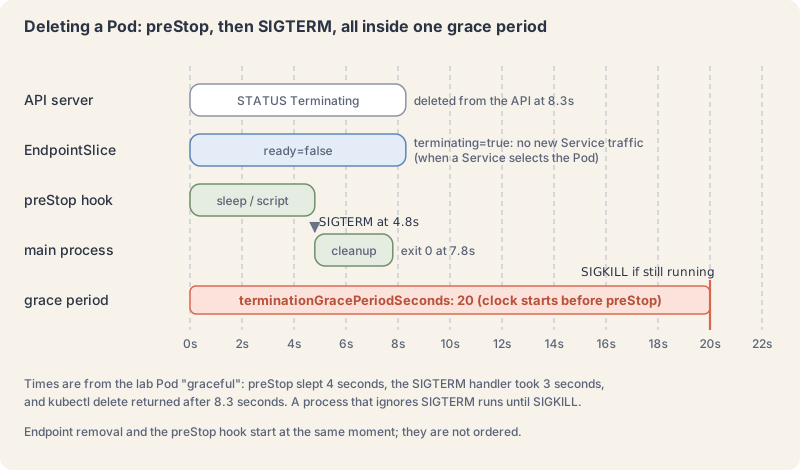
A preStop hook can be a command (exec), an HTTP call (httpGet) or a plain sleep. The short sleep in web.yaml is a common pattern: it keeps the Pod serving for a few seconds while the endpoint change spreads to every proxy, so in-flight and late-arriving requests are not refused.
Try it: a clean exit and a deaf one
- Save this as
graceful.yaml. Its shell traps SIGTERM, “finishes work” for three seconds and exits 0. The preStop hook writes to the container’s log and sleeps four seconds.
apiVersion: v1
kind: Pod
metadata:
  name: graceful
  namespace: k8s-from-zero
  labels:
    app.kubernetes.io/name: graceful
spec:
  terminationGracePeriodSeconds: 20
  containers:
    - name: app
      image: busybox:1.37
      command:
        - sh
        - -c
        - |
          trap 'echo "got SIGTERM, finishing work"; sleep 3; echo "clean exit"; exit 0' TERM
          echo "started"
          while true; do sleep 1; done
      lifecycle:
        preStop:
          exec:
command: ["sh", "-c", "echo 'preStop hook running' > /proc/1/fd/1; sleep 4"]- Save this as
deaf.yaml. It runs the same loop with no trap. Linux delivers a signal to the first process of a PID namespace, which is what process 1 in a container is, only if that process has installed a handler for it (pid_namespaces(7)); SIGKILL is the exception. This shell has no handler, so it never hears the stop request.
apiVersion: v1
kind: Pod
metadata:
  name: deaf
  namespace: k8s-from-zero
  labels:
    app.kubernetes.io/name: deaf
spec:
  containers:
    - name: app
      image: busybox:1.37
      # sh runs as PID 1 and has no SIGTERM handler, so it ignores the signal.
command: ["sh", "-c", "while true; do sleep 1; done"]- Apply both. In a second terminal, follow the logs of
gracefulwith timestamps; in the first, time the delete.
kubectl apply -f graceful.yaml -f deaf.yaml
kubectl logs -f graceful -n k8s-from-zero --timestamps    # second terminal
time kubectl delete pod graceful -n k8s-from-zeroExplain this command
kubectl apply -f graceful.yaml -f deaf.yaml
kubectl logs -f graceful -n k8s-from-zero --timestamps    # second terminal
time kubectl delete pod graceful -n k8s-from-zerokubectlThe Kubernetes command-line client. Subcommands and flags are documented under kubernetes.io/docs/reference/kubectl/.applyApply a configuration to a resource by file name or stdin. The apply docs say the resource is created if it does not exist yet. JSON and YAML are accepted.-fShort form of --filename. The file, directory or URL that contains the configuration to apply.graceful.yamlThe file named by --filename. apply creates the objects or updates them to match this file.-fShort form of --filename. The file, directory or URL that contains the configuration to apply.deaf.yamlThe file named by --filename. apply creates the objects or updates them to match this file.kubectlThe Kubernetes command-line client. Subcommands and flags are documented under kubernetes.io/docs/reference/kubectl/.logsPrint the logs for a container in a pod or specified resource. If the pod has only one container, the container name is optional.-fShort form of --follow. Specify if the logs should be streamed.gracefulThe Pod whose logs to stream: graceful.-nShort form of --namespace. If present, the namespace scope for this CLI request.k8s-from-zeroThe namespace name passed to --namespace.--timestampsInclude timestamps on each log line.#Shell. Starts a comment; the shell ignores the rest of the line.secondPart of the comment, not passed to kubectl.terminalPart of the comment, not passed to kubectl.timeShell. Runs the command that follows and prints how long it took (real, user, sys).kubectlThe Kubernetes command-line client. Subcommands and flags are documented under kubernetes.io/docs/reference/kubectl/.deleteDelete resources by file names, stdin, resources and names, or by resources and label selector.podThe resource type.gracefulThe object name.-nShort form of --namespace. If present, the namespace scope for this CLI request.k8s-from-zeroThe namespace name passed to --namespace.
pod "graceful" deleted from k8s-from-zero namespace

real	0m8.345s
2026-11-10T20:42:03.345218862Z started
2026-11-10T20:42:05.521187129Z preStop hook running
2026-11-10T20:42:10.354779725Z got SIGTERM, finishing work
2026-11-10T20:42:13.356002777Z clean exitThe order is exactly the flow above: the hook first, SIGTERM about five seconds later, a clean exit three seconds after that, and the Pod gone well inside its 20-second budget.
- Now the deaf one:
time kubectl delete pod deaf -n k8s-from-zeroExplain this command
time kubectl delete pod deaf -n k8s-from-zerotimeShell. Runs the command that follows and prints how long it took (real, user, sys).kubectlThe Kubernetes command-line client. Subcommands and flags are documented under kubernetes.io/docs/reference/kubectl/.deleteDelete resources by file names, stdin, resources and names, or by resources and label selector.podThe resource type.deafThe object name.-nShort form of --namespace. If present, the namespace scope for this CLI request.k8s-from-zeroThe namespace name passed to --namespace.
pod "deaf" deleted from k8s-from-zero namespace

real	0m31.062s
Thirty seconds of nothing, then SIGKILL. This is the same gap you saw with stuck. In production it means slow rollouts, and work that is cut off rather than finished.
- Finally, watch endpoints during a real deletion. Delete one
webPod without waiting, and look at the slice a second later:
kubectl delete pod web-b44cbc97c-8ptgj -n k8s-from-zero --wait=false
kubectl get endpointslice -n k8s-from-zero -l kubernetes.io/service-name=web \
-o jsonpath='{range .items[*].endpoints[*]}{.targetRef.name}{" "}{.conditions}{"\n"}{end}'Explain this command
kubectl delete pod web-b44cbc97c-8ptgj -n k8s-from-zero --wait=false
kubectl get endpointslice -n k8s-from-zero -l kubernetes.io/service-name=web \
-o jsonpath='{range .items[*].endpoints[*]}{.targetRef.name}{" "}{.conditions}{"\n"}{end}'kubectlThe Kubernetes command-line client. Subcommands and flags are documented under kubernetes.io/docs/reference/kubectl/.deleteDelete resources by file names, stdin, resources and names, or by resources and label selector.podThe resource type.web-b44cbc97c-8ptgjThe object name.-nShort form of --namespace. If present, the namespace scope for this CLI request.k8s-from-zeroThe namespace name passed to --namespace.--wait=falseDo not wait for the objects to finish deleting. The delete docs say --wait defaults to true.kubectlThe Kubernetes command-line client. Subcommands and flags are documented under kubernetes.io/docs/reference/kubectl/.getDisplay one or many resources. kubectl get prints a table of the most important information about the resources you name.endpointsliceThe resource type to display. kubectl get points you to kubectl api-resources for the full list of types the server supports.-nShort form of --namespace. If present, the namespace scope for this CLI request.k8s-from-zeroThe namespace name passed to --namespace.-lShort form of --selector. A label query. The get docs say it supports '=', '==', '!=', 'in' and 'notin', and that matching objects must satisfy every constraint.kubernetes.io/service-name=webThe label query passed to --selector: kubernetes.io/service-name=web.\Shell. Continues the command on the next line.-oShort form of --output. It selects the output format. For get, the formats include json, yaml, name, jsonpath, custom-columns and wide.jsonpath='{range .items[*].endpoints[*]}{.targetRef.name}{" "}{.conditions}{"\n"}{end}'jsonpath is an output format. A template is JSONPath expressions in curly braces. The JSONPath page says a double-quoted string inserts text, and its example uses a quoted backslash-n for a newline. This token is the template in the lesson command.
web-b44cbc97c-dtv9n  {"ready":true,"serving":true,"terminating":false}
web-b44cbc97c-8ptgj  {"ready":false,"serving":true,"terminating":true}
web-b44cbc97c-m78kg  {"ready":false,"serving":false,"terminating":false}
Three Pods in one view: the survivor serving normally, the deleted Pod still serving during its preStop sleep but marked terminating so it gets no new regular traffic, and its replacement from the ReplicaSet, not ready yet. Eight seconds later the old Pod is gone and both remaining endpoints are ready:true.
When it goes wrong
- A rollout that never finishes. A typo in a readiness probe means new Pods never become ready. We pointed the probe at port 8080, where nginx does not listen:
kubectl rollout statuswaited and then printederror: timed out waiting for the condition, the new Pod sat at0/1withReadiness probe failed: ... connect: connection refused, and the two old Pods kept serving. That is the readiness probe protecting you: the Deployment would not replace working Pods with broken ones. Fix the manifest andkubectl applyit again, or roll back withkubectl rollout undo(part 7). - A restart loop from a liveness probe. If
RESTARTSclimbs and the events sayfailed liveness probe, will be restarted, the probe may be too strict (a 1-secondtimeoutSecondson a slow endpoint) or the app may need longer to start. Use a startup probe for start time; do not inflate the liveness delay. - Liveness that checks dependencies. If a liveness probe calls the database and the database blips, every replica restarts at once. Keep liveness about the process itself; put dependency checks in readiness, if anywhere. The probes concept page warns that a careless liveness probe can cause cascading failures.
- Deletes that always take 30 seconds. The process ignores SIGTERM. Common causes: a shell script as process 1 without
trap, or a shell wrapper that starts the real app as a child, so the signal never reaches it. Useexecin wrapper scripts, or handle the signal. - A preStop hook longer than the grace period. The hook and the shutdown share one budget. If the hook needs 55 seconds and the app 10 to stop, a 60-second grace period kills the app mid-shutdown. Raise
terminationGracePeriodSecondsto cover both.
Cheat sheet
| Task | Command or field | Note |
|---|---|---|
| Restart on hang | livenessProbe |
trips after failureThreshold failures in a row |
| Gate traffic | readinessProbe |
failing removes the Pod from Service traffic, no restart |
| Protect slow starts | startupProbe |
allows failureThreshold x periodSeconds to start |
| HTTP check | httpGet: {path: /index.html, port: 80} |
200 to 399 passes |
| Port check | tcpSocket: {port: 80} |
passes if the port accepts a connection |
| Command check | exec: {command: ["cat", "/tmp/ok"]} |
exit 0 passes |
| Probe timing | periodSeconds, timeoutSeconds, failureThreshold |
defaults 10, 1, 3 |
| See probe failures | kubectl describe pod <name> |
look for Unhealthy and Killing events |
| See endpoint readiness | kubectl get endpointslice -l kubernetes.io/service-name=<svc> -o jsonpath=... |
read .conditions.ready |
| Why it restarted | kubectl get pod <name> -o jsonpath='{.status.containerStatuses[0].lastState}' |
exit 137 means SIGKILL |
| Time to shut down | terminationGracePeriodSeconds |
default 30, covers preStop plus SIGTERM handling |
| Run before SIGTERM | lifecycle.preStop |
sleep, exec or httpGet |
| Field help | kubectl explain pod.spec.containers.livenessProbe |
defaults straight from the API |
| Force delete | kubectl delete pod <name> --grace-period=0 --force |
skips the wait; use with care |
apiVersion: v1
kind: Pod
metadata:
  name: probed
  namespace: k8s-from-zero
spec:
  terminationGracePeriodSeconds: 30
  containers:
    - name: app
      image: nginx:1.29-alpine
      startupProbe:
        httpGet: {path: /index.html, port: 80}
        failureThreshold: 30
        periodSeconds: 2
      readinessProbe:
        httpGet: {path: /index.html, port: 80}
        periodSeconds: 5
      livenessProbe:
        tcpSocket: {port: 80}
      lifecycle:
        preStop:
          sleep: {seconds: 5}
Recap and what is next
- Startup probes cover start time, liveness probes restart a stuck container, readiness probes decide whether a Pod gets Service traffic.
- A failing readiness probe sets the endpoint’s
readycondition to false; the Pod keeps running. - Deleting a Pod runs the preStop hook, then sends SIGTERM, then SIGKILL when the grace period ends; the clock starts before the hook.
- A process that ignores SIGTERM turns every delete and every liveness restart into a 30-second wait.
- Keep liveness checks about the process itself, and give slow starters a startup probe.
Next: part 11, requests, limits and QoS, where you give each container a CPU and memory budget and watch what happens when it goes over. Coming tomorrow.
Command explanations and quoted passages in this lesson come from or adapt the kubectl reference and the Kubernetes documentation, © The Kubernetes Authors, licensed under CC BY 4.0. We shortened and edited some passages. Kubernetes® is a registered trademark of The Linux Foundation. aitamer.news is not affiliated with or endorsed by The Linux Foundation or the CNCF.
The Campfire
CommentsThanks. Your comment is waiting for the desk. Once it is approved it appears here within about a minute.
Add a comment