
In part 8 you gave Pods a stable name. Your apps still have their settings baked into the image or the command line. This episode moves those settings into two Kubernetes objects: a ConfigMap for ordinary settings and a Secret for passwords and keys. By the end you will feed both into a container as environment variables and as files, watch which ones change when you edit them, see with your own eyes that a Secret is only encoded, and lock a ConfigMap so nobody can change it. You need the kind cluster from part 3 and the k8s-from-zero namespace as your context namespace (part 6). We tested on kind v0.33.0 (node image v1.37.0) with kubectl v1.37.2.
What you will build
You will write a ConfigMap with two simple keys and one small properties file, and a Deployment whose container prints a setting from a variable and a line from the file every five seconds. You will change the ConfigMap and watch the file update while the variable does not, then fix that with the rollout restart from part 7. After that you add a Secret, mount it, decode it, and finish with an immutable ConfigMap and a deliberate typo.
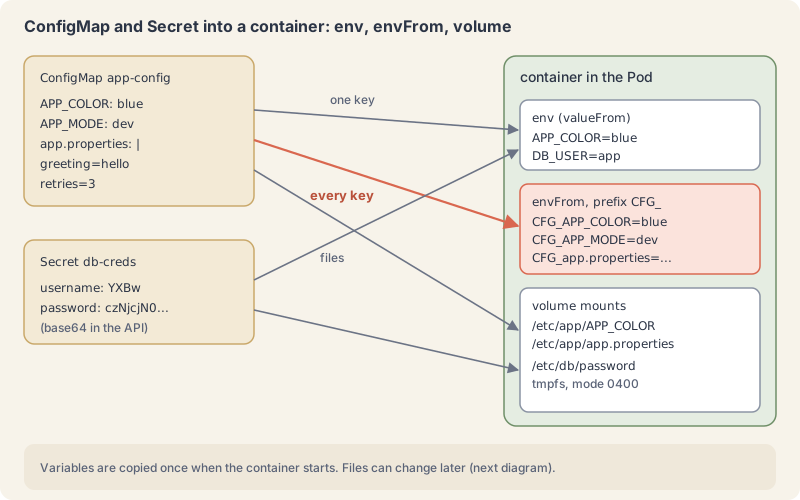
A ConfigMap holds settings outside the image
A ConfigMap is a namespaced object (part 6) with a data map of string keys and string values. The ConfigMaps page calls it a way to “decouple environment-specific configuration from your container images.” The same image can run in dev and prod with different ConfigMaps. A value can be a single word or a whole file, and the total size is capped at 1 MiB; larger data belongs in a volume (part 13) or a database.
A container reads a ConfigMap in one of three ways:
envwithvalueFrom.configMapKeyRef: one key into one variable whose name you choose.envFrom.configMapRef: every key becomes a variable, optionally with aprefix. Quick, but it imports keys you did not mean to, as the lab shows.- a
configMapvolume: every key becomes a file in a directory you mount.
The ConfigMap must exist in the same namespace as the Pod. If it does not, the container does not start.
Variables are read once, files can change
Environment variables are set when a container starts and never again. The ConfigMaps page says so directly: “ConfigMaps consumed as environment variables are not updated automatically and require a pod restart.”
Mounted files behave differently. The kubelet (part 2) refreshes ConfigMap volumes on its periodic sync, so a changed value shows up in the file after a delay. The docs put that delay at up to the kubelet sync period plus the cache propagation delay; in our lab it was about a minute. Two exceptions: a file mounted with subPath never receives updates, and your app only sees a new file if it reads the file again.
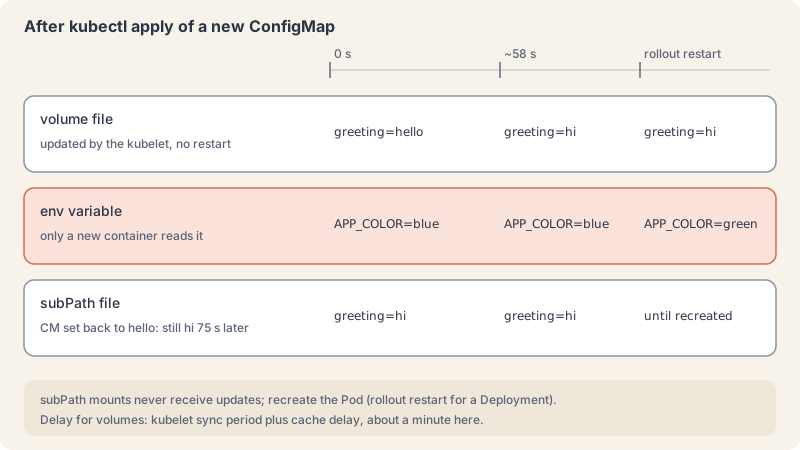
If your app reads its settings only at start, plan on a kubectl rollout restart after each ConfigMap change, or give each version its own ConfigMap name and change the reference in the Deployment, which triggers a normal rollout (part 7).
A Secret is a ConfigMap with stricter handling
A Secret looks almost the same: a namespaced object with a data map, also limited to 1 MiB. The differences are in handling. Values in data are base64-encoded. For convenience you can write plain text under stringData and the API server encodes it for you. Secrets have a type: Opaque for your own keys, and built-in types such as kubernetes.io/dockerconfigjson for registry logins or kubernetes.io/tls for certificates.
base64 is not encryption. It is a reversible encoding with no key. The Secrets page carries a caution that Secrets are, by default, stored unencrypted in etcd, that anyone with API access can read or change them, and that anyone allowed to create a Pod in a namespace can read any Secret in that namespace, including indirectly, for example by creating a Deployment.
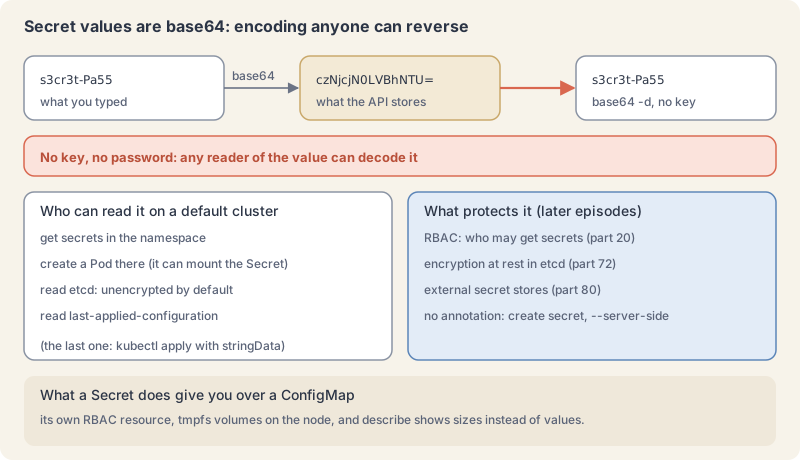
So what does a Secret give you? A separate resource type that access rules can treat differently from ConfigMaps (part 20), volumes the kubelet keeps in memory (tmpfs) so the values are not written to the node’s disk, and kubectl describe showing sizes instead of values. The good practices page adds the rest: encryption at rest for etcd, least-privilege access, and an external secret store for anything serious. Parts 72 and 80 cover those. Never commit a Secret manifest with real values to Git.
Try it: settings in, settings changed
- Draft a ConfigMap the way part 5 taught:
kubectl create configmap demo --from-literal=APP_COLOR=blue --from-literal=APP_MODE=dev --dry-run=client -o yamlExplain this command
kubectl create configmap demo --from-literal=APP_COLOR=blue --from-literal=APP_MODE=dev --dry-run=client -o yamlkubectlThe Kubernetes command-line client. Subcommands and flags are documented under kubernetes.io/docs/reference/kubectl/.createCreate a resource from a file or from stdin, or through a subcommand such as namespace.configmapThe resource type.demoThe object name.--from-literal=APP_COLOR=blueA key=value to store in the new object. create secret and create configmap both take --from-literal. This command passes APP_COLOR=blue.--from-literal=APP_MODE=devA key=value to store in the new object. create secret and create configmap both take --from-literal. This command passes APP_MODE=dev.--dry-run=clientA dry run. The run docs say --dry-run must be none, server, or client. Client only prints the object that would be sent, without sending it. The lesson uses client dry-run to write YAML.-oShort form of --output. It selects the output format. For get, the formats include json, yaml, name, jsonpath, custom-columns and wide.yamlAn output format. It prints the object as YAML.
apiVersion: v1
data:
  APP_COLOR: blue
  APP_MODE: dev
kind: ConfigMap
metadata:
  name: demo
--from-file=app.properties would add a whole file as one key.
- Write the real one. Save as
app-config.yaml:
apiVersion: v1
kind: ConfigMap
metadata:
  name: app-config
  namespace: k8s-from-zero
data:
  APP_COLOR: blue
  APP_MODE: dev
  app.properties: |
    greeting=hello
retries=3kubectl apply -f app-config.yaml
kubectl get configmap app-config
kubectl describe configmap app-configExplain this command
kubectl apply -f app-config.yaml
kubectl get configmap app-config
kubectl describe configmap app-configkubectlThe Kubernetes command-line client. Subcommands and flags are documented under kubernetes.io/docs/reference/kubectl/.applyApply a configuration to a resource by file name or stdin. The apply docs say the resource is created if it does not exist yet. JSON and YAML are accepted.-fShort form of --filename. The file, directory or URL that contains the configuration to apply.app-config.yamlThe file named by --filename. apply creates the objects or updates them to match this file.kubectlThe Kubernetes command-line client. Subcommands and flags are documented under kubernetes.io/docs/reference/kubectl/.getDisplay one or many resources. kubectl get prints a table of the most important information about the resources you name.configmapThe resource type to display. kubectl get points you to kubectl api-resources for the full list of types the server supports.app-configThe object name.kubectlThe Kubernetes command-line client. Subcommands and flags are documented under kubernetes.io/docs/reference/kubectl/.describeShow details of a specific resource or group of resources. The describe docs say this includes related resources such as events or controllers.configmapThe resource type.app-configThe object name.
configmap/app-config created
NAME         DATA   AGE
app-config   3      0s
Name:         app-config
Namespace:    k8s-from-zero
...
Data
====
APP_COLOR:
----
blue

APP_MODE:
----
dev

app.properties:
----
greeting=hello
retries=3
...- Use it three ways. Save as
app.yaml:
apiVersion: apps/v1
kind: Deployment
metadata:
  name: app
  namespace: k8s-from-zero
  labels:
    app.kubernetes.io/name: app
spec:
  replicas: 1
  selector:
    matchLabels:
      app.kubernetes.io/name: app
  template:
    metadata:
      labels:
        app.kubernetes.io/name: app
    spec:
      containers:
        - name: app
          image: busybox:1.37
          command: ["sh", "-c", "while true; do echo \"$(date +%T) color=$APP_COLOR file: $(grep greeting /etc/app/app.properties)\"; sleep 5; done"]
          env:
            - name: APP_COLOR            # one key, under a name you choose
              valueFrom:
                configMapKeyRef:
                  name: app-config
                  key: APP_COLOR
          envFrom:
            - configMapRef:              # every key becomes a variable
                name: app-config
              prefix: CFG_
          volumeMounts:
            - name: config
              mountPath: /etc/app
              readOnly: true
      volumes:
        - name: config
          configMap:
name: app-configkubectl apply -f app.yaml
kubectl rollout status deployment/app --timeout=60s
kubectl exec deploy/app -- env | grep -E "APP_|CFG_" | sortExplain this command
kubectl apply -f app.yaml
kubectl rollout status deployment/app --timeout=60s
kubectl exec deploy/app -- env | grep -E "APP_|CFG_" | sortkubectlThe Kubernetes command-line client. Subcommands and flags are documented under kubernetes.io/docs/reference/kubectl/.applyApply a configuration to a resource by file name or stdin. The apply docs say the resource is created if it does not exist yet. JSON and YAML are accepted.-fShort form of --filename. The file, directory or URL that contains the configuration to apply.app.yamlThe file named by --filename. apply creates the objects or updates them to match this file.kubectlThe Kubernetes command-line client. Subcommands and flags are documented under kubernetes.io/docs/reference/kubectl/.rolloutThe command group for rollout actions.statusShow the status of a rollout and wait until it finishes.deployment/appThe resource written as type/name: deployment/app.--timeout=60sHow long to wait before giving up. This command passes 60s.kubectlThe Kubernetes command-line client. Subcommands and flags are documented under kubernetes.io/docs/reference/kubectl/.execExecute a command in a container. The synopsis is kubectl exec (POD | TYPE/NAME) [-c CONTAINER] [flags] -- COMMAND [args...].deploy/appThe resource written as type/name: deploy/app.--Ends kubectl's flags. The exec examples say to use two dashes so the command's own flags are read as that command's flags.envPrints the environment of the process.|Shell. Sends the previous command's standard output to the next command.grepShell. Prints input lines that match a pattern.-EShort form of --extended-regexp. grep treats the pattern as an extended regular expression."APP_|CFG_"The pattern grep looks for.|Shell. Sends the previous command's standard output to the next command.sortShell. Sorts lines.
deployment.apps/app created
...
deployment "app" successfully rolled out
APP_COLOR=blue
CFG_APP_COLOR=blue
CFG_APP_MODE=dev
CFG_app.properties=greeting=hello
kubectl exec deploy/app picks a Pod of the Deployment for you. Look at the last line: envFrom also turned the file key into a variable, with the whole two-line file as its value (grep shows only the first line). That is why we prefer explicit env entries, or a separate ConfigMap per use.
- Look at the files.
kubectl exec deploy/app -- ls -la /etc/app
kubectl exec deploy/app -- cat /etc/app/app.propertiesExplain this command
kubectl exec deploy/app -- ls -la /etc/app
kubectl exec deploy/app -- cat /etc/app/app.propertieskubectlThe Kubernetes command-line client. Subcommands and flags are documented under kubernetes.io/docs/reference/kubectl/.execExecute a command in a container. The synopsis is kubectl exec (POD | TYPE/NAME) [-c CONTAINER] [flags] -- COMMAND [args...].deploy/appThe resource written as type/name: deploy/app.--Ends kubectl's flags. The exec examples say to use two dashes so the command's own flags are read as that command's flags.lsLists files at the path that follows.-laA flag of the command inside the container: -la./etc/appA path inside the container: /etc/app.kubectlThe Kubernetes command-line client. Subcommands and flags are documented under kubernetes.io/docs/reference/kubectl/.execExecute a command in a container. The synopsis is kubectl exec (POD | TYPE/NAME) [-c CONTAINER] [flags] -- COMMAND [args...].deploy/appThe resource written as type/name: deploy/app.--Ends kubectl's flags. The exec examples say to use two dashes so the command's own flags are read as that command's flags.catShell. Writes the named files to standard output./etc/app/app.propertiesA path inside the container: /etc/app/app.properties.
total 12
drwxrwxrwx    3 root     root          4096 Nov 10 20:52 .
drwxr-xr-x    1 root     root          4096 Nov 10 20:52 ..
drwxr-xr-x    2 root     root          4096 Nov 10 20:52 ..2026_11_10_20_52_56.760051666
lrwxrwxrwx    1 root     root            31 Nov 10 20:52 ..data -> ..2026_11_10_20_52_56.760051666
lrwxrwxrwx    1 root     root            16 Nov 10 20:52 APP_COLOR -> ..data/APP_COLOR
lrwxrwxrwx    1 root     root            15 Nov 10 20:52 APP_MODE -> ..data/APP_MODE
lrwxrwxrwx    1 root     root            21 Nov 10 20:52 app.properties -> ..data/app.properties
greeting=hello
retries=3
Each key is a symlink into a timestamped folder. On an update, the kubelet writes a new folder and swaps the ..data link in one step, so your app never reads a half-written file.
- Change the ConfigMap. Copy it to
app-config-v2.yamlwith two edits:
diff app-config.yaml app-config-v2.yamlExplain this command
diff app-config.yaml app-config-v2.yamldiffCompares inputs line by line.app-config.yamlThe first file diff compares (from-file): the original ConfigMap manifest.app-config-v2.yamlThe second file diff compares (to-file): the copy with APP_COLOR green and greeting=hi.
7c7
<   APP_COLOR: blue
---
>   APP_COLOR: green
10c10
<     greeting=hello
---
> greeting=hikubectl apply -f app-config-v2.yamlExplain this command
kubectl apply -f app-config-v2.yamlkubectlThe Kubernetes command-line client. Subcommands and flags are documented under kubernetes.io/docs/reference/kubectl/.applyApply a configuration to a resource by file name or stdin. The apply docs say the resource is created if it does not exist yet. JSON and YAML are accepted.-fShort form of --filename. The file, directory or URL that contains the configuration to apply.app-config-v2.yamlThe file named by --filename. apply creates the objects or updates them to match this file.
configmap/app-config configuredWe polled the file every two seconds. It changed about 58 seconds after the apply. Then:
kubectl exec deploy/app -- cat /etc/app/app.properties
kubectl exec deploy/app -- cat /etc/app/APP_COLOR; echo
kubectl exec deploy/app -- sh -c 'echo $APP_COLOR'Explain this command
kubectl exec deploy/app -- cat /etc/app/app.properties
kubectl exec deploy/app -- cat /etc/app/APP_COLOR; echo
kubectl exec deploy/app -- sh -c 'echo $APP_COLOR'kubectlThe Kubernetes command-line client. Subcommands and flags are documented under kubernetes.io/docs/reference/kubectl/.execExecute a command in a container. The synopsis is kubectl exec (POD | TYPE/NAME) [-c CONTAINER] [flags] -- COMMAND [args...].deploy/appThe resource written as type/name: deploy/app.--Ends kubectl's flags. The exec examples say to use two dashes so the command's own flags are read as that command's flags.catShell. Writes the named files to standard output./etc/app/app.propertiesA path inside the container: /etc/app/app.properties.kubectlThe Kubernetes command-line client. Subcommands and flags are documented under kubernetes.io/docs/reference/kubectl/.execExecute a command in a container. The synopsis is kubectl exec (POD | TYPE/NAME) [-c CONTAINER] [flags] -- COMMAND [args...].deploy/appThe resource written as type/name: deploy/app.--Ends kubectl's flags. The exec examples say to use two dashes so the command's own flags are read as that command's flags.catShell. Writes the named files to standard output./etc/app/APP_COLORA path inside the container: /etc/app/APP_COLOR.;Shell. Runs the next command after this one finishes, whatever its exit status.echoShell. Writes its arguments to standard output, then a newline.kubectlThe Kubernetes command-line client. Subcommands and flags are documented under kubernetes.io/docs/reference/kubectl/.execExecute a command in a container. The synopsis is kubectl exec (POD | TYPE/NAME) [-c CONTAINER] [flags] -- COMMAND [args...].deploy/appThe resource written as type/name: deploy/app.--Ends kubectl's flags. The exec examples say to use two dashes so the command's own flags are read as that command's flags.shThe program kubectl exec runs inside the container: sh, the shell in busybox:1.37.-cA flag of the command inside the container: -c. sh -c runs the next argument as a shell command.'echo $APP_COLOR'The command string sh -c reads. The single quotes stop your own shell from expanding $APP_COLOR, so the shell in the container expands it and prints the value the container started with.
greeting=hi
retries=3
green
blue
The files say hi and green. The variable still says blue, and it will until the container is replaced.
- Restart to pick up the variables.
kubectl rollout restart deployment/app
kubectl rollout status deployment/app --timeout=60s
kubectl exec deploy/app -- sh -c 'echo $APP_COLOR'
kubectl logs deploy/app --tail=2Explain this command
kubectl rollout restart deployment/app
kubectl rollout status deployment/app --timeout=60s
kubectl exec deploy/app -- sh -c 'echo $APP_COLOR'
kubectl logs deploy/app --tail=2kubectlThe Kubernetes command-line client. Subcommands and flags are documented under kubernetes.io/docs/reference/kubectl/.rolloutThe command group for rollout actions.restartRestart a resource by rolling its Pods.deployment/appThe resource written as type/name: deployment/app.kubectlThe Kubernetes command-line client. Subcommands and flags are documented under kubernetes.io/docs/reference/kubectl/.rolloutThe command group for rollout actions.statusShow the status of a rollout and wait until it finishes.deployment/appThe resource written as type/name: deployment/app.--timeout=60sHow long to wait before giving up. This command passes 60s.kubectlThe Kubernetes command-line client. Subcommands and flags are documented under kubernetes.io/docs/reference/kubectl/.execExecute a command in a container. The synopsis is kubectl exec (POD | TYPE/NAME) [-c CONTAINER] [flags] -- COMMAND [args...].deploy/appThe resource written as type/name: deploy/app.--Ends kubectl's flags. The exec examples say to use two dashes so the command's own flags are read as that command's flags.shThe program kubectl exec runs inside the container: sh, the shell in busybox:1.37.-cA flag of the command inside the container: -c. sh -c runs the next argument as a shell command.'echo $APP_COLOR'The command string sh -c reads. The single quotes stop your own shell from expanding $APP_COLOR, so the shell in the container expands it and prints the value the container started with.kubectlThe Kubernetes command-line client. Subcommands and flags are documented under kubernetes.io/docs/reference/kubectl/.logsPrint the logs for a container in a pod or specified resource. If the pod has only one container, the container name is optional.deploy/appThe resource written as type/name: deploy/app.--tail=2How many recent log lines to show. The logs docs say --tail limits the lines. This command passes 2.
deployment.apps/app restarted
deployment "app" successfully rolled out
green
20:54:40 color=green file: greeting=hi
20:54:45 color=green file: greeting=hi
(The log times are UTC: the container has no time zone set.)
- See subPath stay behind. Save as
subpath.yaml, a Pod that mounts only the one file:
apiVersion: v1
kind: Pod
metadata:
  name: subpath
  namespace: k8s-from-zero
spec:
  containers:
    - name: subpath
      image: busybox:1.37
      command: ["sleep", "3600"]
      volumeMounts:
        - name: config
          mountPath: /etc/app.properties
          subPath: app.properties      # one file only; never updated
  volumes:
    - name: config
      configMap:
name: app-configkubectl apply -f subpath.yaml
kubectl exec subpath -- cat /etc/app.properties
kubectl apply -f app-config.yamlExplain this command
kubectl apply -f subpath.yaml
kubectl exec subpath -- cat /etc/app.properties
kubectl apply -f app-config.yamlkubectlThe Kubernetes command-line client. Subcommands and flags are documented under kubernetes.io/docs/reference/kubectl/.applyApply a configuration to a resource by file name or stdin. The apply docs say the resource is created if it does not exist yet. JSON and YAML are accepted.-fShort form of --filename. The file, directory or URL that contains the configuration to apply.subpath.yamlThe file named by --filename. apply creates the objects or updates them to match this file.kubectlThe Kubernetes command-line client. Subcommands and flags are documented under kubernetes.io/docs/reference/kubectl/.execExecute a command in a container. The synopsis is kubectl exec (POD | TYPE/NAME) [-c CONTAINER] [flags] -- COMMAND [args...].subpathAn argument of this command: subpath.--Ends kubectl's flags. The exec examples say to use two dashes so the command's own flags are read as that command's flags.catShell. Writes the named files to standard output./etc/app.propertiesA path inside the container: /etc/app.properties.kubectlThe Kubernetes command-line client. Subcommands and flags are documented under kubernetes.io/docs/reference/kubectl/.applyApply a configuration to a resource by file name or stdin. The apply docs say the resource is created if it does not exist yet. JSON and YAML are accepted.-fShort form of --filename. The file, directory or URL that contains the configuration to apply.app-config.yamlThe file named by --filename. apply creates the objects or updates them to match this file.
pod/subpath created
greeting=hi
retries=3
configmap/app-config configured
We put the original file back (greeting=hello) and waited 75 seconds:
kubectl exec deploy/app -- cat /etc/app/app.properties
kubectl exec subpath -- cat /etc/app.propertiesExplain this command
kubectl exec deploy/app -- cat /etc/app/app.properties
kubectl exec subpath -- cat /etc/app.propertieskubectlThe Kubernetes command-line client. Subcommands and flags are documented under kubernetes.io/docs/reference/kubectl/.execExecute a command in a container. The synopsis is kubectl exec (POD | TYPE/NAME) [-c CONTAINER] [flags] -- COMMAND [args...].deploy/appThe resource written as type/name: deploy/app.--Ends kubectl's flags. The exec examples say to use two dashes so the command's own flags are read as that command's flags.catShell. Writes the named files to standard output./etc/app/app.propertiesA path inside the container: /etc/app/app.properties.kubectlThe Kubernetes command-line client. Subcommands and flags are documented under kubernetes.io/docs/reference/kubectl/.execExecute a command in a container. The synopsis is kubectl exec (POD | TYPE/NAME) [-c CONTAINER] [flags] -- COMMAND [args...].subpathAn argument of this command: subpath.--Ends kubectl's flags. The exec examples say to use two dashes so the command's own flags are read as that command's flags.catShell. Writes the named files to standard output./etc/app.propertiesA path inside the container: /etc/app.properties.
greeting=hello
retries=3
greeting=hi
retries=3
The directory mount followed the change; the subPath file did not.
- Create a Secret. Save as
secret.yaml. The values are examples; never put real ones in a file you commit.
apiVersion: v1
kind: Secret
metadata:
  name: db-creds
  namespace: k8s-from-zero
type: Opaque
stringData:                # plain text in, stored base64-encoded
  username: app
password: "s3cr3t-Pa55"kubectl apply -f secret.yaml
kubectl get secrets
kubectl describe secret db-credsExplain this command
kubectl apply -f secret.yaml
kubectl get secrets
kubectl describe secret db-credskubectlThe Kubernetes command-line client. Subcommands and flags are documented under kubernetes.io/docs/reference/kubectl/.applyApply a configuration to a resource by file name or stdin. The apply docs say the resource is created if it does not exist yet. JSON and YAML are accepted.-fShort form of --filename. The file, directory or URL that contains the configuration to apply.secret.yamlThe file named by --filename. apply creates the objects or updates them to match this file.kubectlThe Kubernetes command-line client. Subcommands and flags are documented under kubernetes.io/docs/reference/kubectl/.getDisplay one or many resources. kubectl get prints a table of the most important information about the resources you name.secretsThe resource type to display. kubectl get points you to kubectl api-resources for the full list of types the server supports.kubectlThe Kubernetes command-line client. Subcommands and flags are documented under kubernetes.io/docs/reference/kubectl/.describeShow details of a specific resource or group of resources. The describe docs say this includes related resources such as events or controllers.secretThe resource type.db-credsThe object name.
secret/db-creds created
NAME       TYPE     DATA   AGE
db-creds   Opaque   2      0s
Name:         db-creds
Namespace:    k8s-from-zero
...
Type:  Opaque

Data
====
password:  11 bytes
username: 3 bytes- Decode it.
kubectl get secret db-creds -o yamlExplain this command
kubectl get secret db-creds -o yamlkubectlThe Kubernetes command-line client. Subcommands and flags are documented under kubernetes.io/docs/reference/kubectl/.getDisplay one or many resources. kubectl get prints a table of the most important information about the resources you name.secretThe resource type to display. kubectl get points you to kubectl api-resources for the full list of types the server supports.db-credsThe object name.-oShort form of --output. It selects the output format. For get, the formats include json, yaml, name, jsonpath, custom-columns and wide.yamlAn output format. It prints the object as YAML.
apiVersion: v1
data:
  password: czNjcjN0LVBhNTU=
  username: YXBw
kind: Secret
metadata:
  annotations:
    kubectl.kubernetes.io/last-applied-configuration: |
      {"apiVersion":"v1","kind":"Secret","metadata":{"annotations":{},"name":"db-creds","namespace":"k8s-from-zero"},"stringData":{"password":"s3cr3t-Pa55","username":"app"},"type":"Opaque"}
...
type: Opaquekubectl get secret db-creds -o jsonpath="{.data.password}" | base64 -d; echo
echo -n s3cr3t-Pa55 | base64Explain this command
kubectl get secret db-creds -o jsonpath="{.data.password}" | base64 -d; echo
echo -n s3cr3t-Pa55 | base64kubectlThe Kubernetes command-line client. Subcommands and flags are documented under kubernetes.io/docs/reference/kubectl/.getDisplay one or many resources. kubectl get prints a table of the most important information about the resources you name.secretThe resource type to display. kubectl get points you to kubectl api-resources for the full list of types the server supports.db-credsThe object name.-oShort form of --output. It selects the output format. For get, the formats include json, yaml, name, jsonpath, custom-columns and wide.jsonpath="{.data.password}"jsonpath is an output format. A template is JSONPath expressions in curly braces. The JSONPath page says a double-quoted string inserts text, and its example uses a quoted backslash-n for a newline. This token is the template in the lesson command.|Shell. Sends the previous command's standard output to the next command.base64Encodes or decodes base64.-dDecode. base64 writes the original bytes.;Shell. Runs the next command after this one finishes, whatever its exit status.echoShell. Writes its arguments to standard output, then a newline.echoShell. Writes its arguments to standard output, then a newline.-nA flag of echo. -n writes the text with no trailing newline, so the encoded Secret value has no extra line.s3cr3t-Pa55An argument of this command: s3cr3t-Pa55.|Shell. Sends the previous command's standard output to the next command.base64Encodes or decodes base64.
s3cr3t-Pa55
czNjcjN0LVBhNTU=
Two lessons in one output. First, anyone who can read the object reads the password: base64 hides nothing. Second, look at the annotation. Client-side kubectl apply stored your whole file, plain-text stringData included, in last-applied-configuration (part 5). Avoid that with kubectl create secret generic ... --from-literal or with server-side apply, which keeps no such annotation:
kubectl apply --server-side -f secret-ssa.yaml
kubectl get secret db-creds-ssa -o jsonpath="{.metadata.annotations}"; echo "(no annotations)"Explain this command
kubectl apply --server-side -f secret-ssa.yaml
kubectl get secret db-creds-ssa -o jsonpath="{.metadata.annotations}"; echo "(no annotations)"kubectlThe Kubernetes command-line client. Subcommands and flags are documented under kubernetes.io/docs/reference/kubectl/.applyApply a configuration to a resource by file name or stdin. The apply docs say the resource is created if it does not exist yet. JSON and YAML are accepted.--server-sideUse server-side apply. The server tracks field ownership instead of the last-applied annotation.-fShort form of --filename. The file, directory or URL that contains the configuration to apply.secret-ssa.yamlThe file named by --filename. apply creates the objects or updates them to match this file.kubectlThe Kubernetes command-line client. Subcommands and flags are documented under kubernetes.io/docs/reference/kubectl/.getDisplay one or many resources. kubectl get prints a table of the most important information about the resources you name.secretThe resource type to display. kubectl get points you to kubectl api-resources for the full list of types the server supports.db-creds-ssaThe object name.-oShort form of --output. It selects the output format. For get, the formats include json, yaml, name, jsonpath, custom-columns and wide.jsonpath="{.metadata.annotations}"jsonpath is an output format. A template is JSONPath expressions in curly braces. The JSONPath page says a double-quoted string inserts text, and its example uses a quoted backslash-n for a newline. This token is the template in the lesson command.;Shell. Runs the next command after this one finishes, whatever its exit status.echoShell. Writes its arguments to standard output, then a newline."(no annotations)"The text echo prints right after the jsonpath result. echo prints it every time; the point is that nothing comes before it, because the Secret has no annotations.
secret/db-creds-ssa serverside-applied
(no annotations)(secret-ssa.yaml is the same Secret named db-creds-ssa. Delete it afterwards with kubectl delete secret db-creds-ssa.)
- Use the Secret in a Pod. Save as
db-client.yaml:
apiVersion: v1
kind: Pod
metadata:
  name: db-client
  namespace: k8s-from-zero
spec:
  containers:
    - name: db-client
      image: busybox:1.37
      command: ["sleep", "3600"]
      env:
        - name: DB_USER
          valueFrom:
            secretKeyRef:
              name: db-creds
              key: username
      volumeMounts:
        - name: creds
          mountPath: /etc/db
          readOnly: true
  volumes:
    - name: creds
      secret:
        secretName: db-creds
defaultMode: 0400kubectl apply -f db-client.yaml
kubectl exec db-client -- sh -c 'echo user=$DB_USER; ls -lL /etc/db; cat /etc/db/password; echo'
kubectl exec db-client -- sh -c 'mount | grep /etc/db'
kubectl describe pod db-client | grep -A3 "Environment:"Explain this command
kubectl apply -f db-client.yaml
kubectl exec db-client -- sh -c 'echo user=$DB_USER; ls -lL /etc/db; cat /etc/db/password; echo'
kubectl exec db-client -- sh -c 'mount | grep /etc/db'
kubectl describe pod db-client | grep -A3 "Environment:"kubectlThe Kubernetes command-line client. Subcommands and flags are documented under kubernetes.io/docs/reference/kubectl/.applyApply a configuration to a resource by file name or stdin. The apply docs say the resource is created if it does not exist yet. JSON and YAML are accepted.-fShort form of --filename. The file, directory or URL that contains the configuration to apply.db-client.yamlThe file named by --filename. apply creates the objects or updates them to match this file.kubectlThe Kubernetes command-line client. Subcommands and flags are documented under kubernetes.io/docs/reference/kubectl/.execExecute a command in a container. The synopsis is kubectl exec (POD | TYPE/NAME) [-c CONTAINER] [flags] -- COMMAND [args...].db-clientAn argument of this command: db-client.--Ends kubectl's flags. The exec examples say to use two dashes so the command's own flags are read as that command's flags.shThe program kubectl exec runs inside the container: sh, the shell in busybox:1.37.-cA flag of the command inside the container: -c. sh -c runs the next argument as a shell command.'echo user=$DB_USER; ls -lL /etc/db; cat /etc/db/password; echo'The command string sh -c reads. Inside the container it prints DB_USER, lists /etc/db with ls -lL (long format, showing the files the key symlinks point to), prints the password file, then a newline. The single quotes keep $DB_USER for the container's shell.kubectlThe Kubernetes command-line client. Subcommands and flags are documented under kubernetes.io/docs/reference/kubectl/.execExecute a command in a container. The synopsis is kubectl exec (POD | TYPE/NAME) [-c CONTAINER] [flags] -- COMMAND [args...].db-clientAn argument of this command: db-client.--Ends kubectl's flags. The exec examples say to use two dashes so the command's own flags are read as that command's flags.shThe program kubectl exec runs inside the container: sh, the shell in busybox:1.37.-cA flag of the command inside the container: -c. sh -c runs the next argument as a shell command.'mount | grep /etc/db'The command string sh -c reads. Inside the container it lists the mounts and keeps the line for /etc/db, which shows a tmpfs.kubectlThe Kubernetes command-line client. Subcommands and flags are documented under kubernetes.io/docs/reference/kubectl/.describeShow details of a specific resource or group of resources. The describe docs say this includes related resources such as events or controllers.podThe resource type.db-clientThe object name.|Shell. Sends the previous command's standard output to the next command.grepShell. Prints input lines that match a pattern.-A3grep's -A NUM: print NUM lines of trailing context after each matching line, here the 3 lines after Environment:."Environment:"The pattern grep looks for.
pod/db-client created
user=app
total 8
-r--------    1 root     root            11 Nov 10 20:54 password
-r--------    1 root     root             3 Nov 10 20:54 username
s3cr3t-Pa55
tmpfs on /etc/db type tmpfs (ro,relatime,size=16386416k,noswap)
    Environment:
      DB_USER:  <set to the key 'username' in secret 'db-creds'>  Optional: false
    Mounts:
      /etc/db from creds (ro)
Inside the container the values are plain text, as they must be for the app to use them. The files are on tmpfs, readable only by their owner (0400). Many teams prefer files over variables for real secrets, because every child process inherits the environment and debugging tools often print it.
- Lock a ConfigMap. Save as
flags-v1.yaml:
apiVersion: v1
kind: ConfigMap
metadata:
  name: flags-v1
  namespace: k8s-from-zero
immutable: true
data:
NEW_CHECKOUT: "off"kubectl apply -f flags-v1.yaml
kubectl patch configmap flags-v1 -p '{"data":{"NEW_CHECKOUT":"on"}}'
kubectl patch configmap flags-v1 -p '{"immutable":false}'Explain this command
kubectl apply -f flags-v1.yaml
kubectl patch configmap flags-v1 -p '{"data":{"NEW_CHECKOUT":"on"}}'
kubectl patch configmap flags-v1 -p '{"immutable":false}'kubectlThe Kubernetes command-line client. Subcommands and flags are documented under kubernetes.io/docs/reference/kubectl/.applyApply a configuration to a resource by file name or stdin. The apply docs say the resource is created if it does not exist yet. JSON and YAML are accepted.-fShort form of --filename. The file, directory or URL that contains the configuration to apply.flags-v1.yamlThe file named by --filename. apply creates the objects or updates them to match this file.kubectlThe Kubernetes command-line client. Subcommands and flags are documented under kubernetes.io/docs/reference/kubectl/.patchUpdate fields of a resource using a strategic merge patch, a JSON merge patch, or a JSON patch. The patch docs say JSON and YAML are accepted.configmapThe resource type.flags-v1The object name.-pShort form of --patch. The patch to be applied to the resource JSON file. The patch examples pass it as JSON.'{"data":{"NEW_CHECKOUT":"on"}}'The patch, in single quotes. No --type is given, so kubectl uses the default strategic merge patch. It tries to set NEW_CHECKOUT to on, and the API refuses because the ConfigMap is immutable.kubectlThe Kubernetes command-line client. Subcommands and flags are documented under kubernetes.io/docs/reference/kubectl/.patchUpdate fields of a resource using a strategic merge patch, a JSON merge patch, or a JSON patch. The patch docs say JSON and YAML are accepted.configmapThe resource type.flags-v1The object name.-pShort form of --patch. The patch to be applied to the resource JSON file. The patch examples pass it as JSON.'{"immutable":false}'The patch, in single quotes, with the default strategic merge type. It tries to turn immutable off, and the API refuses: the docs say marking a ConfigMap immutable cannot be reverted.
configmap/flags-v1 created
The ConfigMap "flags-v1" is invalid: data: Forbidden: field is immutable when `immutable` is set
The ConfigMap "flags-v1" is invalid: immutable: Forbidden: field is immutable when `immutable` is set
You cannot change the data or undo the flag; you can only delete it and create a new one. That is the point: a change means a new name, such as flags-v2, and a new rollout that you can undo. The docs add that the kubelet stops watching immutable ConfigMaps, which takes load off the API server in big clusters. Secrets accept immutable: true the same way.
- Clean up.
kubectl delete -f subpath.yaml -f db-client.yaml -f app.yaml -f secret.yaml -f flags-v1.yaml -f app-config.yamlExplain this command
kubectl delete -f subpath.yaml -f db-client.yaml -f app.yaml -f secret.yaml -f flags-v1.yaml -f app-config.yamlkubectlThe Kubernetes command-line client. Subcommands and flags are documented under kubernetes.io/docs/reference/kubectl/.deleteDelete resources by file names, stdin, resources and names, or by resources and label selector.-fShort form of --filename. For delete, the file that contains the resource to delete.subpath.yamlThe file named by --filename. delete removes the resources that file describes.-fShort form of --filename. For delete, the file that contains the resource to delete.db-client.yamlThe file named by --filename. delete removes the resources that file describes.-fShort form of --filename. For delete, the file that contains the resource to delete.app.yamlThe file named by --filename. delete removes the resources that file describes.-fShort form of --filename. For delete, the file that contains the resource to delete.secret.yamlThe file named by --filename. delete removes the resources that file describes.-fShort form of --filename. For delete, the file that contains the resource to delete.flags-v1.yamlThe file named by --filename. delete removes the resources that file describes.-fShort form of --filename. For delete, the file that contains the resource to delete.app-config.yamlThe file named by --filename. delete removes the resources that file describes.
When it goes wrong
- The ConfigMap or Secret is missing. Symptom: the Pod shows
CreateContainerConfigError, andkubectl describe podends withError: configmap "app-confg" not found. We caused it with a typo inconfigMapKeyRef.name. Fix the name, or create the object; the kubelet retries on its own. Mark a referenceoptional: trueonly when the app can run without it. - A setting change has no effect. Symptom: the ConfigMap shows the new value, the app behaves the old way. The app reads a variable (fixed at start), uses a
subPathmount, or reads its file only at start. Runkubectl rollout restart deployment/<name>. - A Secret value has a stray newline. Symptom: logins fail with a password that looks right. You encoded it with
echoinstead ofecho -n, sodataholdspassword\n. UsestringDataorkubectl create secret --from-literaland let Kubernetes encode it. - An immutable object will not change. Symptom:
field is immutable when immutable is set. Create a new object under a new name and point the workload at it. - A secret leaked into Git or an annotation. Symptom: the value is in a repository or in
last-applied-configuration. Rotate the credential first, then clean up; removing the file does not remove it from history.
Cheat sheet
| Task | Command or field | Note |
|---|---|---|
| ConfigMap from literals | kubectl create configmap app --from-literal=K=V |
add --dry-run=client -o yaml |
| ConfigMap from a file | kubectl create configmap app --from-file=app.properties |
key = file name |
| One key as a variable | env[].valueFrom.configMapKeyRef |
name the variable yourself |
| All keys as variables | envFrom[].configMapRef, prefix |
imports file keys too |
| Keys as files | volumes[].configMap + volumeMounts |
updates after a delay (about a minute in our lab) |
| Single file mount | subPath: |
never updated in a running Pod |
| Pick up variable changes | kubectl rollout restart deployment/app |
new Pods read new values |
| Secret from literals | kubectl create secret generic db --from-literal=password=... |
no annotation with the value |
| Plain text in a manifest | stringData: |
stored base64 in data |
| Read a value | kubectl get secret db -o jsonpath='{.data.password}' | base64 -d |
base64 is not encryption |
| Secret as files | volumes[].secret.secretName, defaultMode: 0400 |
tmpfs on the node |
| Lock it | immutable: true |
delete and recreate to change |
| Size limit | 1 MiB per ConfigMap or Secret | use volumes for more |
| Same namespace only | Pod and ConfigMap or Secret | otherwise the container does not start (CreateContainerConfigError for an env reference) |
apiVersion: v1
kind: ConfigMap
metadata:
  name: app-config
  namespace: k8s-from-zero
data:
  APP_COLOR: blue
  app.properties: |
    greeting=hello
Recap and what is next
- ConfigMaps and Secrets keep settings out of images; containers read them as variables or files.
- Variables are fixed when the container starts; volume files update after a delay,
subPathfiles never do. - A Secret is base64-encoded and, by default, unencrypted in etcd: limit who can read Secrets and create Pods.
immutable: trueturns every change into a new, named version you can roll out and roll back.
Next: Kubernetes from Zero, part 10, Probes and graceful shutdown, coming tomorrow.
Command explanations and quoted passages in this lesson come from or adapt the kubectl reference and the Kubernetes documentation, © The Kubernetes Authors, licensed under CC BY 4.0. We shortened and edited some passages. Kubernetes® is a registered trademark of The Linux Foundation. aitamer.news is not affiliated with or endorsed by The Linux Foundation or the CNCF.
The Campfire
CommentsThanks. Your comment is waiting for the desk. Once it is approved it appears here within about a minute.
Add a comment