
agentgateway is an open-source proxy for the three kinds of traffic an AI agent produces: calls to language models, calls to tools over the Model Context Protocol (MCP), and calls to other agents over the Agent2Agent protocol (A2A). It is written in Rust, licensed Apache-2.0, and has been a Linux Foundation project since Solo.io contributed it in August 2025 (Linux Foundation). This review covers the latest stable release, v1.5.0 from 27 August 2026 (release notes); two 1.6.0 alphas exist and are not covered.
The short version: its MCP-aware authorization is the best reason to adopt it, and its defaults are the best reason to be careful.
What problem it solves
Once an agent can call a model and a handful of tools, three questions show up in every deployment. Who is calling? What may they call? What did it cost? A plain HTTP reverse proxy can answer the first. It cannot answer the second for MCP, because to MCP a “tool” is an entry inside a JSON-RPC response on a long-lived session, not a URL. To hide a tool from one caller, the proxy has to parse tools/list, filter the result per caller, and refuse a tools/call for anything filtered out.
That is agentgateway’s core idea: one proxy that speaks the agent protocols natively, so identity, authorization, rate limits, budgets and telemetry apply the same way to a model call, a tool call and an agent-to-agent task. Solo.io says it first considered Envoy as the base and concluded that MCP and A2A “would require a significant re-architecture of Envoy itself” (Solo.io); that is the vendor’s reasoning, but it explains why this is a new proxy and not an Envoy filter.
How it works inside
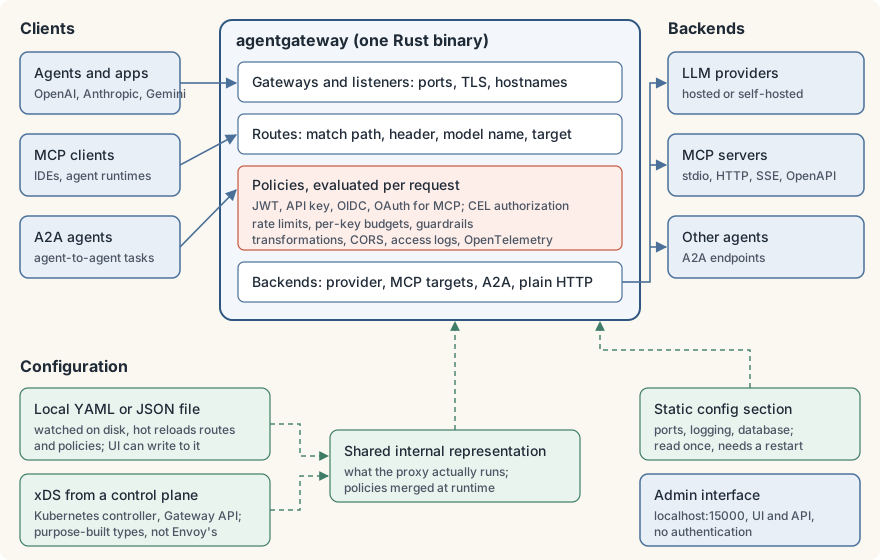
The request path is a conventional gateway pipeline. Gateways (ports, TLS, hostnames) hold listeners; routes match requests; policies run on each request; backends receive it. What is unusual is what the pipeline understands. A backend can be an LLM provider (OpenAI, Anthropic, Gemini, Bedrock and others, behind an OpenAI-compatible API, with native Anthropic Messages and, new in 1.5, native Gemini generateContent), a set of MCP targets, an A2A agent, or plain HTTP (README).
On the MCP side, a target can be a local command that the gateway launches and talks to over stdio, a remote server over streamable HTTP or SSE, or an OpenAPI description turned into tools. Several targets can be multiplexed into one virtual MCP server; tool names are then prefixed with the target name to avoid collisions (example).
Policies are where the value is. Authentication covers JWT, API keys, OIDC and OAuth for MCP clients. Authorization rules are written in CEL, a small expression language, and can read the caller’s identity (jwt.sub, apiKey.<field>) and the MCP request (mcp.tool.name, mcp.tool.target). The LLM side adds token and dollar budgets per API key, rate limits, guardrails, prompt transformations and cost attribution.
Three layers of configuration
The project’s own architecture notes describe three kinds of configuration (configuration.md):
- Static: the top-level
config:section (ports for admin and stats, logging, database). It is read once at startup; changing it means a restart. - Local: a YAML or JSON file with routes, backends and policies. The gateway watches the file and hot-reloads it, and running MCP sessions pick up new policy.
- xDS: the same model pushed from a control plane. agentgateway uses Envoy’s xDS transport but its own purpose-built resource types, deliberately shaped so that one changed route is one small update rather than a multi-megabyte route table. On Kubernetes the project ships a controller that translates Gateway API resources (
Gateway,HTTPRoute) and its ownAgentgatewayPolicyandAgentgatewayBackendresources into that feed.
Both the file and xDS compile into one internal representation, so a policy behaves the same in either mode. The config loader is strict: an unknown field, an enum typo or a CEL syntax error fails validation with the exact location, and agentgateway -f config.yaml --validate-only checks a file without starting anything.
The feature that earns it a place: tool-level authorization
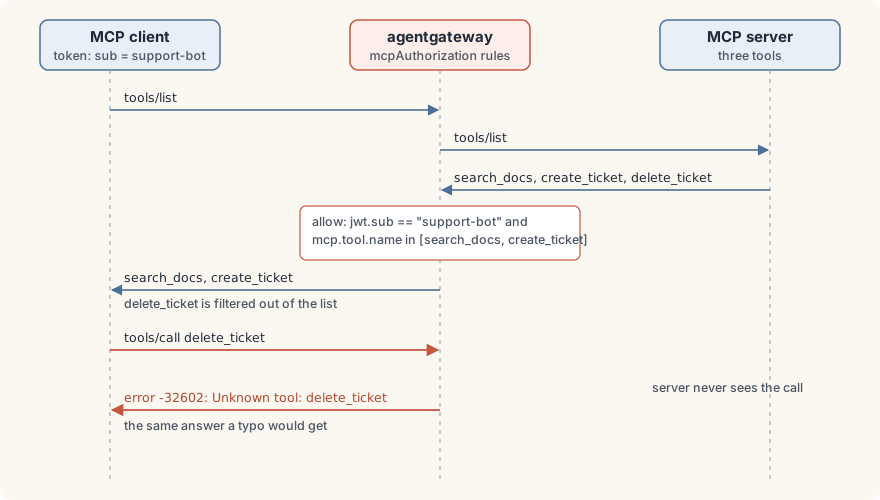
An mcpAuthorization policy does two things with one rule set (docs). On tools/list, anything the caller may not use is removed from the response, so the model never sees it. On tools/call, a forbidden tool is refused at the gateway with JSON-RPC error -32602 and the message Unknown tool: <name>, and the upstream server is never contacted. The project’s own test suite pins that behaviour (authorization_denied_returns_unknown_tool_error in the MCP tests).
This matters because it moves the decision out of the agent. An agent runtime’s own tool allow-list is only as good as its configuration on every machine it runs on. A gateway rule keyed to a credential applies to every client that holds that credential, including one whose local configuration is wrong, and a hot-reloaded rule applies mid-session to tool lists the client has already cached.
Two limits come with it. First, the refusal is indistinguishable from a typo in a tool name, so alerting has to watch for tools/call errors rather than a distinct “denied” status. Second, a rule on the tool name says nothing about the tool’s arguments: if an allowed update_ticket tool accepts status: "closed", the gateway will not stop a caller from closing tickets. The server behind the gateway still has to validate its own inputs.
Getting started
The documented install is a script that downloads the release binary and verifies its checksum (install docs); you can also download the asset and its .sha256 file from the release page yourself. The Linux x86-64 binary for 1.5.0 is a static musl build of about 88 MiB.
curl -sL https://agentgateway.dev/install | bash -s -- --version v1.5.0
agentgateway --version
Run with no arguments and it generates ~/.config/agentgateway/config.yaml with a gateway on port 4000, the UI attached to it, and a SQLite database. For anything real, write your own file. This one serves a model alias on port 4000 and one MCP server on port 3000, requires an API key on both, and lets the support-bot key use only two tools:
# yaml-language-server: $schema=https://agentgateway.dev/schema/config
config:
  adminAddr: localhost:15000
  storage:
    mode: readOnly            # the UI and admin API may not rewrite this file
llm:
  port: 4000
  policies:
    apiKey:
      mode: strict            # the default, "optional", lets keyless requests through
      keys:
      - key: $SUPPORT_BOT_KEY
        metadata:
          bot: support-bot
  models:
  - name: fast
    provider: openAI
    params:
      model: gpt-5.5
      apiKey: $OPENAI_API_KEY
mcp:
  port: 3000
  policies:
    apiKey:
      mode: strict
      keys:
      - key: $SUPPORT_BOT_KEY
        metadata:
          bot: support-bot
    mcpAuthorization:
      rules:
      - allow: 'apiKey.bot == "support-bot" && mcp.tool.name in ["echo", "add"]'
  targets:
  - name: everything
    stdio:
      cmd: npx
      args: ["-y", "@modelcontextprotocol/server-everything"]
export SUPPORT_BOT_KEY=... OPENAI_API_KEY=...
agentgateway -f config.yaml --validate-only # prints "Configuration is valid!"
agentgateway -f config.yamlThat file passes validation with the 1.5.0 binary. Point an OpenAI-compatible client at http://localhost:4000/v1 with the bot key, and an MCP client at http://localhost:3000/mcp (streamable HTTP; SSE is served at /sse). The server-everything test server exposes many tools; through the gateway this caller sees two. In production, list keyHash: sha256:… values instead of raw keys so the file holds no secret.
What it does well
- MCP is first-class, not bolted on. Per-caller filtering of tool lists, refusal of hidden tools, multiplexing, stdio-to-HTTP bridging and OpenAPI-to-MCP conversion in one component. Few alternatives do all of it.
- One policy language across everything. The same CEL expressions, identities and access logs apply to model calls, tool calls and agent calls. Logs and traces carry the MCP method and tool name next to the caller’s identity and the outcome.
- Cost controls you can actually cap. Since 1.5, an API key can carry a rolling budget in US dollars or tokens, set to block or merely audit, persisted in SQLite or PostgreSQL (docs). Keys can also be limited to certain models.
- Operationally small. One static binary, a watched file, hot reload, a Prometheus stats endpoint and OpenTelemetry export. The same data plane scales out under a Kubernetes controller when you need it.
- Neutral governance. A Linux Foundation project with a technical charter and Apache-2.0 code. Solo.io sells an enterprise edition (Solo.io), but everything in this review is in the open project.
Where it falls short
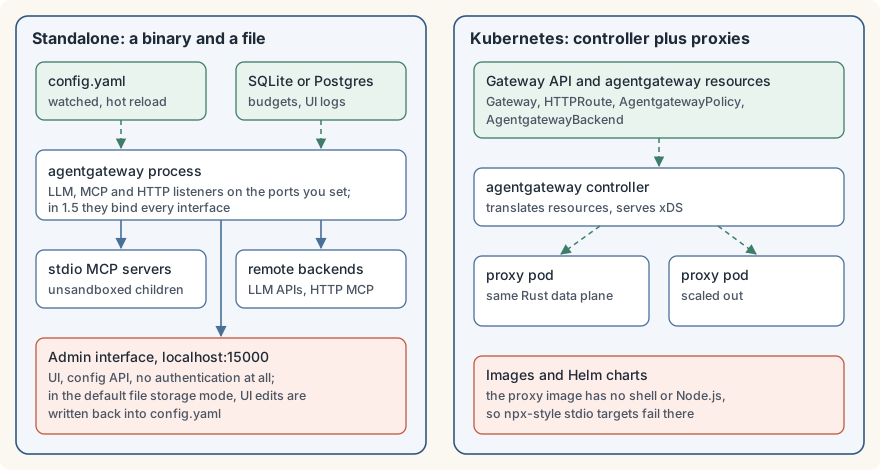
The defaults are open. This is the most important finding, and each item is documented:
| Setting | Default | What it means |
|---|---|---|
apiKey.mode |
optional |
A request with no key is let through; only a wrong key is refused (docs). Use strict. |
deny rules |
fail open | A deny expression that errors does not deny (docs). Write allow or require rules. |
config.storage.mode |
file |
Edits made in the UI or config API are written back into your config file (docs). Use readOnly or hybrid. |
| Admin interface | localhost:15000 |
Serves the UI and config API with no authentication, ever (docs). It is loopback-only by default; keep it that way or set it to off. |
| UI on a gateway | no auth | A UI attached to a gateway port is unauthenticated until you add a policy. |
It cannot bind to one interface in 1.5. The source builds every proxy listener on the unspecified address, 0.0.0.0 or :: (local.rs), and the schema has no bind-address field. A gateway meant only for agents on the same host is reachable from the network unless a host firewall says otherwise. For a security component, that is a notable gap.
stdio targets are unsandboxed. A stdio MCP target is a child process with the gateway’s own user and permissions. If a tool server needs isolation, run it in a container and connect over HTTP. The published proxy image contains no shell and no Node.js, so npx-style stdio targets fail there by design.
Multiplexing is all-or-nothing. The project’s own example notes that one failing target fails initialize for the whole multiplexed backend. A single broken tool server can take every tool behind that route offline.
Session lifetimes need tuning. MCP sessions live 30 minutes by default (config.mcp.sessionTtl), and for stdio targets that can mean idle child processes lingering long after a short agent run. Batch workloads should shorten it.
It moves fast and breaks things. 1.5.0 alone changed how token counts are computed (cached prompt tokens are now included in input tokens, which shifts token-based limits and dashboards), made JWT issuer and audience checks mandatory, and changed policy-merge semantics on Kubernetes (release notes). Budgets also overshoot slightly by design: the request that crosses a limit completes and is charged, and only the next one is refused. Read the release notes before every upgrade.
The documentation is good but fragmented. Standalone and Kubernetes docs are separate trees, versions latest and main differ, and some quickstarts walk through the UI rather than a file. The config schema reference is exhaustive, which helps; the path from quickstart to a hardened deployment is left to you.
How it compares
- LiteLLM proxy is the incumbent for LLM routing: a Python service with a very wide provider list, virtual keys, teams, budgets, and an MCP gateway that controls access “by Key, Team” (docs). Its core is MIT, with an
enterprise/directory under a separate license (repository). Pick LiteLLM if LLM spend management across teams is the main job and you already run Python services. Pick agentgateway if tool-level MCP policy, A2A, or a single static binary matter more. - Agent Router, formerly Envoy AI Gateway, is built on Envoy and Envoy Gateway, is Kubernetes-first, and now sits in the Agentic AI Foundation (repository). If your platform team already runs Envoy and Envoy Gateway, it is the natural fit. agentgateway’s standalone mode, one binary and one file, is simpler when there is no cluster at all.
- MCP-only gateways such as IBM’s ContextForge (a gateway and registry for MCP, A2A and REST, in Python) and the Docker MCP Gateway cover part of the space (ContextForge, Docker). Docker’s has the one thing agentgateway lacks: each local MCP server runs in its own container. Neither is also an LLM gateway.
- A general API gateway can terminate TLS and check a token in front of an MCP server, but without MCP awareness it cannot filter a tool list per caller. You would end up writing the part agentgateway already has.
This review makes no performance comparison: I found no independent benchmark that tests these projects against each other under the same conditions, and vendor numbers would not settle it.
Who should use it, and who shouldn’t
Use it if several agents or teams share tool servers and you need a per-identity answer to “who may call which tool”, with the model traffic, budgets and logs in the same place. It is equally at home as one binary on a host and as a Kubernetes data plane.
Skip it if you have one agent talking to one or two MCP servers you control: the agent’s own allow-list is simpler. Skip it too if your only need is LLM key management across many teams, where LiteLLM’s feature set is broader, or if you need hard isolation of local tool servers, where a container-per-server gateway is the better base.
Verdict
agentgateway is the most complete open-source answer to agent traffic control right now, and its MCP authorization is the real thing: tools are hidden from callers who may not use them and refused if called anyway, at the gateway, without trusting the agent. It is also a young project whose defaults assume a friendly network. Run it with strict keys, allow rules, read-only configuration, the admin port closed, a firewall in front of its listeners, and a server that validates its own arguments, and it earns its place.
This is one half of a pair. For the agent side of the same picture, read the other half of this Tools review: goose, the open-source agent.
The Campfire
No commentsNobody has pulled up a log by this one yet. Be the first to say what you make of it.
Held for the desk. It appears after a look.