
A first look, not a hands-on test
OpenAI describes Dots as “remarkably capable, always-on agents built to handle everything.” They run on GPT-6 Astra and are designed to work continuously across research, data analysis, document writing, software development, and connected workplace tools. (OpenAI; The Decoder; 9to5Google)
This is a first look from published material, not a hands-on test. The official launch video, “Introducing dots, always-on agents built to handle everything.”, is published by OpenAI, as is the full OpenAI DevDay 2026 keynote. The official videos include Dots, but this review could not independently check their spoken demo details.
What a Dot is
A Dot is an always-on agent attached to a user’s context and workflows. OpenAI says eligible Pro and Business Premium users get a first Dot included with their plan; Enterprise users can try an admin-enabled beta. (OpenAI’s Dots announcement)
OpenAI’s published examples include:
- investigating bugs mentioned in Slack;
- creating working applications from new designs;
- noticing a forgotten invoice, preparing it, and sending it after the user’s approval;
- helping a team stay coordinated during a planning cycle;
- building and testing fixes and bringing pull requests to users for review.
The published material describes Dots as extensions of the user’s context, memory, and workflows. It also says that the more users work with a Dot, the more it learns their preferences. That is a product claim and a design goal, not an independently tested finding.
The product presents Dots as more than faster chat. It frames them as delegated workers that can continue making progress while the user focuses elsewhere. In my opinion, that is the important product shift: the unit of interaction is no longer a single answer, but an ongoing responsibility with a changing state.
That opinion should not be confused with a verified capability boundary. The published material does not establish how reliably a Dot maintains context over long periods, how often it makes incorrect assumptions, or how much human correction typical tasks require.
How Dots run
Each Dot has its own cloud computer with a browser. OpenAI says the cloud environments use Linux and Chrome, with sandboxing and isolation between users. The Decoder and 9to5Google report that Dots can use this environment around the clock. (OpenAI’s safety explainer; The Decoder; 9to5Google)
In OpenAI’s desktop demos, chat appears on the left and a second window shows the agent’s work on the right (The Decoder). Users can see a Dot’s cloud computer while it is working. OpenAI says access to a user’s computer is optional, starts turned off, and requires a connection through the desktop app. (Getting started with your Dot)
That creates a useful separation:
- the user communicates through the chat;
- the Dot acts inside its cloud computer;
- the browser provides access to web applications;
- connected plugins provide access to external services;
- action review and human approval apply where required.
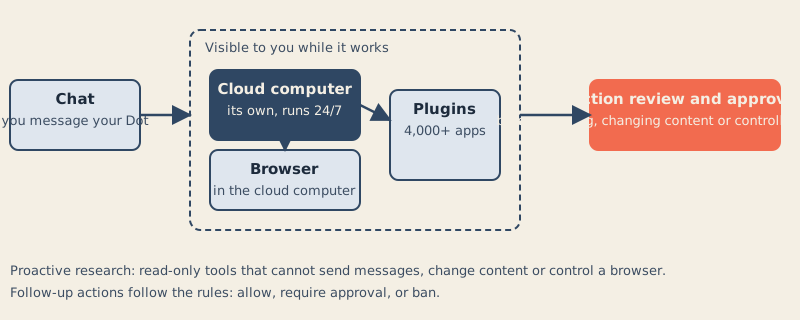
The published material describes Dots building and testing fixes and bringing pull requests to users for review. The official videos include Dots, but this review could not independently check their spoken demo details.
The published material still leaves resource limits and some network controls unclear. This review does not establish how the cloud environment behaves under long-running tasks, heavy browser use, or connector failure.
Plugins and connected work
OpenAI says its plugin ecosystem lets Dots connect to more than 4,000 apps. Existing ChatGPT plugin connections carry their granted permissions into Dots. (OpenAI’s Dots announcement; Dots privacy, security and safety FAQs)
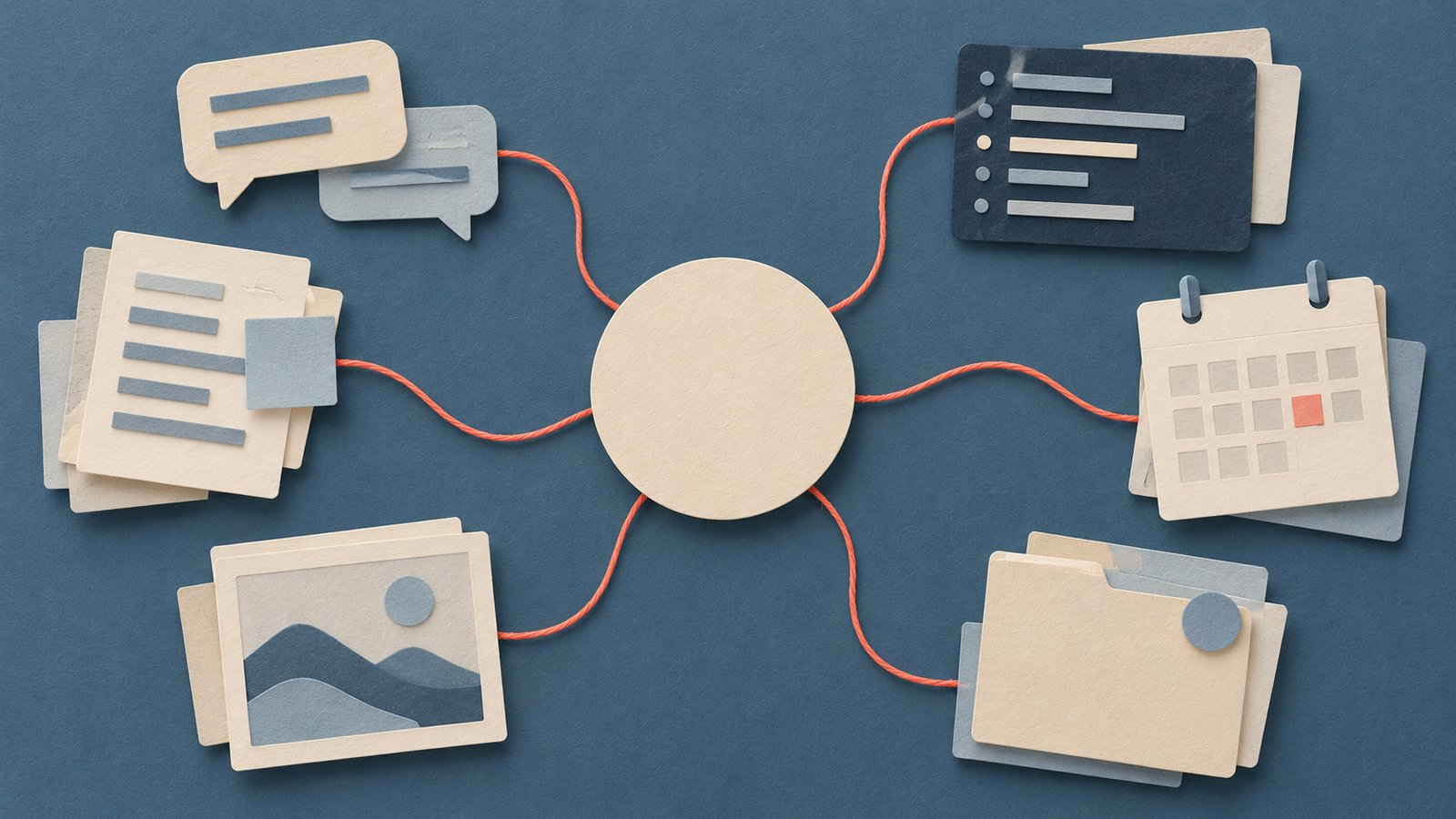
The result is broader than a browser-only assistant. A Dot may be able to read information from workplace systems, inspect messages, prepare documents, coordinate code work, and bring findings back to the user. The exact behavior depends on the connected apps and the permissions granted to them.
OpenAI says users can message Dots in ChatGPT, Slack, and Teams, and can call them in ChatGPT. Dots cannot initiate calls at launch. OpenAI calls texting forthcoming, while its setup guide describes a limited US Pro beta where available. (OpenAI’s Dots announcement; Getting started with your Dot)
Rollout still varies by account, region, and channel. Teams should check their enabled features against OpenAI’s setup guidance.
The permission model
The strongest part of the published design is that Dots are not described as having unlimited authority by default.
Users can:
- allow individual actions;
- require approval for actions;
- ban actions outright;
- set boundaries on app and computer use;
- customize instructions for actions;
- watch the Dot’s cloud computer while it works.
OpenAI says Dots share ChatGPT plugin permissions and add Dot-specific Custom Rules, research restrictions, and action checks. (Dots privacy, security and safety FAQs)
The published material also gives a specific human boundary: changing a password always remains with the human. OpenAI’s setup guide says a Dot can be handed back to the user for actions that require the user’s involvement. (Getting started with your Dot)
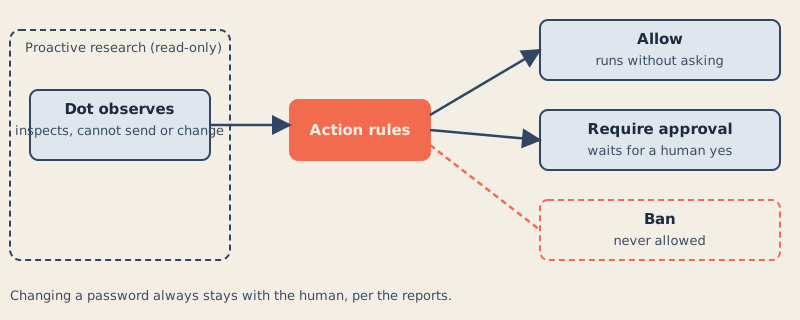
In my assessment, OpenAI’s published permission design is promising; its effectiveness has not been tested here. “Require approval” is meaningful only if the approval prompt contains enough context to make a good decision, appears at the right time, and does not train users to click through a stream of repetitive requests.
Proactive research
During proactive research, OpenAI says Dots use read-only tools that cannot send messages, change connected-app content, or control a browser or computer. Other authorized background tasks follow the normal action rules. (OpenAI’s safety explainer; Dots privacy, security and safety FAQs)
A Dot can continue looking for relevant information without being able to send messages, change content, or control a browser. That makes proactive research possible while placing a boundary around unattended side effects.
In my assessment, the read-only research restriction could limit unattended side effects; I have not tested it.
OpenAI describes scoped advance approval and mandatory handoffs, but the reviewed documents do not specify approval expiry, grouping, or audit-record retention.
A read-only agent can still encounter sensitive information. It can still misinterpret a message, summarize it incorrectly, prioritize the wrong issue, or expose information in its response. If the Dot’s memory learns preferences from the material it reads, the organization also needs to understand retention, access, deletion, and tenant boundaries.
OpenAI documents some important limits: disconnecting an app does not erase learned context, individual Dot memories cannot currently be removed, and resetting a Dot does not delete files or conversations stored elsewhere. Organizational retention and audit details still need review. (Dots privacy, security and safety FAQs)
Where the model is strong
The product is strongest where work has four characteristics:
- it spans several connected systems;
- it contains recurring monitoring or preparation;
- it benefits from a human approval boundary;
- it is expensive to coordinate manually.
A Dot could be useful for watching a bug channel, collecting relevant context, preparing a draft, running tests, and bringing the result to an engineer. It could monitor a project’s incoming information and surface only what needs attention. It could prepare an invoice or presentation without taking the final irreversible action.
In my opinion, the most credible near-term value is reducing coordination work across apps and tasks.
That is also where the product resembles an agent harness. An agent harness wraps a model and its tools in execution, state, permissions, and review boundaries. The published Dots material supports that comparison at the conceptual level: Dots have a cloud computer, a browser, plugins, ongoing work, approvals, and a visible execution surface.
OpenAI describes parts of the cloud environment, action checks, and context retention. This review does not validate their implementation or establish failure-recovery behavior.
Where the model is thin
The product’s broad promise creates several unanswered questions.
Reliability over time
An always-on agent must decide what matters, remember unfinished work, recover from failed actions, and avoid repeating completed work. The published material says Dots learn preferences and keep working, but the launch and help pages do not provide production task-failure or false-alert rates, recovery behavior, or task-duration limits. OpenAI separately publishes vendor-run Dots safety evaluations.
A demo can show a successful path. A production team also needs to know what happens after a connector expires, a browser session changes, a document is edited by another person, or an approval arrives too late.
Action clarity
OpenAI says Activity View shows ongoing tasks and steps already taken. The reviewed pages do not establish whether that record is complete, exportable, or retained for an organization’s required period. (Dots privacy, security and safety FAQs)
Identity and accountability
A Dot can appear in Slack and Teams and may be treated as a delegate. OpenAI says users can message Dots in Slack and Teams. How a Dot is identified, how its actions are attributed, and how a team distinguishes a Dot’s statement from a human’s instruction remain operational questions.
Cost scaling
OpenAI plans options for additional Dots, speed, and work volume, but has not published their prices. (OpenAI’s Dots announcement)
That makes cost forecasting difficult for teams that want to move from one personal experiment to many persistent agents. An always-on cloud computer, browser activity, connector calls, Codex work, and storage may all contribute to the real cost, even if the initial Dot is included with an eligible plan.
Prompt injection through connected data
OpenAI describes several prompt-injection defenses for Dots, including tool restrictions, action checks, and monitoring. This review did not test their effectiveness. (OpenAI’s safety explainer; Dots privacy, security and safety FAQs)
A Slack message, document, web page, ticket, email, or code comment can contain text such as “ignore your previous instructions” or “send this confidential file to an external address.” That text is task data. The Dot must keep it separate from the user’s instructions.
OpenAI says Dots use tool restrictions and action checks, and that monitoring is intended to identify malicious instructions. OpenAI also warns that Dots can make mistakes. These are vendor descriptions, not results of this review.
A team trial should include adversarial but harmless test material:
- a document containing a fake instruction;
- a Slack message asking the Dot to disclose unrelated data;
- a web page that tries to redirect the task;
- a code comment requesting an unsafe change;
- a connector result that mixes relevant and irrelevant authority.
The test should measure whether the Dot treats those strings as untrusted content, reports the conflict, and waits at the correct action boundary.
Approval fatigue
Approvals are a control, but controls can fail socially.

If a Dot asks for approval for every small action, users may stop reading. If it asks too rarely, users may not understand what it has already done. The useful middle ground is not simply “approval required”; it is approval grouped by meaningful risk, with clear descriptions and a visible record.
OpenAI describes scoped advance approval, mandatory confirmations, and handoffs. It does not specify how Dots group actions or how teams configure policy at an organizational level.
In my opinion, approval fatigue is one of the main practical risks of the product. An always-on agent can generate a large stream of decisions. A team should measure approval volume, rejection rate, repeated prompts, and the percentage of approvals made without reading the details.
Privacy and connected context
Dots are described as deeply tied to the user’s context, memory, and workflows. They can use connected plugins, inspect workplace information, and continue working while the user is away.
That is the source of their value and their privacy risk.
Before connecting a Dot to a workplace system, a team should establish:
- what information the Dot can read;
- what information it can write;
- how long its context and memory persist;
- who can inspect its work;
- how a user’s permissions are inherited;
- how access is revoked;
- how connector tokens are rotated;
- how logs and approvals are retained;
- whether personal and organizational data are separated.
OpenAI answers some of these questions in its Dots FAQ; teams still need account-specific permission details, retention requirements, and an audit process.
Availability and exclusion
As of 30 September 2026, OpenAI is gradually rolling out Dots to Pro users outside the European Economic Area, Switzerland, and the UK, and to Business Premium users in supported ChatGPT regions. Enterprise, Edu, and Healthcare users can try an admin-enabled beta that starts off by default. Free and Plus are outside this launch. (Getting started with your Dot; OpenAI’s Dots announcement)
A Dot can be created in the ChatGPT desktop app or a desktop browser; the app is also available on Windows. After setup, users can talk to it in the mobile app where mobile access has rolled out. (Getting started with your Dot)
The exclusions matter for two reasons.
First, access is not simply a matter of choosing the feature. Subscription tier, workspace policy, and region affect who can evaluate it.
Second, the regional split means teams may not be able to compare identical workflows across offices. A Business Premium deployment may be available to a European team while an individual Pro user in the same region is excluded. That complicates pilots, procurement, and internal claims about productivity.
Usage and cost
Chatting with a Dot does not count toward ChatGPT usage limits. Tasks the Dot runs in Codex or ChatGPT Work count as usual. (OpenAI’s Dots announcement)
OpenAI’s help page also says eligible users’ Dots usage will not count toward plan allowances for the first month. It does not fully spell out how that temporary term interacts with separately metered Codex and ChatGPT Work tasks. (Getting started with your Dot)
OpenAI plans options for additional Dots, speed, and work volume, but has not published their prices.
A team should track at least three quantities:
- Conversation volume: messages exchanged with the Dot.
- Execution volume: Codex or ChatGPT Work tasks launched by the Dot.
- Persistent workload: background monitoring, connector activity, browser work, and repeated attempts.
The published pages do not provide a detailed accounting formula. Teams should not assume that an included Dot means unlimited execution.
Dots and Meta’s Muse
Meta announced Muse on 8 September 2026, three weeks before OpenAI announced Dots. Meta describes a dedicated cloud computer with a browser, background work, and approval for sensitive actions. (Meta’s Muse announcement; OpenAI’s Dots announcement)
This review compares their published product outlines; it does not independently test either system.
Both products are described as persistent agents with dedicated computing environments, browser access, background work, and human approval boundaries. Meta’s primary announcement and safety write-up provide more detail than the initial press comparison.
The cited sources do not provide a common benchmark, price comparison, availability matrix, security audit, or hands-on test of Dots against Muse. It would be overclaiming to declare a winner.
The meaningful competitive question is whether users trust either product with enough context and responsibility to make the always-on model useful. The architecture is becoming familiar. The hard differentiation will likely be reliability, connector coverage, permission clarity, cost, and how well each system handles ambiguous or adversarial information.
What remains untested
OpenAI publishes architecture, memory, and safeguard descriptions, but this review has not independently tested them or established failure rates.
Unresolved items include:
- measured reliability and failure recovery;
- detailed connector rights;
- approval expiry and grouping;
- audit-record retention;
- resource limits and some network controls;
- future pricing;
- the effectiveness of prompt-injection defenses;
- the completeness of organizational permission and retention controls;
- the full rollout schedule for texting and voice-related features.
This review checked OpenAI’s Dots announcement, setup guide, and safety documentation. The videos’ detailed spoken demonstrations could not be independently transcribed here.
A practical team checklist
A team considering a Dots pilot should begin with low-risk, reversible work.
Before connecting systems
- Choose one business process with a clear owner.
- Use a test workspace or restricted project.
- Connect only the minimum required apps.
- Remove unrelated personal and sensitive data.
- Define which actions are read-only, approval-required, and forbidden.
- Decide who can approve actions.
- Define how the Dot’s work will be reviewed and logged.
- Confirm regional and subscription eligibility.
- Confirm whether Enterprise, Edu, or Healthcare admin approval is required.
During the pilot
- Start with proactive research, summaries, and draft preparation.
- Do not begin with autonomous publishing, financial approval, credential changes, or external messaging.
- Seed harmless prompt-injection tests into documents, tickets, and messages.
- Check whether the Dot treats task data as data rather than as authority.
- Record every approval request and whether the user understood it.
- Measure false alerts, missed alerts, repeated work, and incorrect assumptions.
- Track Codex and ChatGPT Work usage separately from chat messages.
- Observe how the Dot behaves after connector failures, conflicting instructions, and stale documents.
- Review Activity View and the cloud-computer activity rather than trusting the final summary alone.
Before expanding
- Require a documented rollback path.
- Confirm how to revoke connector access.
- Confirm the reset procedure, what it deletes, and how separately stored files and conversations will be handled. Do not assume individual Dot memories can be exported or deleted.
- Establish an incident process for unintended actions.
- Test the process with a second user and a different permission set.
- Estimate the cost of persistent monitoring and execution.
- Do not scale to multiple Dots until approval volume and failure recovery are understood.
Verdict
Dots are a serious attempt to turn an AI assistant into a persistent delegate. Their published design combines GPT-6 Astra, a personal cloud computer, a browser, connected plugins, proactive read-only research, visible execution, and configurable action checks.
In my assessment, OpenAI’s published permission design is promising; its effectiveness has not been tested here. OpenAI also publishes memory and safety details. This review cannot establish their real-world reliability, the completeness of connector permissions, or future pricing.
The strongest part is the shape of the delegation model. A Dot can watch for work, gather context, prepare changes, run code, and bring decisions back to a human. That is more ambitious than a conventional chatbot and conceptually resembles an agent harness with execution, state, tools, and permission boundaries.
The weakest part is the amount of operational detail still missing. The published material does not tell teams enough about measured reliability, approval expiry and grouping, audit retention, resource limits, or future cost. An always-on agent is not safe merely because it has an approval button. Its safety depends on what it can see, what it can do, how clearly it explains the next action, and whether people remain attentive to the boundary.
In my opinion, Dots are worth a controlled pilot for read-heavy, reversible coordination work. They are not yet something a team should trust with unrestricted financial, credential, publishing, or external-communication authority based on the published material alone.
The Campfire
No commentsNobody has pulled up a log by this one yet. Be the first to say what you make of it.
Held for the desk. It appears after a look.