
A CMS becomes interesting for AI developers at the point where “edit the site” stops being a single operation.
An agent may need to inspect a schema, find an entry, update a draft, attach media, compare it with the live version, and publish only after review. Each action crosses a different boundary. The system needs to know what the agent may read, what it may change, which version it saw, and whether the final transition from draft to public content is allowed.
That is the useful lens for looking at EmDash. It describes itself as “a full-stack TypeScript CMS built on Astro and Cloudflare” and as the “spiritual successor to WordPress.” Its documentation presents an Astro-native application with an admin panel, runtime content APIs, structured content, plugins, a command-line interface, agent skills, and a built-in MCP server.
As of September 2026, EmDash has released version 1.0.1. Its security and architectural claims come primarily from the project’s own documentation, so this piece checks whether EmDash puts the right control surfaces in the right places.
The site is one application
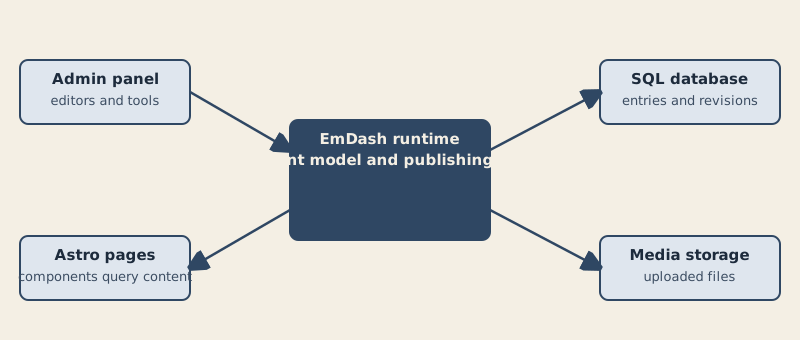
The architecture documentation says the public pages and admin panel share the EmDash runtime, database, and media storage. They are parts of one deployed Astro application rather than a frontend paired with a separate CMS service.

That gives the system a straightforward content path:
- editors use the admin panel;
- the admin panel sends changes to the EmDash runtime;
- the runtime applies the content model, publishing rules, plugins, and API behavior;
- the runtime reads and writes the SQL database and media storage;
- Astro pages and components query content through the runtime.
The database stores the content model, entries, users, settings, and other records. Media storage holds uploaded files separately. A media field points to a stored media item rather than placing file bytes in the content table. (Architecture)
This is different from a purely static publishing pipeline. An Astro page can query an EmDash collection when it renders. A server-rendered page can show current content on an incoming request, subject to configured caching. A prerendered page queries during the build and does not show later edits until another build.
The distinction matters for automation. A git-and-static-files site makes content changes visible as file changes, commits, and builds. EmDash makes them available through application interfaces, revisions, roles, APIs, and runtime publishing. Neither model is automatically safer. They make different things easy to inspect and different things easy to automate.
Structured content instead of rendered HTML
EmDash uses a TipTap editor and stores editor content as Portable Text, structured JSON rather than HTML. The practical consequence is that content is treated as data before it becomes a page.
That supports more than one presentation. An Astro component can render a field for the web. The CLI can return Portable Text or Markdown. An integration can query entries without scraping the final HTML. An agent can operate on fields and records rather than trying to edit a rendered document as a blob.
The content model is shared by the admin panel, runtime queries, APIs, CLI, and MCP server. Administrators can create collections and fields in the admin panel. EmDash changes the database schema so later entries and queries use the new model. Seed files provide a version-controlled starting model for another environment, while generated TypeScript declarations give developers a typed view of the current schema. (Content model)
That shared model is important. If the admin, CLI, REST API, and MCP server each implemented their own interpretation of content, automation would have several subtly different realities. EmDash’s documentation instead describes a common lifecycle and revision model across those interfaces.
The first safety mechanism is version awareness
CLI updates require a prior read and _rev token. CLI creates publish by default, and updates need --draft to remain drafts.

A client can fetch an entry and receive an opaque _rev token. It must provide that token when updating the entry. If the entry changed after the read, the server returns a conflict and the client must read again before retrying. The MCP documentation describes the same pattern for content_update, content_publish, content_schedule, and related operations. (CLI reference; MCP server reference)
This is a small mechanism with large consequences for agents. A model can produce a perfectly reasonable edit against stale content. Without a revision check, the system may overwrite work the model never saw. With one, stale state becomes a conflict that the client must resolve.
The CLI also documents an advisory editor lock. A command can receive an ENTRY_LOCKED response if another editor has the entry open, with an explicit --override-lock option for cases where the operator intends to bypass it.
That is not a complete concurrency model. It is a useful refusal to pretend that a write is safe merely because the payload is valid.
In the documented MCP workflow for revision-enabled collections, updating a published item stages a draft while the live revision remains public. The client can compare live and draft values, then publish or discard the draft. The publication operation also carries a revision token. In the plugin API, publication methods route through policy hooks, revision promotion, locale synchronization, redirects, media-usage updates, cache invalidation, and after-hooks. (Content lifecycle; MCP server)
For an AI editor, that is the difference between “the model changed a record” and “the system has a reviewable content lifecycle.”
Plugins: capability declarations are not magic
EmDash supports native plugins and sandboxed plugins. Native plugins run with the host application’s access. Standard-format plugins can run in an isolated runtime when the site configures a sandbox runner and grants capabilities. (Architecture)

The sandboxed format uses a manifest. A plugin declares capabilities such as:
content:read;content:write;content:publish;media:read;media:write;network:request;email:send;schema:read;taxonomies:write.
The bridge gates host APIs against those declarations. The bridge exposes ctx.content when a declared capability grants content access, including through implication; it exposes ctx.http when a network capability grants access. The registry shows declared capabilities to site operators before installation.
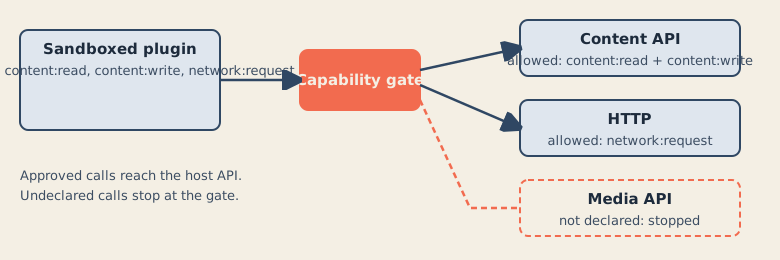
The model is granular enough to distinguish reading content from publishing it. content:write implies reading, while content:publish separately covers publishing, unpublishing, scheduling, and unscheduling. Media metadata, media bytes, and media upload authority are separate capabilities. Network access can be restricted to hosts in an allowedHosts list.
This is a better boundary than a single “plugin trusted” switch. It lets an operator ask what a plugin actually needs.
It is not a complete security guarantee.
The documentation explicitly says a plugin with content:write can edit any content, not only content it created. The capability says “this plugin can write content,” not “this plugin can write only these entries.” Programmatic writes also do not respect an editor’s advisory lock. An operator still has to evaluate the plugin and coordinate automated writes with human editors. (Capabilities and security)
That limitation is especially relevant to AI. A model may be given a narrow task, but the runtime capability may be broader than the task. “The agent was asked to update one article” and “the token can update content” are not the same statement.
What the sandbox actually isolates
The plugin sandbox is not just a label in a manifest. It requires a platform runner.
On Cloudflare Workers, each plugin runs as a Dynamic Worker created through the Worker Loader binding. On Node.js preview and production deployments, EmDash starts workerd as a child process. During astro dev, Miniflare manages the workerd process. The sandboxRunner option selects the runner and enables the hosted registry catalog. (Plugin sandbox)
The Cloudflare setup requires a Workers Paid plan, a worker_loaders binding named LOADER, and a PluginBridge export from the Worker entry point. The bridge is the route through which sandboxed plugins reach content, media, storage, and email.
The documentation lists these sandbox properties:
- capability-gated host APIs;
- plugin-scoped KV and storage;
- blocked direct network primitives;
- network access only through
ctx.http.fetch(); - no host environment variables, filesystem, or platform bindings;
- resource limits.
Cloudflare’s documented defaults include 50 milliseconds of CPU time, 10 subrequests, and 30 seconds of wall time per plugin invocation. The Node.js workerd runner enforces the 30-second wall-time default, while standalone workerd does not enforce the same CPU, memory, and subrequest limits. (Capabilities and security)
The Node.js runner also passes only a restricted set of environment variables to workerd by default. Additional variables require an explicit passthrough configuration. That is a meaningful secret boundary: the server’s environment is not automatically the plugin’s environment.
The failure behavior is documented too. If workerd exits, the runner retries with an increasing delay. After more than five crashes within 60 seconds, it stops restarting the process and sandboxed hooks and routes fail until the server is restarted or the plugin is updated.
There is also a sharp edge. Setting sandbox: false runs sandboxed-format plugins in the server process without isolation or limits. The documentation calls this a debugging option and warns not to deploy it to production. On Cloudflare Workers, the runtime refuses that setting.
The important phrase is “when a sandbox runner is active.” A configuration that names a sandbox but lacks the required binding does not produce the same boundary. On Cloudflare, missing LOADER means sandboxed plugins are disabled. Installing a sandboxed plugin then fails with SANDBOX_NOT_AVAILABLE.
A sandbox is a deployment property, not a decorative feature in a package manifest.
The MCP server is an application API for agents
EmDash exposes a built-in MCP server at /_emdash/api/mcp. Its documentation says MCP clients can read and manage content, bylines, schemas, media, taxonomies, menus, revisions, and settings, and can export or import the whole site. (MCP server reference)
The endpoint uses Bearer authentication. It supports:
- OAuth 2.1 Authorization Code with PKCE for interactive clients;
- personal access tokens beginning with
ec_pat_; - OAuth 2.0 Device Authorization Grant, which the CLI uses.
Session cookies do not authenticate the MCP endpoint.
The authorization model has two dimensions. Tokens carry scopes, while the user’s role is checked separately. A scope does not grant a permission the user does not have.
The scopes separate read and write operations:
content:readreads and searches content, with draft-like content requiring an additional user permission;content:writecreates and changes content, bylines, and revisions; for compatibility it also grants taxonomy and menu management;media:readandmedia:writeare separate;schema:readandschema:writeare separate;taxonomies:manageandmenus:managecontrol those structures;settings:readandsettings:manageare separate;transfer:export,transfer:analyze, andtransfer:executeseparate site transfer operations;mcp:toolscontrols tools exposed by enabled plugins, andmcp:tools:<pluginId>limits access to one plugin.
The role table adds another gate. Reading published content can be available to a Subscriber. Reading drafts requires Contributor-level access. Editing or publishing owned content requires Author-level access. Managing schemas, settings, or whole-site transfer requires Admin.
Scopes let a client hold only the access it needs. A client should not receive an all-powerful “CMS token” merely because it needs to update one article.
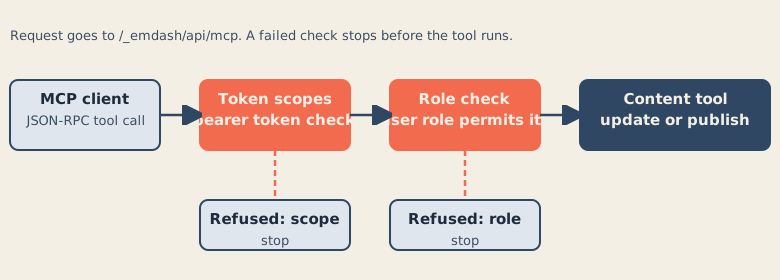
The MCP server uses stateless Streamable HTTP. Each request is independent; the server does not keep an MCP session or a Server-Sent Events connection. Clients POST JSON-RPC requests to the endpoint, call tools/list to obtain the current tool schemas, and then call tools with the arguments supported by the installed version.
The tool inventory is broad. It includes content creation, update, deletion, restoration, publishing, scheduling, comparison, draft discard, translation lookup, schema changes, media operations, search, taxonomies, menus, revisions, settings, and site transfer.
That breadth is useful and dangerous in equal measure. MCP makes the operations discoverable and callable. It does not decide whether an AI should be trusted with them. The token scopes, user role, approval process, revision checks, and deployment policy do that.
The server’s documentation also describes a useful approval path for site transfer. An admin can approve an export or import request, after which the operation can continue with the approved request. That is a stronger pattern than silently giving an automation token permission to move an entire site.
CLI and agent skills make the system legible
The EmDash CLI covers database setup, migrations, type generation, authentication, content, schema, media, search, taxonomies, menus, site export, and secrets.
It can output raw JSON, read content from files or standard input, return raw Portable Text, and operate against a remote instance. The types command fetches a schema and writes TypeScript definitions plus a schema.json reference file. The doctor command checks a local SQLite database for connection, migration, collection, table, and user problems, and can also check Cloudflare scheduling configuration.
The migration command is unusually explicit about deployment safety. It can check for pending migrations without applying them, report status, require an expected target fingerprint for non-interactive application, and use a lock-release path for D1 migration coordination. Those details are not AI-specific, but they matter when an agent is allowed to operate a deployment.
EmDash also publishes agent skills for AI coding assistants. The documented skills cover building an EmDash site, creating plugins, using the CLI, and porting WordPress themes and plugins. A project created with npm create emdash includes several skills in .agents/skills/, with a .claude/skills link to the same folder. EmDash maintains these skills in its official repository. (Agent Skills)
Skills are instructions and reference material, not enforcement. They can help an assistant use the current patterns. They do not replace API authorization, revision checks, sandbox boundaries, or human review.
Cloudflare deployment changes the operational picture
The Cloudflare deployment guide uses Workers, D1 for the database, and R2 for media. The Worker entry point connects Astro to scheduled tasks and exports PluginBridge for sandboxed plugins. The Cron Trigger handles scheduled publishing, plugin tasks, backups, and maintenance. (Deploy to Cloudflare)

The guide recommends placing the Worker near the D1 primary because server-rendered requests make several D1 round trips. It also distinguishes two caches:
- an object cache in KV for database query results inside the Worker;
- Workers Cache in front of the Worker for public responses.
That distinction is operationally important. A cache in front of the Worker can serve a response without running the Worker at all. The documentation warns that responses without explicit cache headers may still be cached heuristically, and that a logged-in editor may receive a cached anonymous variant of a public page. Admin and API responses are sent as private, no-store responses.
The deployment guide also warns about public R2 access. If a bucket is exposed through a public domain, every reachable object is public, including any backup prefix that is not separately protected. Again, the boundary must be understood at the layer where it actually exists; Cloudflare is not the problem.
Secrets are runtime configuration, not build-time content. The guide says to store them with Wrangler secrets rather than wrangler.jsonc or build-time import.meta.env, which can write values into the server bundle. EmDash’s plugin settings encryption uses EMDASH_ENCRYPTION_KEY, which must be preserved separately from D1 backups and rotated with care.
A preview environment must repeat its bindings and use separate D1 and R2 resources. The documentation explicitly warns not to point preview bindings at production databases or buckets.
EmDash versus a git-and-static-files site
A git-and-static-files site has a powerful property: the primary artifact is inspectable. A content change can be reviewed as a diff. The build is a visible transition from repository state to deployed pages. Permissions can be attached to branches, pull requests, and deployment credentials.
EmDash moves the center of gravity into the application. The content model lives in the database. The admin panel, CLI, REST API, and MCP server can all operate on it. Revisions and _rev tokens make changes less destructive. Roles and scopes make access more specific. Plugins can extend the runtime, with a working runner, sandboxed plugins receive the capabilities their declarations grant, including implied capabilities.
For AI editing, the CMS model has an advantage: the agent can work with structured records, drafts, schemas, media metadata, and explicit lifecycle operations. It does not need to manufacture a commit merely to change a title.
The git model has a different advantage: the change boundary is naturally visible in the repository. A CMS needs to recreate that confidence through revision history, conflict detection, audit logs, approval gates, and clear publication state.
The two approaches can also be combined. An Astro site can keep page components, seed files, and deployment configuration in git while EmDash stores the active content model in its database. The database-backed content and the code-backed presentation do not have to be enemies.
What EmDash does not solve
EmDash’s controls are meaningful, but they do not remove the hard problems.
A capability can be broader than the task. content:write can write any content. An MCP token can have more scope than the immediate request requires. A user role can still be powerful. An agent can make a semantically bad edit while obeying every authorization rule. A plugin can misuse an operation it was legitimately granted. A cache can expose the wrong variant if configured carelessly. A missing LOADER binding disables sandboxed plugins and logs a warning; it does not silently run them in process.
The project documentation itself supplies the ingredients for a cautious evaluation:
- inspect the plugin manifest and requested capabilities;
- verify that the sandbox runner is active in the target deployment;
- give MCP clients the narrowest scopes and lowest suitable role;
- preserve revision tokens and treat conflicts as stops, not inconveniences;
- keep drafts separate from publication;
- review schema, media, redirect, and site-transfer permissions separately;
- test preview resources independently from production;
- treat project documentation as a description of intended behavior until independently tested.
That last point matters. The documentation is detailed, but detail is not the same as an external security audit. The claims here describe what EmDash says it does. They do not prove that every deployment has been configured correctly or that every implementation path is free of defects.
Verdict
EmDash is more than a WordPress-shaped editor running on Astro. Its most consequential design is the separation between content operations and the boundaries around them: revisions for stale writes, scopes for MCP clients, roles for users, capabilities for plugins, and platform runners for sandboxed execution.
That makes it relevant to the agent-edited web. An AI agent needs more than a content API. It needs a content API that can say: you may read this, you may draft that, you may not publish yet, you saw an old version, your plugin lacks this capability, your token cannot export the site, and the sandbox is not active.
EmDash documents many of those answers. It does not make them automatic. EmDash has reached 1.0, while its documented security model still needs deployment-specific testing, and the security model remains something operators must configure, test, and keep honest.
The Campfire
No commentsNobody has pulled up a log by this one yet. Be the first to say what you make of it.
Held for the desk. It appears after a look.